The Amazon Buy Box for wholesale sellers: how it works and what you control
The Buy Box, which Amazon calls the Featured Offer, is the offer beside the Add to Cart button on a product page. On a shared listing, Amazon ranks every offer on total price, delivery speed, seller performance and stock. You control all four, and the first step is a price floor set from your own costs.
- The Buy Box and the Featured Offer are the same thing: the offer a shopper buys from when they press Add to Cart or Buy Now.
- Amazon weighs total price, delivery speed, free shipping and returns, seller performance and stock. Its announcement of the 2026 change says reviews, the Prime badge and FBA versus seller-fulfilled don't count.
- On a shared listing, your real competitors are the offers that can match your delivery at a similar price, not every seller on the page.
- Work out a floor for every product from your own costs before you cut a price or switch on a repricer. A Buy Box won at a loss is still a loss.
- Your Featured Offer percentage in Business Reports shows how often you're winning. When it drops, check stock and Pricing Health before you touch the price.
This part of the roadmap is for sellers whose first units are live, or about to be. In wholesale you rarely own the product page. You add your offer to a listing that the brand or another seller created, next to everyone else selling the same item, and most sales go to whichever offer Amazon features at that moment. By the end of this page you'll know how Amazon makes that choice, which parts of it you can move, and where your own numbers should stop you.
Amazon's rules below come from its public guide to the Featured Offer, its pricing guide and an announcement Amazon's staff posted on the US Seller Forums, all linked in the Sources list. Amazon also has a Seller Central help page on becoming the Featured Offer. It needs a sign-in, and we couldn't open it to check its current wording, so nothing here rests on it alone.
What the Buy Box (Featured Offer) is
When more than one seller offers the same product, Amazon doesn't build a page for each of them. Its pricing guide says it combines the offers on a single product detail page. Near the top of that page are the price, the delivery date and the Add to Cart and Buy Now buttons. Amazon's guide to the Featured Offer calls that area the Offer Display, says it's sometimes called the Buy Box, and calls the offer shown there the Featured Offer. Buy Box is still the name most sellers use. Every other offer sits in the "Other sellers on Amazon" list further down, where far fewer shoppers look.
That's why the Buy Box decides so much in wholesale. Your offer can be live, in stock and sensibly priced, and still sell very little if it's rarely the featured one.
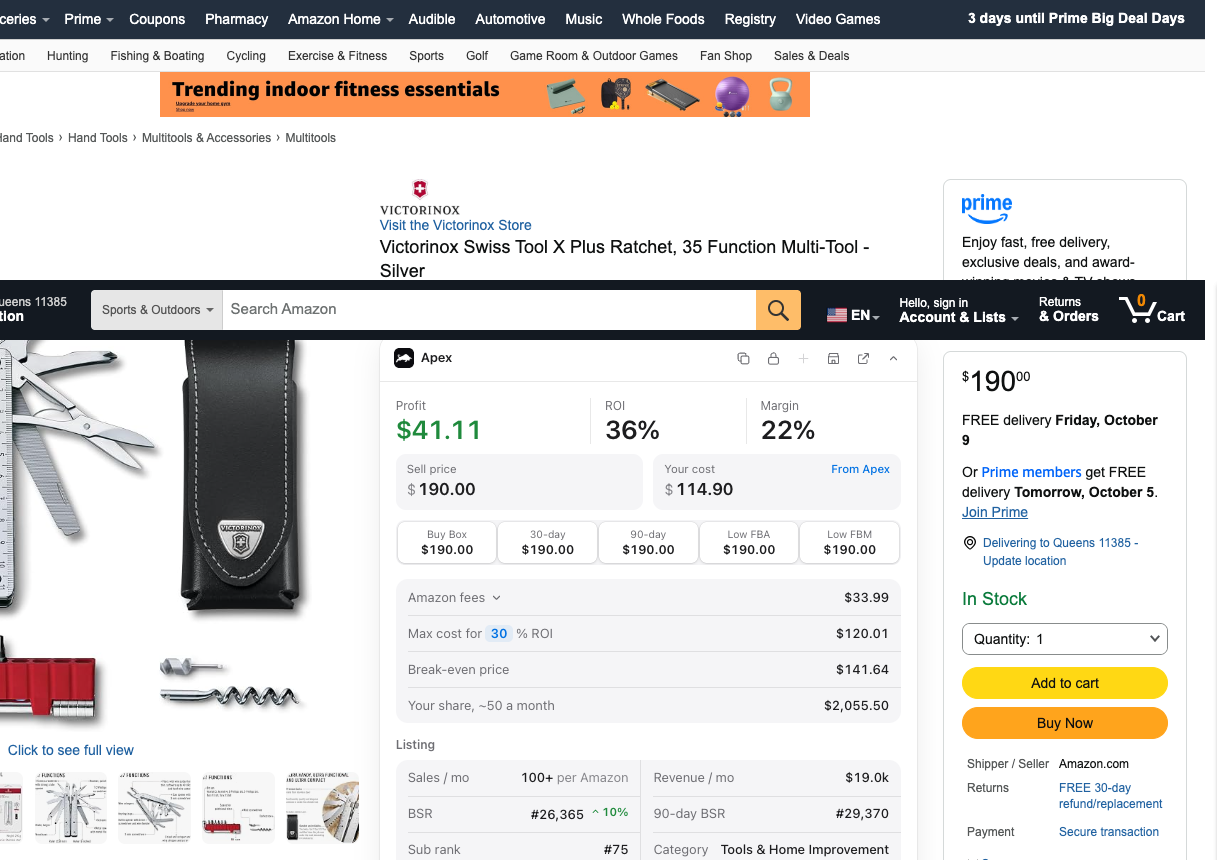
Two details in Amazon's guide trip up new sellers:
- There can be more than one. Amazon says the Offer Display contains one or more Featured Offers. It doesn't say when it shows more than one.
- Sometimes there's none. A product page can show a "See options" button instead of a Featured Offer. Amazon says that can mean no offer is eligible right now, and gives three examples: the seller ran out of stock, the price is too high, or the price is too low. Amazon may also ask a seller to confirm a price it suspects is an error.
Stef makes a related point in his walkthrough lesson at 13:53: when a product shows no 30, 60 or 90-day Buy Box average, there was no Buy Box or it was suppressed. That doesn't make it a bad buy, but it does mean you need to look closer before you order.
How Amazon chooses the offer
Amazon ranks the offers on a listing on what it says matters most to customers. It doesn't publish how much each factor weighs. Its announcement of the 2026 eligibility change lists these factors, and its Featured Offer guide covers most of them:
| What Amazon weighs | What it means on a shared listing |
|---|---|
| Total price | The item price plus any shipping fee. Amazon's guide says Featured Offer prices are "commonly at or below the lowest priced alternatives." |
| Delivery speed | Faster offers rank higher, and so do delivery dates Amazon can state with more certainty. |
| Free shipping and free returns | Amazon's guide says offers with fast, free shipping are more likely to be featured. Its announcement says free returns are especially important in categories that get returned often, such as clothing. |
| Seller performance | Order volume, chargeback rate and complaints in Voice of the Customer. |
| Stock | An offer that's out of stock can't be featured. |
The same announcement lists what doesn't count: customer reviews and star ratings, the Prime badge on the offer, and how the order is fulfilled. It says FBA and seller-fulfilled offers are treated equally, and Amazon's guide says fulfilling orders yourself can work as well as FBA. So the useful question isn't FBA or not. It's which offer can promise the faster, surer delivery date at a competitive total price.
The announcement also notes that being considered doesn't guarantee your offer will be featured. And a lower price isn't always better: Amazon's guide lists a price that's too low, as well as one that's too high, among the reasons a page can show "See options" with no Featured Offer at all.
Sharing a listing with other sellers
Every seller on a listing is selling the same product under the same ASIN, so shoppers see one page, one set of reviews and one Offer Display. Amazon doesn't publish how it divides the featured spot between offers that are close to each other. What you can see is the result: Keepa's Buy Box statistics show what share of the time each seller held it over a period. Our guide to reading Keepa charts shows where to find them, and do you need Keepa? covers which version shows what.
The number of sellers on a listing is the figure beginners worry about most, and on its own it tells you very little.
From Stef's lesson (Purchasing, 15:17 to 16:53): he looks at a listing with 40 sellers, where one seller held 23% of the Buy Box and the rest was shared among other resellers, and says:
"Even though there's forty people selling this item, this does not mean that there's forty competitors for this product."
He checks two things for each offer: its price, and whether it's FBA or seller-fulfilled. Offers priced well above the current price aren't competing for the sale, and in his view neither are the seller-fulfilled ones. "The only real competitors are people selling at the competitive price for this item and doing FBA," he says, and on that listing he counts about five. That's Stef's rule of thumb, not an Amazon rule.
Amazon's announcement puts the fulfillment part differently: it says the fulfillment method itself isn't weighed, while delivery speed is. Both views point to the same practical test. Count the offers that can match your delivery date at a similar total price. Those are the sellers you'll share the Buy Box with, and their number, not the total on the page, tells you how many units you can expect to sell. Our first wholesale order guide shows how Stef turns that count and the Buy Box shares into a test quantity.
The end of the eligibility step
Amazon announced that from July 2026 it would stop deciding which sellers are eligible and rank every seller's offers instead. How it picks the winner didn't change. Amazon rule changes for resellers has the dates and where the rollout stands.
What you control: price, stock, delivery speed, account health
Of everything Amazon weighs, four things are in your hands every day.
Your total price
Compare your total price with the offers that deliver as fast as yours, not with the cheapest offer on the page. A slower offer a dollar below you isn't necessarily taking your sales. And judge price against the product's history, not just today: if today's Buy Box price sits well above what the product sold for over the last 90 days, treat it as a spike that may not last.
Slow sales are often a price signal before they're a product problem. From Stef's lesson (Restocking, 10:52 to 11:15): when some products are sitting on more than 60 days of stock, he doesn't treat that as a bad sign about the product. He says it "just means that we're probably not priced correctly to be getting the sales within the buy box," and he looks at the price first.
Your stock
An offer that's out of stock can't be featured, and every day you're out, your share goes to the sellers who aren't. For FBA that means reordering early enough to cover your supplier's lead time and the time Amazon takes to check units in. When to reorder shows how to work out the timing. Amazon's guide also points to the "Price and shipping costs" column in Manage All Inventory, which shows whether your offer is the Featured Offer right now.
Your delivery promise
With FBA, Amazon sets the delivery date shoppers see. If you ship orders yourself, your handling time and shipping settings set it, and Amazon's announcement suggests reviewing your delivery options and shipping templates in Shipping Settings. Either way, a faster, more specific date helps, and so do free shipping and free returns.
Your account health
The seller performance Amazon weighs includes your order volume, chargeback rate and complaints in Voice of the Customer. Its guide adds the basics of a good order: the correct item, undamaged, authentic, not expired, in the condition the product page shows, with the buyer charged the correct amount. The same habits protect your whole account, which our account health guide covers. For a reseller the complaint to fear most is an authenticity or IP complaint, explained in what to do about an IP complaint.
Your Featured Offer percentage
You don't have to guess how often you win. In Seller Central, open Reports, then Business Reports, then the Detail Page Sales and Traffic report by ASIN. Amazon's own post on Business Reports points sellers to the Featured Offer percentage in that report: how often your offer appears as the Featured Offer. Look at it by ASIN every week. A falling number while your price hasn't changed usually means something else moved.
- Is the product in stock at Amazon and the offer active? Check Manage All Inventory.
- Does the product page show "See options"? Look in Pricing Health for offers that aren't currently eligible.
- Did someone who delivers as fast as you drop their total price?
- Did your delivery promise change: units still in transit to Amazon, or a new handling time on seller-fulfilled orders?
- Are there new complaints in Voice of the Customer, or new issues on your Account Health page?
- Did Amazon join the listing, or did a larger seller come back in stock?
- Is your price above what the product sold for over the last 90 days?
Set your floor before your strategy
Every pricing decision on a shared listing should start from one number: your floor, the lowest price at which a sale still earns the least you're willing to make. Work it out before you lower a price by hand, and before you let any tool lower it for you. Without it, matching the lowest offer is a guess, and the guess usually goes the wrong way.
A floor has three parts:
- Your landed cost per unit. What you paid the supplier, plus freight, prep, labels and any inbound placement fee. Our landed cost guide walks through each piece.
- Amazon's fees at that price. The referral fee is a share of the selling price (referral fees by category), and the FBA fulfillment fee depends on size and weight (size tiers and fulfillment fees).
- Your minimum. A dollar profit, or a return on what you paid, that makes the sale worth the cash it ties up.
Because the referral fee moves with the price, work backward: your floor is your landed cost plus the FBA fee plus your minimum profit, divided by one minus the referral rate. Then check the answer, because some categories charge a different rate above and below a price threshold, and some set a minimum referral fee per item.
Grocery and Gourmet is a good example of why the check matters. At $15.49 in Grocery and Gourmet, Amazon's referral fee is $2.32, which is 15% of the price. At $14.99 in Grocery and Gourmet, Amazon's referral fee is $1.20, which is 8% of the price. Compare the two: when a small cut takes the price into the lower rate, the payout after the referral fee can come out higher at the lower price. In a tiered category your floor isn't always a straight line.
If you'd rather not do the algebra, use the calculator below. Enter a selling price, the fee category, your costs and the FBA fulfillment fee (Amazon's FBA Revenue Calculator in Seller Central shows it, or look the product up in our FBA calculator: 3 free lookups, then sign in with a plan). Then lower the selling price until profit per unit reaches your minimum. That price is your floor.
Profit and most-you-can-pay calculator
Per unit, from Amazon's FBA fulfillment fees page or Amazon's Revenue Calculator. Leave it empty if you ship orders yourself.
Per unit.
Per unit: storage, returns, ads, anything else you count.
Per unit.
Type what you pay the supplier.
Runs in your browser from Amazon's published US fee tables. Nothing you type is sent anywhere.
From Stef's lesson (Purchasing, 17:40 to 18:35): before he buys, he types a lower target price into the purchase order to see what happens if the price falls. In that one example the product would lose $2.40 a unit at $9.99, and still make $2.60 at $14.99, so he plans around $14.99, a price that stays competitive and still makes money. It's the same floor, worked out before the money is spent.
Set a ceiling too: the most you'd ask when you hold the Buy Box alone. Keep it near what the product has actually sold for, because a price far above recent prices can run into Amazon's fair pricing rules (more on those below).
When a repricer helps and when it does not
A repricer changes your prices for you, following rules or a strategy you set. Amazon has its own, Automate Pricing, which is included in the Professional selling plan and needs an active offer on each product. Third-party repricers add more ways to respond to other offers. Amazon Automate Pricing vs a repricer compares the two.
A repricer earns its place when:
- You have more products on shared listings than you can check by hand, and the competitive offers on them change price during the day.
- You already know the floor and ceiling for every one of them.
- You want a record of what changed, when and why.
It won't help much when:
- You're the only seller on the listing. There's no other offer to respond to. Your price question is about demand, not the Buy Box.
- Price isn't the problem. You're out of stock, your delivery date is slower than the others, or Pricing Health has flagged the offer. A repricer can't fix any of those.
- Everyone is already at their floor. A repricer can't make a product profitable. If every seller's tool keeps matching the lowest price, it only gets everyone to the bottom faster, and the product stops paying for anyone.
- The brand has a minimum advertised price you agreed to. See the next section.
- You have a handful of products. Checking them each morning by hand, with your floors written down, works fine.
Whatever tool you use, insist on floors worked out from your real costs rather than typed guesses, a ceiling, a preview of what will change, and a log of every move.
Apex Gold is our repricer. It's in beta, and it's rule-based, not AI. You set floors from your cost and Amazon's fees, or from a target ROI, margin or dollar profit, in bulk; build strategies for how to respond to competing offers; and preview what would change before any price moves. Prices change when you run your strategies from Apex. Repricing automatically the moment a competitor changes price is built but not switched on yet. Every price decision is logged with its reason. The repricer is part of the Pro plan. Nobody can promise you the Buy Box or a profit, and Gold doesn't: the floor only stops it pricing below your own numbers. How Gold works has the details, and we compare it with BQool, Informed Repricer, Seller Snap, Aura and Repricer.com.
Fair pricing and MAP
Two sets of rules sit on top of your own floor and ceiling: Amazon's, and the brand's.
Amazon's fair pricing rules. Amazon's pricing guide says it monitors prices across its stores and compares them with other prices. If it sees pricing that could damage customer trust, it may remove the Featured Offer or the offer, suspend shipping, or end selling privileges in serious cases. The practices it tells sellers to avoid:
- setting a misleading price,
- a price significantly higher than recent prices for the same product,
- selling multiple units for more per unit than a single unit,
- excessive shipping fees.
Seller Central's Pricing Health page is where this shows up day to day. Amazon's guide says its Pricing Opportunities tab lists offers that aren't currently eligible to become the Featured Offer. Check it whenever your share drops and the reason isn't obvious.
The brand's MAP. A minimum advertised price comes from the brand, not from Amazon. It's usually part of the terms you accept when you open an account with a brand or its distributor, and breaking it can cost you that account, which in wholesale is worth more than any single sale. So your real floor is the higher of two numbers: the floor from your costs, and MAP. If the other sellers on a listing routinely sell below MAP, you'll either hold MAP and accept a smaller share, or break the agreement. Decide that before you buy, not after; products to avoid in wholesale covers what to check first. Gold shows MAP status by brand.
Reviews and feedback on shared listings
Reviews and seller feedback get mixed up, and on a shared listing the difference matters.
Reviews belong to the product page. Every seller on the listing shares the same reviews and star rating, and Amazon's announcement says reviews and star ratings don't count toward the Featured Offer. Asking buyers for reviews helps the listing, and every seller on it, but it won't win you the Buy Box. Our guide to automating review requests covers what Amazon lets you ask for and how.
Seller feedback belongs to you. It's the buyer's rating of you as a seller: delivery, packaging, service. Negative feedback is one part of the order defect rate on your Account Health page. Amazon's announcement doesn't list feedback ratings among the Featured Offer factors, but the seller performance it does weigh includes complaints in Voice of the Customer, and the habits that earn good feedback keep those complaints low too. Seller feedback vs product reviews explains both in full.
Review Booster, part of Apex Black, is Amazon's own Request a Review button, pressed for you on eligible orders. It asks for reviews and feedback in the way Amazon allows. Like any review request, it doesn't change who gets the Buy Box.
Questions about the Buy Box
Can a new seller win the Buy Box?
Yes. Amazon announced that it would remove the separate eligibility step, finishing by the end of 2026, so a new seller's offers are ranked alongside everyone else's. Order volume is one of the seller performance signals Amazon names, though, and a new account has very little, so it's reasonable to expect a smaller share in your first weeks than an established seller at the same price. Give a product several weeks before you judge it, and meanwhile keep stock in, your delivery date fast and your total price competitive.
Do I need the Professional selling plan to win the Buy Box?
Amazon's announcement of the eligibility change doesn't mention selling plans, and we haven't found an Amazon US page that says whether Individual plan offers are now ranked for the Featured Offer. If you're selling wholesale you'll want the Professional plan anyway: Amazon's comparison of the two plans lists bulk listing, detailed sales reports and advertising tools on Professional, and Automate Pricing is included with it.
Do product reviews decide who wins the Buy Box?
No. Amazon's announcement lists customer reviews and star ratings among the factors that don't matter for the Featured Offer, and every seller on a listing shares the same reviews anyway. Your seller performance does count: order volume, chargebacks and customer complaints.
How does the Buy Box rotate between sellers with similar prices?
Amazon doesn't publish how it shares the Featured Offer between close offers. Its guide says the Offer Display can show more than one Featured Offer, and Keepa's Buy Box statistics often show several sellers each holding a share of the time, as on the 40-seller listing Stef looks at above. A seller with a lower total price, a faster delivery date or better performance tends to hold more of it, and one who runs out of stock drops out until they're back.
Should I sell on a listing where Amazon is one of the sellers?
Don't rule it out on sight. Stef's advice in his walkthrough lesson (14:17 to 14:51) is to look at how much of the Buy Box Amazon actually holds in Keepa's Buy Box statistics, and he says to check them with a paid Keepa subscription. His example is a hypothetical product selling 10,000 units a month where Amazon holds 20% of the Buy Box, leaving 8,000 units a month to resellers. If Amazon holds most of it, there's little left for you; if it holds a small share of a fast seller, the rest is shared.
How can I win more of the Buy Box without cutting my price?
Stay in stock when others don't. From Stef's lesson (Restocking, 4:18 to 5:00): before every restock he rechecks the competitors on the listing, their stock and their prices, because when bigger sellers run low you can win more of the Buy Box and may want to buy more. Beyond stock, a faster delivery promise, free shipping on seller-fulfilled orders and a clean Account Health page all count, and none of them costs you margin.
Every guide in this part
Apex University comes with a free Apex account: nine lessons, no card.
Start Apex UniversityReview Booster presses Amazon's own Request a Review button for you on eligible Amazon.com orders. It is free to switch on until October 31, 2026, with 20 requests a month. On a plan, Beginner sends 20 requests a month; Starter and Pro send unlimited.
Beginner, $49.99 a month
Start my 7-day trial on Beginner7 days free, then $49.99 a month, plus tax where applicable. Card required, nothing charged until day 8. Cancel any time before then.
Sources
- Maximize your sales potential with the Featured Offer (formerly the Buy Box), Amazon
- Featured Offer Update: Every Seller's Offers Are Now in the Running, Amazon Seller Forums (Indy_Amazon)
- Becoming the Featured Offer, Amazon Seller Central
- Amazon pricing strategies: how to price products to drive sales, Amazon
- Get actionable B2B insights with Amazon business reports, Amazon
- Sales Down? Use Business Reports to Identify Issues and Take Action, Amazon Seller Forums (Indy_Amazon)
- Automate Pricing, Amazon
- Individual vs Professional selling plan, Amazon
Some of Amazon's pages need a Seller Central sign-in to read, and we have not yet checked their current wording for this version of the page. If Amazon's page and this guide disagree, Amazon's page is the one that counts.
What is an IP complaint or a Section 3 deactivation, and how do I avoid one?