The Amazon wholesale roadmap: every stage, free
Amazon wholesale runs in ten stages across three phases. Before you buy: understand reselling, set up the business, learn the fees, get approved. Your first orders: find suppliers, research and place a first order, prep and ship. Run and grow: compete for the Buy Box, protect your account, run the numbers. Each stage has a step that costs nothing.
- You can learn every stage before you put money into inventory. Every guide on this roadmap is free to read.
- Order matters most in phase 1: understand the model, set up the business, and check the fees before you chase approvals.
- Approvals and suppliers (stages 4 and 5) often run side by side, so expect to go back and forth between them.
- Stages 1 and 2 have nothing to buy from Apex. Software starts to make sense when the same work repeats faster than a spreadsheet can keep up.
Find your stage
Not everyone starts at the beginning. Some already have a seller account, some have a supplier's price list sitting in their inbox, and some are selling and want the numbers to add up. Pick the line that sounds most like you and jump to that stage.
- You're still deciding whether reselling on Amazon is for you. Start at stage 1. Reselling on Amazon compares wholesale, arbitrage and private label, and how Amazon wholesale works shows where the money comes from.
- You've picked wholesale, but nothing is set up yet. That's stage 2, and how to start Amazon wholesale walks through it.
- You have a seller account and want to know what Amazon keeps from each sale. That's stage 3 and the Amazon FBA fees guide.
- You found products you want to sell, but Amazon says you need approval. Go to stage 4 and the Amazon ungating guide.
- You're ready to buy, but no supplier has opened an account for you. Go to stage 5 and the guide to Amazon wholesale suppliers. The Distributor Vault is Apex's directory of US wholesale distributors.
- A supplier sent you a price list and you're not sure where to start. That's stage 6, where you work out which lines are worth buying. How to analyze a wholesale price list takes you through it line by line.
- Your first order is on the way, and it needs labels and a route to Amazon. Go to stage 7 and the FBA prep center guide.
- Your listings are live, but sales are slow or you rarely get the Buy Box. That's stage 8, which also covers asking buyers for reviews.
- Amazon sent you a warning, a complaint or a deactivation notice. Go to stage 9 and Amazon account health. If your account is already deactivated, start with what to do when Amazon suspends you.
- You're selling and restocking, and you want to know what you really make. That's stage 10.
This roadmap is about selling on Amazon's US marketplace, mostly through Fulfillment by Amazon (FBA), with stock bought from wholesale suppliers. Arbitrage and private label come up in stage 1 so you can compare them. Everything after that assumes wholesale.
Where are you starting?
How much you start with changes the first few stages. Our guide to what it costs to start walks through each budget:
Phase 1: Before you buy
- Stage 1
Understand reselling
What is reselling, and is wholesale, arbitrage or private label right for me?
- Without paying
- Create a free account and work through Apex University, no card. Start Apex University
- In Apex
- You don't need to pay for anything at this stage.
- Stage 2
Start and set up
How do I start? Do I need an LLC, an EIN and a resale certificate? How much money?
- Without paying
- Set up the business before you buy anything, with Apex University's checklist lessons. Start Apex University
- In Apex
- Nothing to buy yet. When you start scanning supplier lists, the Beginner plan is built for new sellers.
- Stage 3
Fees and numbers
What does Amazon take from each sale?
- Referral fees by category
- Inbound placement fee
- Amazon Wholesale Profit Margins in 2026: What's Actually Realistic
- Without paying
- Work out fees and profit with the free calculators. Open the profit calculator
- In Apex
- Beginner, $49.99 a month. Start my 7-day trial on BeginnerNew sellers under $5,000 a month in Amazon sales. 2 supplier price lists a month, up to 20,000 lines, 500 products, purchase orders and profit and loss.Up to $5K/mo in revenue7 days free, then $49.99 a month, plus tax where applicable. Card required, nothing charged until day 8. Cancel any time before then.
- Stage 4
Get approved
How do I get ungated? What invoice works?
- Without paying
- Follow the ungating guide to gather your documents. Finishing Apex University also unlocks the Chrome extension. Start Apex University to unlock the extension
- In Apex
- You don't need to pay for anything to apply. Amazon decides every application.
Phase 2: Your first orders
- Stage 5
Find suppliers
Where do I find distributors, and how do I approach them?
- Without paying
- Browse the Distributor Vault's supplier names by category, then learn how to approach them in Apex University's Finding Suppliers lesson. Browse the Distributor Vault
- In Apex
- Beginner, $49.99 a month. Start my 7-day trial on BeginnerEvery subscription, trial included, opens 3 US wholesale distributors from the Distributor Vault when it starts and 3 more each month. The first three that open are the same for every account, so they may not be in the category you want. Yearly billing, which opens the whole Vault at once, is on Starter and Pro.7 days free, then $49.99 a month, plus tax where applicable. Card required, nothing charged until day 8. Cancel any time before then.
- Stage 6
Research and first order
How do I check a supplier price list? How many units should my first order be?
- Without paying
- Check numbers with the profit calculator, and finish Apex University to unlock the extension. Open the profit calculator
- In Apex
- Beginner, $49.99 a month. Start my 7-day trial on BeginnerNew sellers under $5,000 a month in Amazon sales. 2 supplier price lists a month, up to 20,000 lines, 500 products, purchase orders and profit and loss.Up to $5K/mo in revenue7 days free, then $49.99 a month, plus tax where applicable. Card required, nothing charged until day 8. Cancel any time before then.
- Stage 7
Prep and ship
Do I need a prep center? What is an FNSKU?
- Without paying
- Put prep and shipping costs into the profit calculator before you choose a prep center. Open the profit calculator
- In Apex
- Nothing to buy for prep. Apex Red, for shipments and prep, is in beta and opened by invitation.
Phase 3: Run and grow
- Stage 8
Sell and win the Buy Box
How does the Buy Box work on a shared listing? How do I get reviews?
- Without paying
- See how to read Buy Box statistics in Apex University's Purchasing lesson, and check listings with the FBA calculator. Start Apex University
- In Apex
- Beginner, $49.99 a month. Start my 7-day trial on BeginnerReview Booster presses Amazon's own Request a Review button for you on eligible Amazon.com orders. Beginner sends 20 requests a month; Starter and Pro send unlimited.7 days free, then $49.99 a month, plus tax where applicable. Card required, nothing charged until day 8. Cancel any time before then.
- Stage 9
Protect your account
What is an IP complaint or a Section 3 deactivation, and how do I avoid one?
- Without paying
- Keep supplier invoices and records for every product you sell. Apex University's walkthrough shows how Stef files each invoice with its purchase order. Start Apex University
- In Apex
- Starter, $149 a month. Start my 7-day trial on StarterPick the plan that fits your monthly Amazon sales.Up to $10K/mo in revenue7 days free, then $149 a month, plus tax where applicable. Card required, nothing charged until day 8. Cancel any time before then.
- Stage 10
Run the numbers and scale
What is my real profit? When do I reorder? Why is my payout lower?
- Without paying
- Check each product's real profit with the profit calculator, and learn when to reorder in Apex University's Restocking lesson. Open the profit calculator
- In Apex
- Starter, $149 a month. Start my 7-day trial on StarterPick the plan that fits your monthly Amazon sales.Up to $10K/mo in revenue7 days free, then $149 a month, plus tax where applicable. Card required, nothing charged until day 8. Cancel any time before then.
What you can use without paying, and what needs a plan
- No account
- Guides and articles
- Profit, ROI and break-even calculator: unlimited, no sign-in
- FBA calculator: 3 free lookups, then sign in with a plan
- Distributor Vault names: names and categories are public, and contacts open with a subscription
- Free account
- Apex University: nine lessons, no card
- Apex Red (prep and shipments): when your prep center is approved on Apex
- After Apex University
- Apex for Amazon Sellers (Chrome extension): free to install, and its data opens once you finish Apex University
- Paid plans
Supplier price list scans, Distributor Vault contacts, Purchase orders, Profit and loss, The repricer, on Pro.
- Beginner, $49.99 a month, plus tax where applicable. New sellers under $5,000 a month in Amazon sales.
- Starter, $149 a month, plus tax where applicable. Sellers building their first supplier catalog and purchase orders.
- Pro, $299 a month, plus tax where applicable. Teams running several suppliers and marketplaces at once.
Why the stages come in this order
Most stages either cost money or depend on something from the stage before. Doing them out of order is the easiest way to spend money before you need to.
Understand the model before you set anything up. Wholesale, arbitrage and private label need different suppliers, different paperwork and different amounts of money up front, so decide which one you're doing first. If you're torn, wholesale vs private label and online vs retail arbitrage take the comparisons one at a time, and the challenges of Amazon wholesale lists what makes it hard.
Set up the business before you contact suppliers. Distributors look at who is applying before they open an account. Stef, who teaches Apex University, makes the point in its Checklist lesson: wholesalers and distributors want to do business with companies, not individuals, so a registered business and its tax ID come before the first application (from Stef's lesson The Checklist, 0:43 to 1:20). A resale certificate belongs to the same pile of paperwork, and what it costs to start helps you plan the money side.
Check the fees before you chase approvals. Getting approved in a category takes work, and it's only worth it where the numbers still hold up after Amazon's fees. Check a few products from that category with the FBA calculator or the profit calculator before you start collecting documents.
Approvals and suppliers run side by side. Stages 4 and 5 don't always happen one after the other. You might open a supplier account first and then apply for approval, or apply first and find out what paperwork you need. Both are normal. The ungating guide covers what Amazon asks for, and the suppliers guide covers who to ask and how. Once a supplier says yes, negotiating with distributors is the next conversation.
Research the list before you place the order. A supplier's price list can run to thousands of lines, and you only want the ones that still make money after fees and leave room for one more seller on the listing. That work is stage 6, and so is sizing your first wholesale order.
Know where the boxes go before the supplier ships. Decide who receives your units, labels them and sends them to Amazon before you pay the invoice, not after the pallet is on a truck. That's stage 7. If you're not sure which labels your units need, start with FNSKU labels.
Phase 3 is not a sequence. Once units sell, stages 8, 9 and 10 happen every week, together: checking your price against the other sellers, keeping the records that protect your account, and deciding what to reorder.
What each phase is for, and when it's done
Stef teaches Apex University from his own experience selling wholesale on Amazon. One passage from his lessons sums up each phase below. They describe his experience, not a promise about yours. Each phase ends with a short list you can tick off, copy or print.
Before you buy: learn the whole game first
Stef titled the lesson The Game because once you understand every step a wholesale business involves, you can scale it and automate as much of it as possible. Then he names the pillars to master: how suppliers work and how to approach them, product research, buying the right amount, prepping and shipping, and finally scaling and optimizing (from Stef's lesson The Game, 7:14 to 7:51).
That list is phases 2 and 3 of this roadmap. Phase 1 is everything you need to know before any of it costs you money.
- You can explain how a wholesale seller makes money, and why you chose wholesale.
- Your business is set up the way suppliers will ask about it.
- Your Amazon seller account is open and verified.
- You can work out what Amazon keeps from a sale before you buy anything.
- You know which of the categories you want need approval, and what each one asks for.
Your first orders: a no is where the conversation starts
Phase 2 is where money starts to move, and where you hear no for the first time. In the Finding Suppliers lesson, Stef looks at a redistributor with a very high minimum order, the kind that is hard for a new seller to open an account with. His advice is to try anyway, and if they turn you down, ask who you could buy from instead and who they supply. In his words, "that's how we turn negatives into positives in this business" (from Stef's lesson Finding Suppliers, 8:45 to 9:30).
- At least one supplier has opened an account for you.
- You've checked a full price list and know which lines make money after fees.
- Your first order is placed, and you know roughly how many weeks of sales it covers.
- Your units are labeled, sent and checked in at Amazon, and your offer is live on the listing.
Run and grow: let the numbers point at the problem
Phase 3 doesn't really end. It's the weekly work of selling, protecting the account and restocking, and it rewards reading your numbers before you react to them.
In the Restocking lesson, Stef sorts a list of products by days of inventory, and some show more than sixty days. That isn't a bad sign by itself, he says. It probably means the price isn't right to win sales in the Buy Box. "So now you have a pricing issue," and the fix starts with the price (from Stef's lesson Restocking, 10:52 to 11:15).
- Check your price against the other sellers on each listing.
- Keep a supplier invoice for every product you sell, somewhere you can find it in minutes.
- Know your profit per product after every fee, each month.
- Reorder before you run out, based on how fast each product sells and how long its supplier takes.
Which Apex University lesson covers which stage
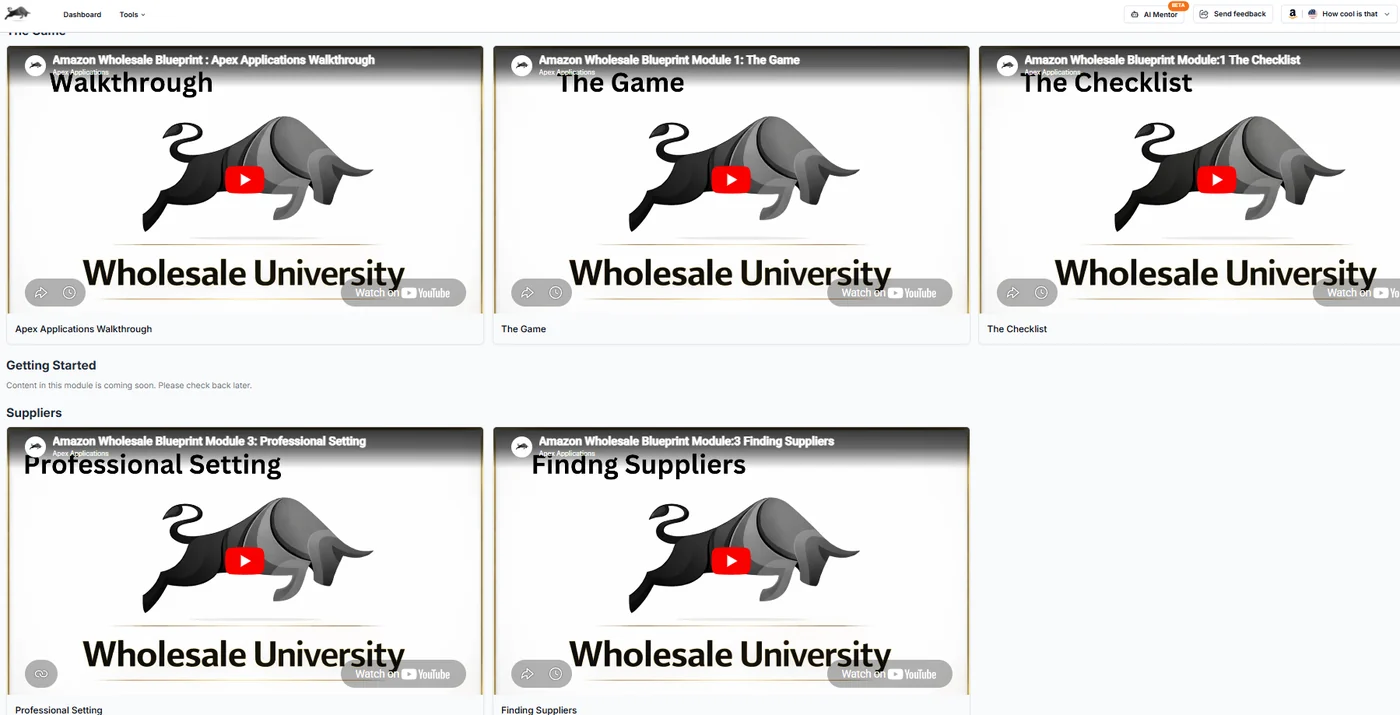
Apex University is Apex's video course on wholesale. It comes with a free Apex account. Nine lessons, no card.
Here's where each lesson sits on the roadmap, so you know what each one is for before you start.
| Lesson | What it covers | Stage |
|---|---|---|
| Apex Applications Walkthrough | A tour of the Apex software, filmed on an earlier version of it | All |
| The Game | Private label and wholesale compared, and FBA against fulfilling orders yourself (FBM) | 1 |
| The Checklist | The setup to finish before you buy: a registered business, a tax ID, a business bank account, a resale certificate and a professional email | 2 |
| Professional Setting | A domain email, a website and a business address, so distributors take you seriously | 2 and 5 |
| Finding Suppliers | How brands, distributors and wholesalers connect, and where to find them | 5 |
| UPC Scanner | Checking a supplier price list against Amazon, filmed on an earlier version of Apex | 6 |
| Brand Reverse Search | Working back from a brand to its products and distributors, filmed on an earlier version of Apex | 5 and 6 |
| Purchasing | New product and restock orders, test buys, and reading Buy Box statistics, filmed on an earlier version of Apex | 6 and 8 |
| Restocking | Lead time, prep days, sales speed and how much to reorder | 10 |
No lesson is dedicated to fees, approvals, prep or account health. The guides for stages 3, 4, 7 and 9 cover those.
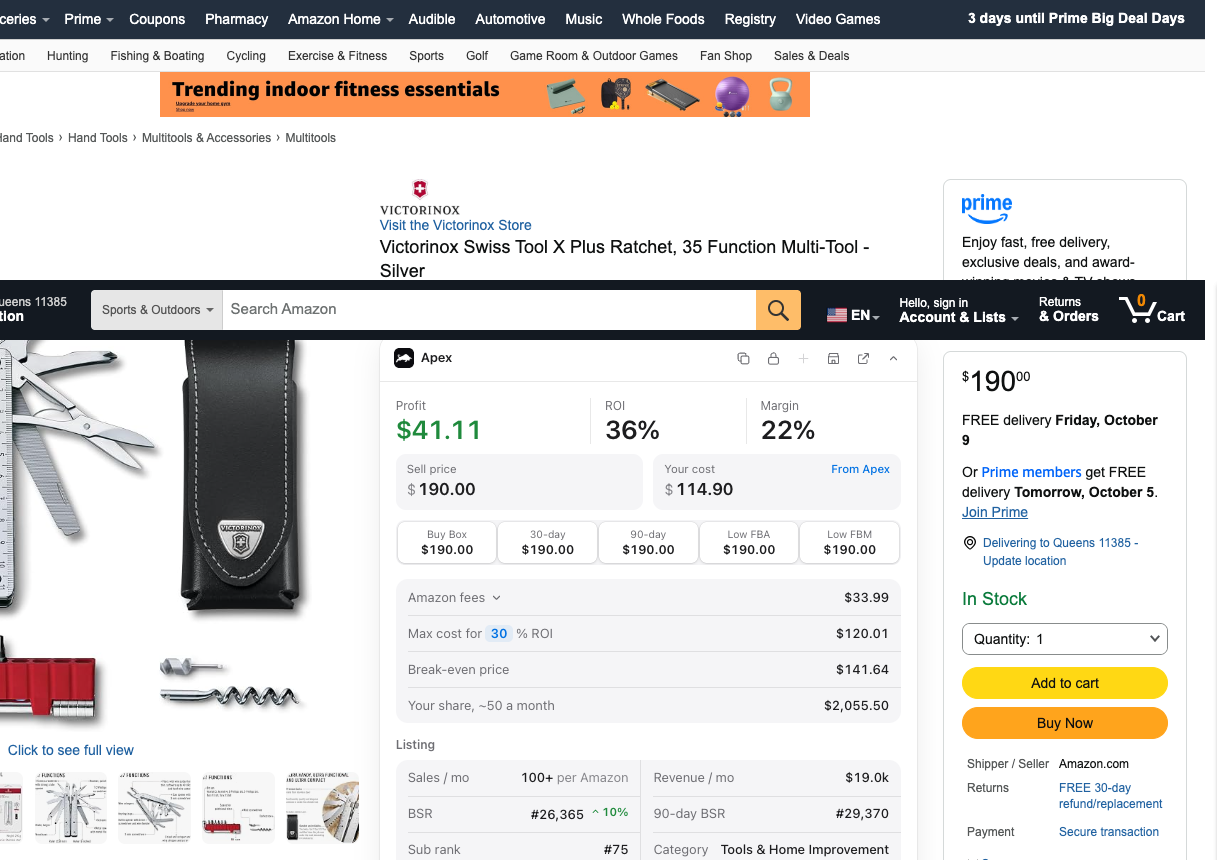
Finishing the course opens one more thing: the Chrome extension. It's free to install, and its numbers open when you finish Apex University. On an Amazon product page, it shows your profit, ROI and margin at your cost, Amazon's fees, the most you can pay for the return you want, and the listing's sales rank. The Chrome extension page has the details.
For calculators and checklists, the tools page puts every tool in one list, with each one's limit beside it.
Signs you have outgrown spreadsheets
Most of this roadmap works with a spreadsheet, the calculators and some patience. Software earns its place when the same job repeats faster than you can do it by hand. In the Restocking lesson, Stef describes that moment: once you're doing the reorder math across every active product, with several suppliers and each product selling at its own pace, "you cannot always be calculating this on pen and paper, on spreadsheets" (from Stef's lesson Restocking, 6:00 to 6:21).
These are the signs to watch for:
- Price lists arrive faster than you can check them. Matching every line to Amazon, then looking up fees, rank and competition for each match, takes longer than the list stays current. In Apex, that's the job of Apex Green, which matches a supplier's list to Amazon by UPC and lets you filter the matches.
- You can't trace a unit back to the order it came from. When you need a supplier invoice for an approval or a complaint, you're digging through email to work out which order a product came from. Apex Blue keeps suppliers, purchase orders and costs in one place, and a submitted order's unit costs become the cost of those products.
- Reorder math covers more products than you can follow. Different suppliers, different lead times, and every product selling at its own speed. Blue's inventory view shows days of stock left for each product. Its restock suggestions come from your stock, your sales speed and the cover you choose, so treat them as math on your own numbers, not a forecast.
- The margin you planned and the margin you made drift apart. The price list said one thing, and after fees, refunds and shipping the month said another. Blue's profit and loss reads your sales, refunds and Amazon fees from your account and shows profit by day, week or month. It's only as complete as the costs you enter, so a product with no cost shows sales but no true profit.
If none of these sounds like you yet, you don't need software. The course, the calculators and a tidy spreadsheet can carry you through your first orders. When one of these starts eating your week, the card for that stage names the plan built for the job, and pricing compares them side by side.
Amazon changes its rules and fees every year. Amazon rule changes for resellers: what changed, and what to do keeps track of what changed and what it means for resellers.
Apex University comes with a free Apex account: nine lessons, no card.