How to read a Keepa chart for Amazon wholesale, with real examples
A Keepa chart is a product's price, rank and seller history. For a wholesale buy, set it to a year and check four things: whether the Buy Box price has held steady, whether the sales rank keeps dipping, how many FBA sellers sit near that price, and how much of the Buy Box Amazon holds.
- Hide the lines you don't need. For a wholesale decision, the Buy Box, Amazon, lowest FBA offer, sales rank and offer count lines carry almost everything.
- Price lines show what sellers ask, not what buyers paid. The Buy Box line is the closest thing to a selling price, so judge your profit at its low end over 90 days.
- Each sharp dip in the sales rank line is most likely a sale. Dips spread across the year mean steady demand; dips bunched into a few months mean a seasonal product.
- Forty offers is not forty competitors. Count the FBA sellers priced near the Buy Box, then open Buy Box statistics to see who actually wins it, and how often.
- Amazon on a listing is not an automatic no. How much of the Buy Box it holds, and at what price, decides it.
Keepa is the price history tool many wholesale sellers use when they go through a supplier's price list one product at a time, stage 6 of the Amazon wholesale roadmap. In his Checklist lesson (at 5:06), Stef, who teaches Apex University, calls Keepa a mandatory piece of software for analyzing each product you plan to sell.
A Keepa chart looks like a tangle the first time you open one. It gets simple once you know which lines to read, in what order, and what each pattern usually means for a buy. We go line by line first, then through six real products Stef checks in his Purchasing lesson before placing an order, then four patterns you'll meet on almost every price list.
You'll find the chart in two places: under the product on Amazon's own page once Keepa's browser extension is installed, and on keepa.com. Keepa's free version shows the price lines. The sales rank and offer count lines and the Buy Box statistics this guide leans on come with Keepa Pro, its paid subscription, which Stef recommends having. What each version shows, and whether you need to pay, is covered in do you need Keepa?.
What each line on a Keepa chart means
The legend beside the chart names every line, and clicking a name hides or shows it. Go by the names rather than the colors, because several lines look alike. Two are easy to remember: Amazon's own price is the shaded orange area, and the sales rank is the green line.
Here's what each line tracks, based on Keepa's own documentation of its data:
| Line | What it tracks | What it tells a wholesale buyer |
|---|---|---|
| Amazon | The price of Amazon's own offer. A gap means Amazon had no offer, for example because it was out of stock. | Whether you'd be selling against Amazon, and how often it runs out |
| Buy Box | The price of the offer in the Buy Box, the one shoppers buy with Add to Cart. A gap means no offer qualified. | The closest thing to what the product actually sells for |
| New | The lowest new offer from anyone at each moment | A floor, but the cheapest offer is often not the one winning sales |
| New FBA (third party) | The lowest new offer from a seller using FBA, not counting Amazon | Your real price competition once your stock is at Amazon |
| New FBM (third party) | The lowest new offer, with shipping, from a seller who ships orders themselves | Usually not your competition (more on this below) |
| Sales rank | The product's Best Sellers Rank in its category over time | How often it sells, and whether that changes through the year |
| New offer count | How many sellers offer it new | Sellers arriving or leaving |
| Rating and review count | The star rating and number of ratings over time | A falling rating can warn of a problem with the product |
| Used, collectible, warehouse, list price, lightning deals | Other kinds of offers, and the list price | Rarely matter for wholesale. Hide them. |
For a wholesale buy, keep five lines on: Buy Box, Amazon, New FBA, sales rank and new offer count. Turn the rest off until you have a reason to look at them. The chart gets much easier to read with half the lines gone.
Set the range before you read anything
The same product can look healthy over a month and worrying over a year, so pick the range on purpose. Hover over any point on the chart to read the exact price, rank and date.
- Three months shows the current state: today's price compared with the last 90 days, and whether competition is changing right now. Many tools, our Chrome extension included, quote 30-day and 90-day averages, so this view lines up with them.
- One year shows seasonality. Compare this month with the same month last year before you assume today's sales are normal.
- All shows how long the product has been selling. A listing with years of steady history is a different bet from one that appeared a few months ago.
Start wide and then zoom in. Most misreadings come from looking at a short window and missing what happened around it.
The price lines: what the product actually sells for
Every price line on the chart is an asking price, not a sale. The Buy Box line is the price of the offer that wins Add to Cart, so it's the closest thing Keepa has to what buyers paid. The lowest New line often sits below it, because the cheapest offer isn't always the one that wins the Buy Box.
Three shapes matter on the Buy Box line:
- Flat or gently moving. The market has settled. This is what you want.
- Stepping down. Sellers are undercutting each other. By the time your stock arrives, the price you modeled today may be gone.
- A short spike. Usually stock ran low for a while and the price jumped. It tends to come back down once stock returns, so never price a purchase off the top of a spike.
The safe habit is to judge profit at the low end of the last 90 days, not at today's price. In his walkthrough lesson (at 13:21) Stef checks one product whose Buy Box price was $24.63, with a 30-day average of $24.63, a 60-day average of $24.08 and a 90-day average of $21.59. At the 90-day average it no longer met his profit targets, and he calls that very important to keep an eye on. For what counts as a good result, see wholesale profit margins.
Prices that go up need the same care. In his Purchasing lesson (at 17:29), one product had climbed from $9.99, where Stef worked out he would lose $2.40 on every unit.
"There could be several reasons why the price went up, by the way. It could be that the manufacturer itself has raised its prices, so the distributor raised their prices and so did the sellers."
From Stef's lesson, Purchasing at 18:00
Because the product had sold at the higher price for the last two months, he planned around $14.99, a little under the roughly $15 to $16 other sellers were charging, where he would still make $2.60 a unit. That's the pattern to copy: find the price that's been holding, check the profit there, and know what happens if it falls back.
One more thing to watch: gaps in the Buy Box line. Keepa records no Buy Box price when no offer qualified for it, which its documentation calls a suppressed Buy Box. Stef points out in the walkthrough lesson (at 13:53) that a product with no Buy Box averages isn't automatically a bad buy. It only means there was no Buy Box, or it was suppressed, so check on the chart how long and how often that happened.
The sales rank line: how often it sells
The green line is the product's Best Sellers Rank. Amazon's guide to sales rank says the rank is calculated from sales, that recent sales count more than older ones, and that it shows a product's position within a category. A lower number means more sales, and a product listed in more than one category can have a different rank in each.
On the chart, the number drifts up between sales, because other products keep selling, and drops sharply when this one sells. So a line that saw-tooths up and down all the time means frequent sales, and a line that climbs for weeks without dropping means the product barely sold in that stretch.
"We can see the rank dropped right here. This is that green bar. So the higher the ranking is, the slower it's selling."
From Stef's lesson, Purchasing at 19:08
Keepa also keeps a count of these drops over the last 30, 90, 180 and 365 days. Its documentation describes a drop as the rank moving from a high to a low value, which it considers a sign of a sale. Treat the count as a count of drops, not of units: one drop can hide more than one sale, and on very fast sellers the line moves so often that the drops blur together. It's most useful for comparing products in the same category.
A few things that trip people up:
- A rank only means something inside its category. A rank of 20,000 can be strong demand in one category and ordinary in a bigger one. Compare a product with others in the same category, not with a number you read somewhere.
- Variations can share a rank. Keepa's documentation notes that variation items usually don't have their own sales rank. If a product comes in sizes or colors, each with its own ASIN, the rank you see may describe the whole family, not the one size your supplier sells.
- Units sold last month is a separate figure. Many listings show how many were bought in the past month. Keepa records that figure where Amazon shows one and says it's not an estimate, but it comes in ranges such as 100+, applies to the exact variation, and most products don't have it. In his Purchasing lesson, Stef starts each product from the units bought in the last month, then checks the chart.
With the range set to a year, look at where the drops fall. If they're spread evenly, demand is steady. If they crowd into a few months, you have a seasonal product, covered in the patterns below.
The offer count: how many sellers, and how many really compete
The new offer count line shows how many sellers offer the product new. Its direction matters more than its size. A rising count while the Buy Box price falls usually means a price war is starting. A falling count often means sellers are selling out, which can push the price up and leave room for you. In the lesson (at 22:28) Stef notices that some sellers on one listing had sold out in the past and calls it good news, because it gives him more runway.
The number on its own overstates the competition.
"Now, even though there's forty people selling this item, this does not mean that there's forty competitors for this product."
From Stef's lesson, Purchasing at 15:33
His test is two questions about each offer: is it priced near the Buy Box, and is it fulfilled by Amazon? Sellers who ship orders themselves, or who price far above the Buy Box, mostly aren't competing with your FBA stock. On that listing, only about five of the forty were. The full method is in step 7 of how to analyze a supplier price list.
Stock levels matter too. On another product (at 20:41) Stef counts eight competitors, then reads how much stock each one has left. A seller with one unit left isn't much of a threat, and knowing that, he adds a case to his order.
Apex for Amazon Sellers is free to install, and its numbers open when you finish Apex University. Create a free account, work through the lessons, then install it from the Chrome Web Store.
Buy Box statistics: who actually gets the sales
The offer count tells you how many sellers there are. Buy Box statistics tell you how often each of them wins the Buy Box, which is the best guide you have to how the sales are shared. For each seller who won the Buy Box in the period, Keepa lists how often they won it, their average price and whether they used FBA. In the lesson, Stef opens Keepa's Data tab and then Buy Box Statistics for each product he's considering.
"We're gonna be able to see other third-party resellers and how much percentage they have over the Buy Box."
From Stef's lesson, Purchasing at 13:28
How to read the shares:
- Shared fairly evenly. On his first product, the top two sellers held roughly 20 to 25% each and the rest split the remainder. There's room for one more seller at a competitive price.
- One seller takes most of it. On another product one seller held 71%, and Stef kept his order to a single case. A dominant seller may be the brand itself, or someone who reprices hard.
- Amazon takes most of it. Covered in the next section.
Keepa's documentation describes each share as the percentage of time the seller held the Buy Box, as seen by shoppers without Prime. Time isn't the same as units sold, so read the shares as a guide to who wins most often, not an exact split of the sales. Turning a share into an order quantity is covered in your first wholesale order. How Amazon chooses the winning offer, which it now calls the Featured Offer, is in our Buy Box guide.
Buy Box statistics come with Keepa Pro. Stef's advice in the walkthrough lesson (at 14:34) is to have the subscription and check those stats before you decide.
Amazon on the listing
The Amazon line shows when Amazon itself sells the product and at what price. Where the shaded area stops, Amazon had no offer, usually because it ran out of stock. Many new sellers skip every product Amazon sells. Stef's view is that this is a mistake.
"Do not just look if Amazon is selling. Look at the buy box statistics."
From Stef's lesson, the walkthrough at 14:30
His illustration in the same passage: if a product sold 10,000 units a month and Amazon held only 20% of the Buy Box, the other 8,000 would go to third-party sellers. That's a made-up case to show the logic, not a real listing. A real one from the Purchasing lesson (at 14:59): Amazon had moved into the Buy Box and the price had dropped from where it used to be, but the product was still profitable at the lower price, so he kept it on the order.
When Amazon on a listing is a no:
- Amazon holds most of the Buy Box, most of the time, with few gaps.
- Amazon's price sits at or below the point where you'd make money after fees.
- The Buy Box price only jumps while Amazon is out of stock, and you'd need those windows to profit. Amazon's restocks aren't on any schedule you can see.
More reasons to pass on a product are in products to avoid in Amazon wholesale.
Six real products from one price list
Here's how the lines come together on real listings. All six are from Stef's Purchasing lesson, where he goes through one supplier's products before placing a purchase order. It was filmed on an older version of Apex, and Keepa's screens may look a little different today. These are one list's products, not averages, and yours will look different.
| Lesson time | What the chart and statistics showed | What he did |
|---|---|---|
| 13:06 | About 200 bought in the past month. Price "very consistent." Top two sellers held roughly 20 to 25% of the Buy Box each; the rest shared it evenly | Aimed for about a quarter of monthly sales: two cases of 24, so 48 units |
| 14:48 | About 400 a month. Forty sellers. Amazon now in the Buy Box, and the price lower than it used to be. One seller held about 23% | Still profitable at the lower price. Counted about five real competitors and raised the order to 96 units |
| 17:29 | About 200 a month. Price had risen from $9.99, where he'd lose $2.40 a unit | Planned around $14.99, just under other sellers, still making $2.60 a unit |
| 19:03 | About 200 a month. Fifteen sellers, consistent price, sales rank recently dropped. One seller held 48% of the Buy Box, the next 20% | Read the rank drop as faster sales. Two cases, 48 units |
| 23:13 | About 300 a month. Price with some drops and highs. One seller held 71% of the Buy Box | Kept it to one case |
| 23:45 | About 400 a month. Price used to be higher, dropped, and is now climbing steadily. Eleven sellers; the top two held 43% and 32% | Found three real competitors, FBA sellers at $15.99, and ordered 12 cases of six |
Notice what he never does: buy off one line. Every decision combines the price history, the sales, who's competing and how the Buy Box is shared.
Four patterns you'll see on almost every price list
Once you can read the lines, most charts fall into one of four shapes. Here's what each looks like, what it usually means, and what to do.
Steady
On the chart: the Buy Box price is flat or moves gently for months, the sales rank dips all the time, and the offer count wanders within a band. Amazon may or may not be there.
What it means: settled demand and a settled market. These are the products a wholesale business is built on, because you can reorder them month after month.
What to do: check the profit at the 90-day low, check the Buy Box statistics, and size a test order from your likely share. Stef's last product in the lesson (at 25:34) sold about 500 a month, with what he calls an extremely healthy Keepa graph.
Seasonal
On the chart: with the range set to a year, the rank drops crowd into the same months and thin out the rest of the time. The price may rise during the season and sag after it.
What it means: the product sells, but only part of the year. Toys and gifts around the holidays and outdoor products in summer are the familiar examples.
What to do: compare the same months last year before you trust this month's sales. Time your stock to arrive before the season, not during the peak or after it. Storage also costs more late in the year: Amazon's supply chain page shows a higher FBA storage rate for October to December, so stock left over after the holidays is expensive to hold. See Amazon FBA storage fees.
Amazon on and off
On the chart: Amazon's shaded area comes and goes. While Amazon is in stock, the Buy Box price sits at Amazon's price; while it's out, the Buy Box price jumps and third-party sellers make most of the sales.
What it means: your profit depends on how much of the time Amazon is there, and at what price.
What to do: work out your profit at Amazon's price, not at the price during its gaps. If it only works while Amazon is out of stock, it's a gamble on timing. Check the Buy Box statistics for Amazon's share.
Price war
On the chart: the Buy Box price steps down over weeks, the new offer count climbs at the same time, and the lowest FBA offer keeps chasing the price lower.
What it means: more sellers arrived than the sales can support, and they're undercutting each other to move stock. It tends to follow a stretch when the product looked very profitable, which is what drew the extra sellers in.
What to do: pass, or wait until the count falls and the price recovers. A single dip that bounces back within days is different: that's usually a deal or one seller clearing stock, not a war.
| Pattern | On the chart | Usually means | What to do |
|---|---|---|---|
| Steady | Flat Buy Box price, rank dipping all year | Settled demand you can reorder | Check profit at the 90-day low and buy a test quantity |
| Seasonal | Rank drops bunched into the same months | Sells only part of the year | Compare last year, time stock before the season |
| Amazon on and off | Amazon's area comes and goes; price jumps in the gaps | Profit depends on Amazon's stock | Price from Amazon's price, not the gaps |
| Price war | Price stepping down while sellers pile in | Margins shrinking for everyone | Pass, or wait for sellers to leave |
A quick Keepa check before you order
You don't need Keepa for every line on a price list. Filter the list on cost, fees and the 90-day price first, and open the chart only for what's left. In the Purchasing lesson (at 19:56) Stef had already filtered his list on 30, 60 and 90-day average prices before he opened Keepa, so his Keepa check was mostly about how much to buy. The filtering step is in how to analyze a supplier price list.
For each product on the short list:
- Range set to one year, with the extra lines hidden
- Buy Box price over 90 days: steady, stepping down, or spiking? Note the low end.
- Profit still there at that low price, after Amazon's fees and your full cost per unit
- Sales rank: dips spread across the year, or bunched into one season?
- Units bought in the past month, where Amazon shows a figure
- New offer count: steady, rising or falling?
- FBA sellers priced near the Buy Box: how many, and how much stock they hold
- Buy Box statistics: shared, or one seller or Amazon taking most of it?
- Amazon's line: there all the time, in and out, or absent?
To check the profit line, type the low end of the 90-day price into the calculator below as your sell price, with your landed cost as the cost. If the product only makes money at today's price, it doesn't pass.
Profit and most-you-can-pay calculator
Per unit, from Amazon's FBA fulfillment fees page or Amazon's Revenue Calculator. Leave it empty if you ship orders yourself.
Per unit.
Per unit: storage, returns, ads, anything else you count.
Per unit.
Type what you pay the supplier.
Runs in your browser from Amazon's published US fee tables. Nothing you type is sent anywhere.
Where Apex fits, and where you still need Keepa
Apex doesn't replace Keepa's charts. It shows averages over the last 30 to 90 days, not years of rank history, so it can't show you a product's past seasons. What it gives you is the snapshot that tells you whether a chart is worth opening.
On any Amazon product page, the panel from our Chrome extension, Apex for Amazon Sellers, shows today's Buy Box price beside its 30-day and 90-day averages, the lowest FBA and FBM offers, the sales rank beside its 90-day rank, monthly sales, and your profit after Amazon's fees. It's free to install, and its numbers open when you finish Apex University.
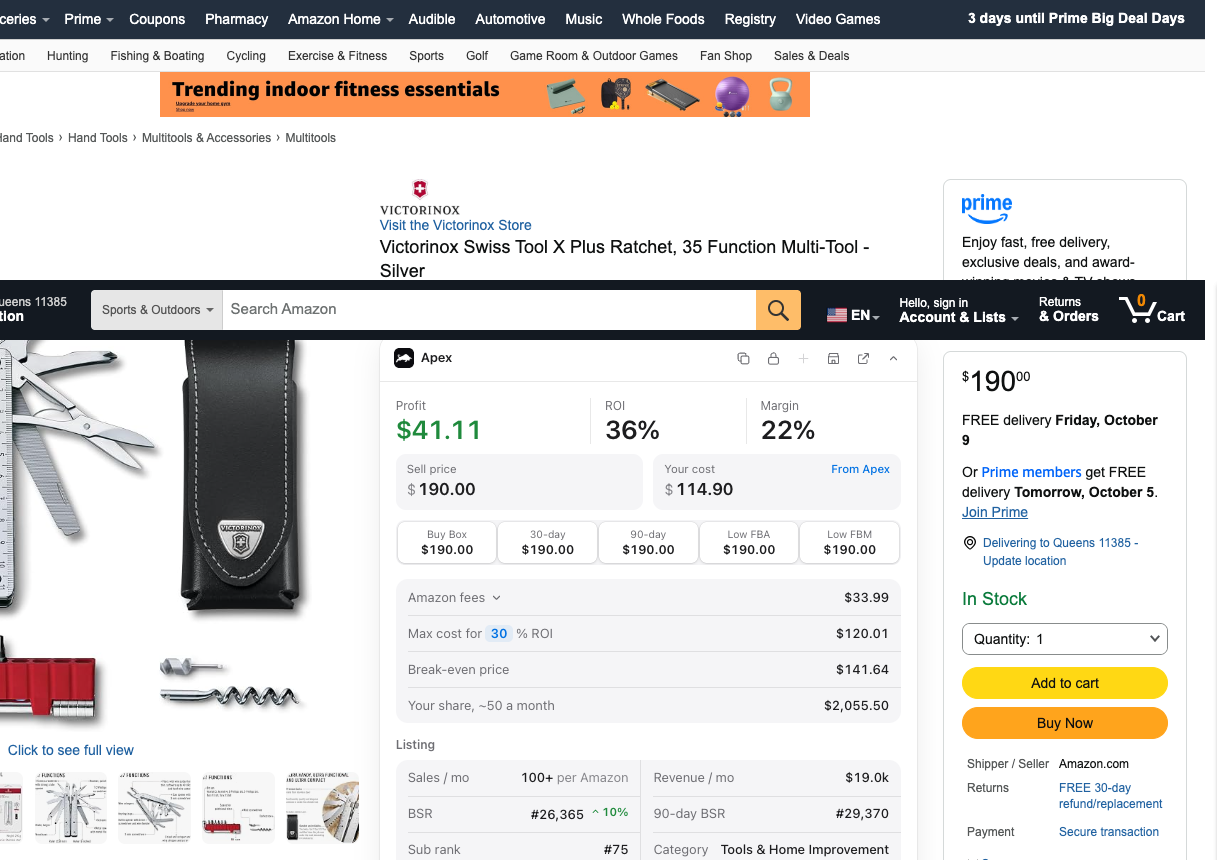
If today's Buy Box matches the 90-day average and the rank is close to its 90-day rank, the chart will usually confirm a steady product. If they disagree, that's when the full history matters. On a whole supplier price list, Apex Green checks each line that matches an Amazon product for profit at the Buy Box, sales rank, seller count and whether Amazon is on the listing, so you only open Keepa for the products that pass.
Mistakes that cost money
- Pricing the buy off today's Buy Box when it sits on a spike. Check the 90-day low.
- Reading the lowest New line as the selling price. The cheapest offer often isn't the one winning sales.
- Counting every offer as a competitor, or ignoring how much stock the real competitors have left.
- Skipping every product Amazon sells, or the opposite, buying deep where Amazon holds most of the Buy Box.
- Treating rank-drop counts as unit sales, or comparing ranks across categories.
- Trusting a shared rank for one variation. Check the exact size or color your supplier sells.
- Buying a seasonal product at the end of its season, then paying storage until next year.
- Skipping the check because the supplier is pushing a product. Their enthusiasm isn't sales data.
Once a product passes, your first wholesale order covers how many units to buy, and the purchase order workflow covers placing the order and keeping track of it.
Profit, ROI and break-even calculator: unlimited, no sign-in.
New sellers under $5,000 a month in Amazon sales. Unlimited supplier price lists a month, up to 50,000 lines, 500 products, purchase orders and profit and loss.
7 days free, then $49.99 a month, plus tax where applicable. Card required, nothing charged until day 8. Cancel any time before then.
Sources
- Keepa API documentation: the Product Object, Keepa
- Keepa API documentation: the Statistics Object, Keepa
- Guide to Amazon sales rank: Best Sellers Rank (BSR), Amazon
- Supply chain by Amazon (FBA storage rates by season), Amazon
- Keepa Pro: subscription benefits and data allowance, Keepa
- Maximize your sales potential with the Featured Offer (formerly the Buy Box), Amazon
We build software for Amazon sellers who buy from wholesale suppliers, and we write these guides from what we see in that work.
How to test small across several products, size each line from sales and case packs, plan the cash beyond the order, and build your first purchase order.