How to get ungated on Amazon: the complete guide for resellers
Getting ungated on Amazon means getting Amazon's approval to sell a product, brand or category that is gated for your account. Search the product in Seller Central's Add a Product tool, click Show limitations, then Apply to sell, and upload what the application asks for, usually an invoice from the brand or an authorized distributor.
- Ungated describes your account, not the product. Two sellers can get different answers for the same listing, and the answer can change over time.
- Search every product in Add Products before you buy it. Show limitations without an Apply to sell button means there's nothing you can apply for yet, so leave that product on the shelf.
- Amazon's public checklist asks for a recent invoice from a manufacturer or distributor, with at least 10 units, your name and address as they appear on your selling account, and the supplier's name and address. Your own application has the final word.
- Never apply with a retail receipt or an edited document. Being turned down costs you one product. A doctored document can put the whole account at risk.
- A denial is information. Read it, fix that one thing, or move to a product you can sell.
If you buy name-brand products to resell on Amazon, sooner or later Seller Central will tell you that listing limitations apply. That's gating, and getting past it is what sellers call ungating.
It feels like a wall the first time. Most of the time it is a form, and the form tells you what Amazon wants to see. This guide takes you through it in order, from checking a product before you spend money on it to what to do when Amazon says no, with a link to a deeper guide wherever you want the detail.
Where our Amazon quotes come from. Amazon keeps its detailed approval pages inside Seller Central, behind a sign-in. We link them, but we couldn't read their current wording for this version of the guide. Everything we quote as Amazon's comes from places you can open yourself: the wholesaler guide Amazon publishes on sell.amazon.com, and how-to posts and replies from Amazon staff on the US Seller Forums. When a point comes from another company or another seller, we say so and label it reported.
What ungated means on Amazon
Gated means Amazon wants to approve your account before you list a product. Ungated means your account can list it. When sellers say they "got ungated" in a brand or a category, they mean Amazon approved their application.
In a how-to post on the US Seller Forums, Amazon staff describe approvals as a way to keep products in its store safe, authentic and compliant. That tells you what the application is really asking: can you show that your stock came from a legitimate source?
Three things about the word trip people up.
It is about your account. Approval is decided account by account. A product that is ungated for a seller who has been approved for its brand can be gated for you, and the reverse. So another seller's list of "ungated brands" says nothing reliable about your own account.
Gated is not the same as restricted or prohibited. Gated means you can apply. Restricted products, such as supplements or pesticides, carry extra rules whatever your approvals say. Prohibited means no application will unlock it. Our guide to gated categories lays out the difference, with the category list and where Amazon explains each one.
Some products open on their own. Sellers call this auto-ungating: a product that was gated for your account becomes open without an application.
How to check if you need approval
Make this a habit for every product, before it lands on a purchase order. It's one search, about a minute, and it is the only answer that applies to your account.
In Seller Central, go to Catalog, then Add Products, and search for the exact product by ASIN, UPC or name. Use the exact listing you plan to buy, because a restriction can sit on one size or one variation of a product.
Amazon's wholesaler guide also points to the Manage Your Compliance dashboard in Seller Central for the documents a category or product requires.
You will see one of three things:
- Nothing shows. No approval stands between your account and that listing, so you can add your offer. The product's own rules, such as expiration dates or hazmat handling, and FBA's rules still apply. They just aren't an approval.
- Show limitations and an Apply to sell button. Approval is required, and the door is open. Click through and the form lists the documents Amazon wants for that product.
- Show limitations, but no Apply to sell. Amazon isn't taking an application from your account for that product today. In a US Seller Forums thread, an Amazon staff reply said the only way to list such items is if there is an option to apply to sell through Seller Central. Skip it, and put that money into something you can list.
Checking a whole price list
Wholesale price lists can run to thousands of rows, and nobody searches every row by hand. You don't need to. Approval only matters for products you would actually buy, so do the profit work first (how to analyze a wholesale price list shows the method) and run the approval check on the short list that's left.
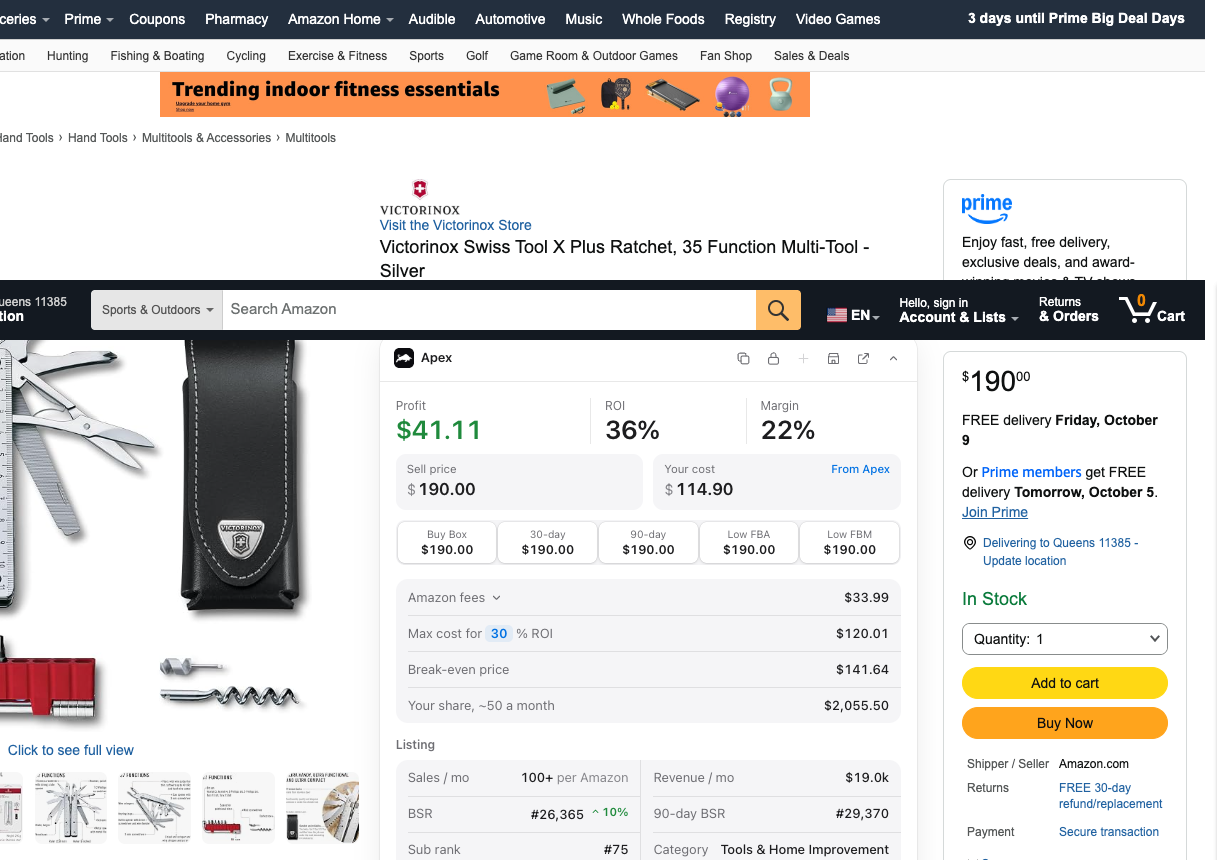
If you use Apex's Chrome extension with your Amazon account connected, its Check if you can sell it button asks Amazon the same question from the product page and shows the answer as Ungated, Needs approval, Can't sell, or Amazon didn't say. It's free to install, and its numbers open when you finish Apex University. Our extension page explains what it shows and what it needs.
Category, brand and product approvals
Gating isn't only a category thing. According to the Amazon staff post linked above, a restriction can sit on any of these:
- A single listing. You can be blocked on one ASIN while the rest of the brand is fine.
- A whole brand, in every category where it sells.
- A brand, but only in one category, so the same brand can be open in one place and gated in another.
- An entire category. Jewelry, Music, and Video, DVD and Blu-ray are the examples the post gives.
- Part of a category, a subcategory, while the rest of it stays open.
The same post says you may need to submit different applications for different approvals. That has two practical results.
One approval doesn't open the others. Being approved in Grocery is a statement about a category. It doesn't open every grocery brand that is gated on its own, and an approval for one brand doesn't open its category.
Brand gates can be the harder ones. Some brands only want authorized resellers on their listings, and a good invoice from a distributor may not be enough for those. For a gated brand, an Amazon staff reply in a thread about denied applications put it this way: your best bet is to work with the brand directly and get its approval to sell on Amazon.
That's why the best first application is rarely the one that sounds most impressive. Choose the approval that unlocks the most rows on your own supplier's list, the products you would stock anyway. To see which categories commonly need approval and what their applications tend to ask for, use our gated categories guide.
How to apply, step by step
This is the order that keeps your money safe: prove the product is worth it, buy it the right way, then apply with what you bought.
- Run the numbers first
Don't apply for a product that doesn't make money. Work out the fees and your profit at today's price before you think about approval. The fees guide covers what Amazon takes, and the price list guide shows how to find the products worth buying on a supplier's list.
- Buy from the brand or one of its direct distributors
Amazon's wholesaler guide says branded goods should come straight from the brand or from one of its direct distributors or wholesalers, and that's exactly whose invoice an application is looking for. The same guide suggests checking a wholesaler's business license and its brand authorization letter before you buy. To find and vet those suppliers, start with the wholesale suppliers hub. The Distributor Vault lists US distributors by name, and opening a wholesale account walks through the paperwork. One detail saves a lot of grief later: open the supplier account in the exact business name and address your Amazon selling account uses.
- Order enough, on one invoice
Amazon's published checklist asks for a combined purchase of at least 10 units on the invoice. Your application may ask for something different, and it wins. Order products you would sell anyway, so the purchase is stock, not a fee.
- Open the application
Go to Catalog, then Add Products, search the exact ASIN you bought, click Show limitations, then Apply to sell. Read the whole form before you upload anything. It tells you what this particular approval asks for, and that can be more than an invoice.
- Upload exactly what it asks for
Upload the invoice as your supplier issued it: the original file, readable, every page. If the application asks for a letter of authorization or anything else, supply exactly that. Don't crop, retype or edit a document to make it fit.
- Wait, then search the product again
When Amazon decides, search the product in Add Products again. If you were approved, the limitation is gone and you can create your offer. If you were denied, read the notice before you do anything else, and see if you are denied below.
- File the invoice with the order
Keep the invoice with the purchase order it belongs to. You will reuse it for the next application in that brand or category, and it is your proof of where the stock came from if a listing is ever questioned.
- The product passes your profit check at today's price.
- The invoice comes from the brand or one of its direct distributors, not from a store.
- Your business name and address on the invoice match your Amazon selling account.
- The invoice date is inside the window your application shows.
- The quantity meets what your application asks for.
- The supplier's name and address are on the invoice.
- The products you are applying for are itemized on the invoice.
- The file is the original from your supplier, readable and unedited.
- If the brand only works with authorized resellers, you have its letter of authorization.
What Amazon checks on an invoice
The clearest public statement of what Amazon looks for is in its own wholesaler guide on sell.amazon.com:
You'll find other windows quoted around the web, and some of those guides are describing a different Amazon process, such as answering a policy complaint. Follow the window and the quantity shown in your own application. Where it says nothing different, Amazon's public checklist above is the safest reading.
The other half is what the invoice is not. A retail receipt shows you bought something, not where the stock came from in the supply chain.
For the line-by-line version, including the documents that most often get turned down, read our invoice requirements guide.
Applying with a letter of authorization
Amazon's own checklist names two routes: an invoice, or a letter from the brand authorizing you to sell its products. You need the second one when a brand only wants authorized resellers on its listings. In a US Seller Forums thread about a gated brand, an Amazon staff reply said a letter of authorization from Nike, the brand in question, would be needed to sell its products.
A distributor's invoice shows where your stock came from. A brand's letter shows the brand agrees to you selling it. Some brands may want you to have both.
Two things to know before you ask:
- An LOA comes out of a relationship, not a form. As a rule of thumb, brands give them to resellers they already know: someone with a buying history through their distributors and a sensible plan for their listings. A cold request to a brand you have never bought from is a long shot.
- An LOA doesn't replace genuine stock. It says you may sell the brand. Every unit you send in still needs to trace back to the brand through invoices.
Our letter of authorization guide covers who can issue one, what it should say and what it doesn't do, and the distributor email templates include the request email.
Without an invoice: what you can do
The routes Amazon's wholesaler guide names are an invoice from a manufacturer or distributor, or a letter from the brand. We don't know of a legitimate third door, and anyone selling one is selling risk. What you can do is make the real route cheaper and sell what is already open to you while you work on it.
- Start with what you can already sell. Not every product is gated. Check the products on your supplier's list, and build your first orders from the ones that are open to your account today.
- Recheck the products you want. Approvals change, and products sometimes open on their own, as the reported note above describes. A product that was gated last month is worth a fresh search before you give up on it.
- Turn your first order into your invoice. The invoice that ungates you is a by-product of a real purchase from an authorized distributor. Order products you would stock anyway, enough to meet the quantity your application asks for, and the approval costs you little beyond inventory you wanted in the first place. Our first wholesale order guide covers sizing that first buy.
- Ask the brand who it supplies. If a brand won't sell to you directly, it can still point you to the distributors it stands behind, and their invoices trace straight back to it.
- Ask for a letter of authorization once you have a relationship with the brand, as described in the section above.
Asking the brand who it supplies is how Stef, who teaches Apex University, works the supply chain when a company says no:
"And if these people deny you guys, then you ask them, 'Who do you distribute to that I can buy from?' Because at the end of the day, the supply chain doesn't lie, and all the companies are going to profit eventually."
From Stef's lesson (Finding Suppliers, at 4:34)
What not to do
- Don't apply with a retail receipt. Store and online order receipts are on the list of documents the reported decline notice above says Amazon won't accept.
- Never edit, borrow or buy an invoice. An invoice from a supplier you never bought from, or one altered to fit, is the kind of document that turns a denied application into an account problem.
- Be wary of anyone selling a shortcut. If a service promises to supply the documents, that is the part to walk away from.
The rule behind all of this paperwork is Amazon's anti-counterfeiting policy:
For the bigger picture, the account health guide explains what Amazon monitors and which records to keep from each order.
If you are denied
A denial on its own is about one application, and it is information, if you read it. (A finding that a document was altered is a different and far more serious matter, which is why the rules in the section above matter.)
Read the notice first. A notice may point at a document problem: a receipt instead of an invoice, details that don't match your account, a quantity or a date outside what the application asked for. Sometimes the notice says very little. Either way, start from what it says, not from a guess.
Fix that one thing, then send something new. Sending the same documents again is unlikely to change the answer.
When the brand is the block, change the question. If the brand only wants authorized resellers, a better invoice won't fix it. Ask the brand for a letter of authorization, or put your money into a product you can sell today.
Our invoice requirements guide covers denials in detail: the usual causes, reapplying, and when to pick another product.
Approval isn't permanent: keep your invoices
An approval is not a lifetime pass. In the Seller Forums thread we linked in the checking section, a seller could no longer send inventory for listings that were still active. The Amazon staff reply said restrictions and policies can change, and that although the seller may have been approved in the past, Amazon continuously makes new determinations as its catalog grows.
Two habits follow from that.
Check approval before every reorder, not only before the first order. It is the same one-minute search in Add Products.
Keep every invoice, matched to the order it came from. From Stef's lesson (Apex Applications Walkthrough, 19:24 to 19:49): once a supplier is paid, he attaches its invoice to that purchase order, so that if Amazon ever raises a product authenticity claim, he can search the ASIN and pull up the supplier it came from and the invoice that proves it. His caveat is the one that matters most here: it only works if you buy from authentic suppliers in the first place. He does it in an older version of Apex. A folder per supplier, with files named by order date, does the same job.
Those invoices are what you reuse for the next application in that brand or category, and they are the records the account health guide tells you to keep.
Category guides
Approval is only the first hurdle that changes from one category to the next. Food, for example, brings expiration dates and heat into the picture. The category playbooks take one category at a time, from approval through the first order.
Grocery and Gourmet Food is a category many wholesale resellers look at early, because grocery distributors carry so many brands that sell week in, week out. The step-by-step Grocery application lives in the Grocery playbook, next to the expiration, meltable and labeling rules and the fees: how to sell grocery on Amazon.
Working in a different category? Start with the gated categories guide to see where approval tends to sit, then come back here for the application. Rule changes that affect approvals go into our log of Amazon rule changes for resellers.
Questions about getting ungated
How long does it take to get ungated on Amazon?
It varies, and Amazon doesn't publish a timeline we could check. Some applications are decided quickly and others sit under review for longer. The slow part is usually before you apply: opening a supplier account and receiving a real order, so the invoice exists. Search the product again in Add Products to see whether the limitation has gone.
Should I pay an ungating service to get me approved?
Be careful. An ungating service can only fill in the same form you can, and one that supplies invoices from a supplier you never bought from puts your whole account at risk to save you the cost of a small first order.
Why did a product I was approved for need approval again?
Because Amazon keeps reviewing which products need approval as its catalog grows, and Amazon staff have said a past approval doesn't promise you can keep selling. Search the product in Add Products before every reorder, and if Apply to sell appears, apply again with a recent invoice.
Every guide in this part
- Amazon ungating invoice requirements: what Amazon checks, line by lineWhat Amazon checks on an invoice for category or brand approval, the documents that are commonly rejected, and what to do if your application is denied.Read
- Best categories for Amazon wholesale: competition, margins and supplier depthThe categories wholesale resellers do well in and why, with competition, margins and supplier depth for each, and links to approval guides per category.Read
- How to sell grocery on Amazon as a reseller: approval, rules and feesWhether Grocery needs approval on your account, how to apply step by step, the expiration, meltable and labeling rules that trip resellers, and the fees.Read
- Letter of authorization for Amazon: what it is, who issues it, and how to ask a brandWho can authorize you to sell a brand on Amazon, what a letter of authorization should cover, how to ask for one, and what it does not do for you.Read
Apex for Amazon Sellers is free to install, and its numbers open when you finish Apex University. Create a free account, work through the lessons, then install it from the Chrome Web Store.
Start Apex University to unlock the extensionYou don't need to pay for anything to apply. Amazon decides every application.
Sources
- How to find wholesalers, Amazon
- Categories and products requiring approval, Amazon Seller Central
- Requesting approval to sell a brand (staff post), Amazon Seller Forums (Manny_Amazon)
- Listing is still active but I can't send inventory (thread with an Amazon staff reply, US Seller Forums), Amazon Seller Forums
- Selling Applications Denied (thread with an Amazon staff reply, US Seller Forums), Amazon Seller Forums
- Amazon anti-counterfeiting policy, Amazon Seller Central
Reported by others
- Multiple applications to sell Nike brand (a seller's post quoting Amazon's case message, with an Amazon staff reply), Amazon Seller Forums
- Brand Approval: Invoices vs Receipts and Retail vs Distributor (a seller's post quoting Amazon's decline notice), Amazon Seller Forums
- How to find ungated products on Amazon every day (July 2026), SellerAmp
Some of Amazon's pages need a Seller Central sign-in to read, and we have not yet checked their current wording for this version of the page. If Amazon's page and this guide disagree, Amazon's page is the one that counts.