Do you need Keepa? What the free version shows, and what only Keepa does
Keepa is free for price history: its browser extension and keepa.com show a product's Amazon price history and send price alerts, with no account needed. The sales rank and offer count graphs, stock levels and Buy Box statistics that a wholesale buy depends on come with Keepa Pro, its paid subscription. If you're placing orders, you'll want it.
- Keepa's free version is a price tracker: the price history graph under Amazon listings, price alerts and the Deals page, with no sign-up needed.
- Keepa Pro, the paid subscription, adds the sales rank, offer count and rating graphs, Buy Box statistics, competitors' stock levels and the Product Finder. Keepa's own page has the current price, and Keepa doesn't offer trials or discounts.
- Only a long history tells you whether a product is steady, seasonal or in a price war. Apex doesn't replace that.
- Amazon's own pages, Amazon's Revenue Calculator and Apex's calculators and extension cover the snapshot: today's price, rank, fees and profit. Use them to narrow a list, then open Keepa on what's left.
- Stef, who teaches Apex University, calls Keepa mandatory for wholesale. Learn on the free version, and subscribe once you're sizing real orders.
Nearly every guide to working through a supplier's price list, ours included, tells you to open Keepa at that step, stage 6 of the Amazon wholesale roadmap. So it's fair to ask what you get without paying, what the subscription adds, and whether a wholesale buyer really needs it.
The short version: Keepa's free version is a good price tracker, and it's enough to learn on. The checks that decide how much to order (how fast the product sells, how the Buy Box is shared, whether competitors are running out) sit in the paid version. Below is what each version shows, what you can check elsewhere without paying, and where Apex fits and where it doesn't.
Keepa changes what each version includes from time to time, so check its own pages before you subscribe. Everything here about Keepa comes from its subscription page and its help page.
What Keepa's free version shows
Keepa's help page says you can use Keepa without registering at all, and that registering costs nothing. An account mostly makes it easier to manage the products you track and your alert settings.
There are two ways in:
- The browser extension. Keepa makes extensions for Chrome, Firefox and Edge. Once installed, a box with the price history graph (Keepa calls it the Keepa Box) appears on Amazon product pages, below the product image and details. If you don't see it, scroll down; that's the first fix Keepa's own help page suggests.
- keepa.com. Search for a product on the site and you get the same graph, plus Keepa's Deals section for browsing price drops.
With the free version you can:
- See a product's price history. The graph shows the product's prices on Amazon over time. Click the labels beside the graph to hide or show each kind of data, and hover over any point to read the price on that date.
- Track a product and get alerts. Open the "Track product" tab above the graph and set the price you're waiting for. Keepa can tell you when the price reaches it or when the product is back in stock, by email, Telegram, web push or its iOS and Android app.
- Browse deals. The Deals section lists recent price drops. Keepa Pro opens the full Deals table with no row limits.
Keepa tracks Amazon's US store and ten others. Its help page says a product someone is tracking updates at least once an hour, and most others several times a day, so the price you see can be slightly behind Amazon's.
For a reseller, the free graph answers one important question: is today's price normal, or a spike? A product that only looks profitable at today's price, and has spent most of the last three months well below it, is the classic bad buy. You can catch that on the free version.
What the free version doesn't show is everything about sales and competition. On Keepa's own subscription page, the sales rank, offer count and rating graphs, Buy Box statistics and sellers' stock levels are all listed as things Keepa Pro unlocks. So the free graph tells you what the product has been priced at. It doesn't tell you how often it sells or who's getting the sales.
What the paid version adds
Keepa calls its subscription Keepa Pro. Here's what its subscription page says Pro unlocks, in Keepa's words where it matters, and what each item means when you're deciding on a wholesale buy.
| What Keepa Pro adds | What Keepa says it does | Why it matters for wholesale |
|---|---|---|
| Advanced graphs | Sales rank, offer count and rating and review count graphs | The rank line is your best read on how often the product sells. The offer count shows sellers arriving or leaving. |
| Buy Box statistics | Insight into Buy Box rotation and competitive pricing history | How the sales are shared between sellers, which is what your order size depends on |
| Inventory tracking | Current and historical stock levels for all offers | Whether the competition is about to run out, or has just restocked |
| Variation data | All variations compared by review share and price | A rough read on which size or color sells, from each one's share of the reviews, when the variations share one listing's rank |
| Product Finder | Search and filter millions of products | Finding products by rank, price and sellers, outside any supplier's list |
| Product Viewer | Import and export lists to analyze in bulk | Checking a batch of products at once instead of one page at a time |
| Product Best Sellers, Top Seller Lists, Category Tree | The leaders in each category, the top sellers and their storefronts, and Amazon's category directory | Seeing which brands the big resellers carry |
| Deals | The full Deals table with no row limits | Mostly useful for arbitrage |
| Expanded and price increase tracking | Updated price data on the products you choose to track, including when prices rise | Watching the prices on everything you stock |
For a wholesale buyer, the first three rows are the reason to pay. In his Purchasing lesson (at 19:46), Stef sums up how he sets each order quantity: he adjusts it to the monthly sales and the Buy Box statistics while keeping an eye on the Keepa graph. Our guide to reading a Keepa chart goes through each of those lines with real products.
How Keepa Pro is sold
A few things from Keepa's help page that are worth knowing before you pay:
- The price is on Keepa's page. Keepa sells Pro monthly or yearly, and its help page says a year costs the same as ten months. We don't print the price here, because it's Keepa's to change; check the subscription page.
- You need an account to subscribe. The free version works without one, but Keepa's help page says you have to be logged in, with a verified email address, to see the subscription options.
- It's billed in euros. Keepa is based in Germany and bills only in euros, by credit or debit card (not PayPal). If your card is in dollars, your bank converts it, so the amount on your statement moves with the exchange rate. Keepa's help page also says some banks flag the charge as foreign, and suggests asking your bank to authorize it.
- No trials or discounts. Keepa's help page says it offers no free trials, coupons or promotional discounts. Its free version is the way to try it.
- One subscription is one person. Subscriptions are per seat, and Keepa says they can't be shared within a company or a household. If a virtual assistant does product research for you, they need their own.
- It has a data allowance. Pro includes an allowance for loading product details, which refills by the hour. Keepa says the interactive graphs don't count against it, so ordinary chart reading won't run it down; big Product Viewer imports and exports can.
- The Keepa API is separate. Keepa's help page treats Pro and the API as two different subscriptions. The API is for software that pulls Keepa's data; you don't need it to read charts.
- You can switch or cancel yourself. Both are in the subscription dashboard, and Keepa credits what's left of a monthly payment toward the yearly price when you switch.
What only Keepa does
Plenty of tools show today's price, rank and fees. Among the tools in this guide, three jobs need a product's history, and only Keepa does them.
A year or more of one product's history
The question a long chart answers is what kind of product this is. Steady demand that you can reorder every month? A seasonal product that sells for three months of the year? A price war where sellers keep undercutting each other? You can't tell any of that from one day's numbers. You need the rank and the price over months, and ideally the same months last year.
Amazon's product page shows today's Best Sellers Rank, not its history. Amazon's guide to sales rank says the rank comes from sales, with recent sales counting more than older ones, so it moves all the time and one reading can mislead you.
How the Buy Box is shared
Forty sellers on a listing doesn't mean forty competitors, and a seller count can't tell you who's actually getting the sales. Keepa's Buy Box statistics show each seller who won the Buy Box over a period, how often they won it and at what average price. That share is what Stef uses to size a test order, which our guide to your first wholesale order walks through. How Amazon picks the winning offer in the first place is in the Buy Box guide.
The same check matters when Amazon itself sells the product. Stef's advice in his walkthrough lesson is to check how much of the Buy Box Amazon really holds before ruling the product out, because the share it doesn't win goes to other sellers.
"Have a Keepa Pro plan subscription and check those stats."
From Stef's lesson, the walkthrough at 14:34
Who is about to run out
Keepa Pro's stock tracking shows how much stock each offer has, now and over time. That's how you notice a competitor about to sell out, which can leave room for you, or one who keeps restocking at a lower price. In his Purchasing lesson (at 20:41), Stef counts eight competitors on one product and reads how much stock each has left. One is down to a single unit, so he doesn't count it as much of a threat, and he squeezes in one more case.
Apex for Amazon Sellers is free to install, and its numbers open when you finish Apex University. Create a free account, work through the lessons, then install it from the Chrome Web Store.
What you can check for free without Keepa
A lot of what you check on a product is a snapshot: today's price, today's rank, the fees and the profit. None of that needs Keepa. Here are the places that cost nothing.
Amazon's own product page
- The sales rank. Amazon's guide says you can often find a product's Best Sellers Rank in the "Product information" section of its page. It's today's number only.
- "Bought in past month." Many listings show how many were bought in the past month. It's rounded (100+, 1K+) and only appears on some listings, but where it's there, it's Amazon's own figure.
- The other offers. The list of other sellers shows who else offers the product, at what price, and whether Amazon ships it. It's today's list, with no history.
Amazon's Revenue Calculator
Amazon describes its FBA Revenue Calculator as a way to preview estimated net proceeds, and says it's free to use. You search by ASIN, UPC, EAN, title or SKU, then enter your price and costs. It works out Amazon's fees and your profit. It doesn't show price history or sales; you type the units you expect to sell.
Amazon's Product Opportunity Explorer
Inside Seller Central, under Growth, Product Opportunity Explorer groups products into niches by customer need, with trends in pricing, reviews and returns, and the search terms behind them. Amazon pitches it for finding new product ideas to launch, so it helps more with the private label question than with checking one wholesale listing. You need a selling account to open it.
camelcamelcamel
camelcamelcamel describes itself as a free Amazon price tracker, with price history charts and price drop alerts. It's built for shoppers waiting for a deal, so it centers on the price. As a second opinion on whether today's price is a spike, it does the job.
Apex's calculators and Chrome extension
- The profit calculator is free: unlimited, no sign-in. Type in the price, your cost and the fees, and it gives you profit, ROI and the most you can pay.
- The FBA calculator looks up a listing's fees, Buy Box price and averages: 3 free lookups, then sign in with a plan.
- Our Chrome extension, Apex for Amazon Sellers, puts a panel on Amazon product pages with today's Buy Box price beside its 30-day and 90-day averages, the lowest FBA and FBM offers, the sales rank beside its 90-day rank, monthly sales and your profit after Amazon's fees. It's free to install, and its numbers open when you finish Apex University.
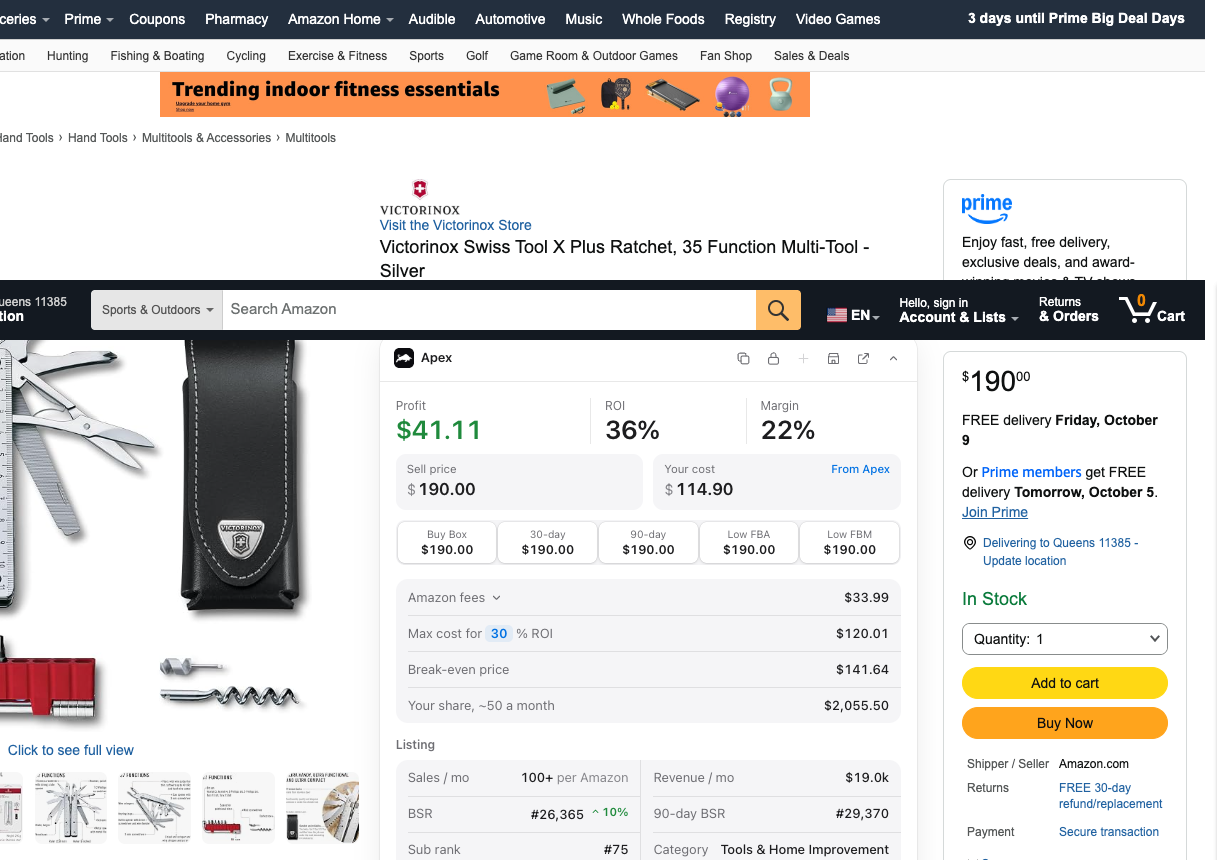
Averages do a lot of the early work. In his walkthrough lesson (at 13:21), filmed on an older version of Apex, Stef filters his suppliers' products and looks at one whose Buy Box price and 30-day average were both $24.63, with a 60-day average of $24.08 and a 90-day average of $21.59. At the 90-day price, it missed his profit targets.
"I did not even have to open up Keepa."
From Stef's lesson, the walkthrough at 13:40
That's the right use of a snapshot: ruling products out quickly, so Keepa only gets the ones worth a closer look. Which Apex plans include those 30, 60 and 90 day averages in price list scans is in the plan table of our price list guide.
Which tool answers which question
| The question | Where to check it at no cost | Needs Keepa Pro? |
|---|---|---|
| What does it usually sell for? | Keepa's free price graph, camelcamelcamel, or the extension's 30-day and 90-day averages | No |
| What are Amazon's fees, and what's my profit? | Amazon's Revenue Calculator, or Apex's profit and FBA calculators | No |
| How fast does it sell right now? | The rank on the product page, "bought in past month" where Amazon shows it, or the extension's monthly sales | No |
| Is it steady, seasonal or in a price war? | Not without months of rank and offer history | Yes |
| How is the Buy Box shared? | Not on Amazon's pages or the other tools here | Yes, Buy Box statistics |
| Is a competitor about to run out? | Only roughly: the offers list shows who's selling today, not their stock over time | Yes, with inventory tracking |
| Which variation actually sells? | Partly, from each variation's own page | Helps, with variation data |
Do you need Keepa for wholesale?
Stef's answer, in his Checklist lesson for Apex University, is yes.
"Keepa as a mandatory software that will help you analyze each and every product that you want to sell."
From Stef's lesson, The Checklist at 5:06
He says it helps you track sales trends, the Buy Box price and the competition. In the same passage he calls SellerAmp and RevSeller great extensions to have for research, but a preference rather than a must. That's a useful way to think about it: other tools can save you time, but the history only Keepa shows is the part you shouldn't skip.
That doesn't mean you need to pay on day one. Here's how we'd stage it.
While you're learning, the free version is enough. If you don't have a supplier account or a price list yet, there's nothing to size an order for. Learn the price lines on the free graph, and watch Stef read the rest on screen in Apex University, which comes with a free Apex account (nine lessons, no card).
Subscribe when you start sizing real orders. The decision that costs money is how many units to buy, and that comes from the sales rank, the offer count and the Buy Box statistics. Weigh the subscription against the size of the orders it's helping you decide, not against nothing.
- You have a supplier account and price lists to check
- You're setting quantities for first orders, and need to know how the Buy Box is shared
- A product's price has jumped and you need to know whether it will hold
- You're checking more products than you can judge from price alone
- You're looking for brands beyond your suppliers' lists, with the Product Finder or top seller lists
Keep the cost down. A few habits make one subscription go further:
- Filter before you open Keepa. Cut the price list on cost, fees and average price first, so you only open charts for the survivors. Our guide to analyzing a supplier price list shows the order of checks.
- Pay monthly while you're testing, and switch to yearly once it's part of your routine, since a year costs the same as ten months. Keepa applies what's left of your monthly payment to the yearly one.
- Budget one seat per researcher. Keepa doesn't allow one subscription to be shared.
- Log it with your other costs. In his walkthrough lesson (at 24:43), Stef says to log a Keepa Pro subscription with the rest of your operating expenses. Our bookkeeping guide covers keeping those records.
If you're looking at a "Keepa alternative," ask one question first: does it show a product's rank and Buy Box history going back a year or more? If it only shows today's numbers and a few averages, it's a snapshot tool. That's useful, and it's what our extension is, but it's a different job. For the rest of the stack, our guide to Amazon wholesale software covers what each kind of tool is for.
Questions about Keepa's free and paid versions
Does Keepa have a free trial?
No. Keepa's help page says it doesn't offer trials, coupons or promotional discounts on Keepa Pro. The free version, with price history and alerts, is the way to try Keepa before you pay.
Does the free Keepa extension show the sales rank?
Not as a graph. Keepa's subscription page lists the sales rank, offer count and rating graphs among what Keepa Pro unlocks, along with Buy Box statistics and stock levels. The free version shows the price history.
Can I share one Keepa subscription with my virtual assistant?
No. Keepa sells subscriptions per seat and says they can't be shared within a company or a household. Anyone who researches products for you needs their own subscription.
Why does Keepa charge in euros?
Keepa is based in Germany and bills only in euros. If you pay with a dollar card, your bank converts the charge, so the dollar amount can change from month to month. Keepa's own subscription page has the current price.
Is the Keepa API included in Keepa Pro?
No. Keepa's help page treats the API and Keepa Pro as separate subscriptions. The API is for software that pulls Keepa's data automatically. To read charts and Buy Box statistics yourself, Keepa Pro is the one you need.
Is Apex a Keepa alternative?
Not for history. Apex shows 30 to 90 day averages, so it can't show you a product's past seasons the way Keepa can. What Apex does is the work around Keepa: scanning whole price lists for profit, comparing today's price with its averages, and turning the products that pass into purchase orders. Use it alongside Keepa, not instead of it.
Profit, ROI and break-even calculator: unlimited, no sign-in.
You don't need to pay for anything at this stage.
Sources
We build software for Amazon sellers who buy from wholesale suppliers, and we write these guides from what we see in that work.
How to read Keepa's price, sales rank, offer count and Buy Box data before a wholesale buy, with real examples and four patterns to recognize.