Your first Amazon wholesale order: how much to buy and how to split it
Make your first wholesale order a set of small test buys across several products instead of a deep buy of one. Apex University's rule of thumb is 24 to 48 units per new product, sized from its sales and rounded to the supplier's case packs. Keep cash back for prep, shipping to Amazon and the restock.
- Spread a first order across several products, so one wrong pick costs you a test and not the business.
- Size each line from the listing's monthly sales, the share you can expect to win and the days you want covered, then round to whole cases.
- The supplier's invoice is only part of the cash. Freight, prep and labels, shipping to Amazon, the placement fee and the wait for payouts come on top.
- Ask for an invoice with your business name and address exactly as they appear in Seller Central, because it can also support an approval.
- Treat the first order as a test, then reorder from your own sales numbers.
You have a supplier, an open account and a shortlist of products that make money on paper. Now come the questions that keep people stuck for months: how many of each should I buy, how many products should I start with, and how much money do I really need?
This guide answers them with the method Apex University teaches in its Purchasing lesson, where Stef, who teaches the course, builds a live purchase order for products he has never sold and explains every quantity he picks. If you are not at the shortlist yet, start with how to analyze a supplier price list, which ends where this guide begins.
Test small across several products
A first order is different from every order after it.
In the Purchasing lesson, Stef splits purchase orders into two kinds. A restock order is for products you have already sold, so your own sales history tells you how many to buy. A new product order is for things you have never sold, so all you have is the listing's numbers and a guess at your share. Your first order is new products only. Every line on it is a test.
That changes the goal. You are not trying to buy the perfect quantity. You are trying to find out, as cheaply as you can, which products sell for you at the price you expected. Spreading the money across several products means one slow seller costs you a single test, while the others keep the order profitable.
Amazon's own guide to finding wholesalers points the same way: before you commit to a new supplier, it suggests you "place a small order so you can test their product quality and shipping speed" (Amazon).
How many units of each product?
From Stef's lesson (Purchasing, 14:05 to 14:40): "I always recommend, especially when doing test buys, to buy roughly twenty-four to forty-eight units of a product." His reasons are practical. You need enough units to see how fast the product really sells from your storefront, and a handful sells out before it tells you much. And with only one unit in stock, a shopper who wants two cannot buy from you.
Treat 24 to 48 as a starting range, not a rule. In the same lesson he goes well past it on a product selling about 700 units a month, because even 72 units would have been under a tenth of a month's sales. On the slowest product on the order, about 50 sales a month, he keeps it to a few cases.
What to leave off a first order
- Products you are not approved to sell. Check each one on your account before you order. The exception is an order placed on purpose to get the invoice for an approval, which is covered below.
- Hazmat products. In the lesson, Stef deletes the one hazmat item from his shortlist before building the order. He explains that hazmat shipments need a separate prep type, and he does not recommend them to beginners.
- Products priced at a spike. If a product makes money only at today's Buy Box price and loses money at its average over the last 90 days, it is a gamble. Our guide to reading Keepa charts shows how to spot one.
- One big bet. However good a product looks, a first order that is mostly one product is a single coin flip.
How to size each line
For every product on your shortlist you need four numbers. Multiply them out and round to the supplier's case pack.
Units to buy = (the listing's monthly sales x your share ÷ 30) x the days you want this order to cover, rounded to whole cases.
- Find how many units the listing sells a month
Use the monthly sales figure you trust most, such as a Keepa sales estimate or another sales estimator. This is every seller's sales on the listing, not yours. Stef works from the units sold in the last month.
- Work out the share you can realistically win
Count only the sellers you really compete with. Stef's rule of thumb from the same lesson: the competitors that matter are the FBA offers priced at or near the Buy Box. Seller-fulfilled offers and offers priced far above it are not taking your sales. On a listing with 40 offers, he counts about five.
Then look at how the Buy Box is shared today, in Keepa's Buy Box statistics. If the top two sellers hold 20 to 25% each and the rest split the remainder, aiming for about a quarter of the sales is aggressive but reasonable for a test.
- Pick the days of stock this order should cover
A test buy only needs to last long enough to show you whether the product sells. In the lesson's worked example below, it covers about a month of expected sales. For running stock, Amazon's inventory management guide suggests keeping about two months of supply, and it counts more than 90 days of supply as excess inventory. A test buy can sit at the low end of that, because you are still finding out whether the product sells for you.
- Multiply, then round to whole cases
Expected daily sales times the days of cover gives the units you need. Suppliers sell by the case, so divide by the case pack and round to the nearest whole case. Rounding down a little on a test is fine. Rounding up a lot defeats the point of testing.
A worked example from the lesson
Here is the first product on Stef's order, from the lesson (Purchasing, 13:40 to 14:03). The numbers are his, on one listing, and show the method, not a result.
| Step | The lesson's first product |
|---|---|
| Units the listing sold last month | about 200 |
| Buy Box share | the top two sellers held about 20 to 25% each |
| Share he aimed for | about 25%, so about 50 units a month |
| Case pack | 24 |
| Cases ordered | 2, the closest the case pack allows to 50 |
| Units ordered | 48 |
Notice that the two ways of thinking about it agree. A quarter of 200 sales a month is about 1.7 units a day, and 48 units at 1.7 a day is about 29 days of stock. That is about a month of expected sales, inside the 24 to 48 range, on a product that already sells every day.
Is there a limit on how many units you can send to Amazon?
Amazon's 2023 announcement of its capacity system says FBA capacity limits are measured in cubic feet, not units, and shown in the Capacity Monitor in Seller Central. For brand new accounts, an Amazon staff member answered the question in the Seller Forums: "New professional selling accounts (active in FBA for less than 39 weeks) don't receive FBA capacity limits" (Amazon Seller Forums). Neither is recent, and we could not check the current rules without a Seller Central sign-in, so look at your Capacity Monitor before you ship. For a first order of a few dozen units per product, the limit to plan around is usually your cash, not Amazon's space.
Can a small order trigger the low-inventory-level fee?
It is a fair worry, because the fee punishes stock that runs low against sales. When Amazon introduced it, a staff post said the fee is charged only when your historical days of supply are below 28 days, and it listed new Professional sellers as exempt "for the first 365 days after the first inventory-received date" (Amazon Seller Forums). Some of those terms have changed since. Our storage fees guide covers the fee and its exemptions in more detail.
The money you need beyond the order
The supplier's invoice is the number everyone budgets for. It is not the number that leaves your bank. Before your first sale you will also pay for:
- Freight from the supplier to you or your prep center. Some suppliers ship at no charge above an order size. Many do not, so ask.
- Prep and labels. Amazon stopped offering prep and item labeling for FBA shipments in the US on January 1, 2026, according to its Selling Partner API notice. And for inventory shipped on or after March 31, 2026, Amazon's commingling announcement says resellers must use Amazon barcode stickers even on products that already have a manufacturer barcode. So a label, and sometimes a poly bag, is now part of every unit's cost. Our FNSKU labels guide covers who can do the labeling and what it adds per unit, and the prep center guide covers choosing a prep center.
- Shipping to Amazon, and the inbound placement fee. The fee depends on how many warehouses you split a shipment across. The inbound placement fee guide has Amazon's table and a calculator.
From Stef's lesson (Purchasing, 3:49 to 4:14): he budgets inbound shipping at a per pound rate a little above what he usually pays, so a product that clears his numbers on paper has some cushion in real life. It is a good habit for a first order, when you do not know your real shipping costs yet.
Two more costs come later but decide whether the order makes money:
- Amazon's fees on each sale. The referral fee and the FBA fulfillment fee come out of each sale rather than your bank, so they do not need cash upfront. They do decide your profit. The Amazon FBA fees guide explains each one, and the profit calculator works out profit and the most you can pay per unit.
- Storage while it sells. Small for a test buy that sells in a month, bigger for one that sits. See the storage fees guide.
How long your money is out
This is the part that catches first-time buyers. Money leaves in stages and comes back in stages.
| Stage | What happens to your cash | What sets the timing |
|---|---|---|
| You pay the supplier | The invoice leaves your account. New accounts usually pay upfront | The supplier's terms |
| Freight to your prep center | You pay freight | The supplier's lead time |
| Prep and labeling | You pay prep and labels | Your prep center's queue |
| Shipping to Amazon | You pay the carrier and any placement fee | Transit and Amazon's check-in |
| First sales | Amazon takes its fees from each sale | How fast the product sells |
| Payout | Sale money becomes available after delivery plus a holding period | Amazon's payout policy |
| Restock | You pay the supplier again, ideally before you sell out | You |
Amazon's holding period is known as DD+7. Our log of Amazon rule changes quotes Amazon's payments page on how it works.
Put a number of days against each row for your own supplier, prep center and product, and the total is how long the order's money is out. The exact number matters less than what it tells you: if a product works, you will want to reorder it before the first batch sells out, and that is before all of its money has come back. Keep cash aside for that restock. Our guide to what it costs to start covers budgeting for it.
On payment terms: a new account usually pays before the order ships. Terms such as net 30 tend to come once you have ordered a few times, so ask then. Our guides on payment terms for a new wholesale account and negotiating with distributors cover both conversations.
Profit, ROI and break-even calculator: unlimited, no sign-in.
First order checklist
- The supplier is the brand or a distributor the brand authorizes, and you have seen its business license or brand authorization.
- You are approved to sell every product on the order, or you know which lines are there to support an approval application.
- Each line still makes money at the product's lower prices over the last 90 days, not only at today's Buy Box price.
- You counted the real competitors on each listing: FBA offers at or near the Buy Box price.
- Nothing on the order is hazmat or meltable, and anything with an expiration date will arrive with plenty of shelf life left.
- Every line is in whole cases, and the order meets the supplier's minimum.
- Your landed cost per unit includes freight, prep, labels, shipping to Amazon and the placement fee.
- The invoice will show your business name and address exactly as they appear in Seller Central.
- The ship-to address is your prep center or you, and labeling is agreed: an Amazon barcode on every unit.
- You are paying in a way you could dispute if the order never arrives, and you are not wiring money to a supplier you have not verified.
- There is cash left for prep, shipping, fees and a restock.
- You have the supplier's written order confirmation before you pay.
Your invoice is also your approval document
The invoice from your first order does a second job. If you plan to sell in a category or brand that needs Amazon's approval, it may be the document you apply with.
What that means for a first order:
- Tell the supplier your exact business name and address before they invoice you, written the way Seller Central has it.
- If the order is meant to unlock a category, buy at least what the application needs, only from the brand or an authorized distributor, and only products you would still be glad to own if Amazon says no. Amazon decides every application. Our guide to Amazon's ungating invoice requirements goes through the invoice line by line, and the ungating guide walks through applying.
- Keep every invoice. If Amazon ever asks where a product came from, the invoice is what you send. Our account health guide explains when that happens.
From Stef's lesson (Purchasing, 30:19 to 30:56): once he has paid the supplier, he closes the purchase order in Apex and attaches the supplier's invoice to it. If Amazon later questions a product's authenticity, he looks up the ASIN and pulls up every purchase order, with its invoice, that included it.
Building the purchase order
A purchase order is your written order to the supplier. It does not need to be fancy, but it does need to be exact.
From Stef's lesson (Purchasing, 27:31 to 28:11): every supplier takes orders differently. Some have a website, some want an email, some want a spreadsheet. What they need on each line is the UPC, their own SKU for the item, the case pack, the unit cost and the number of cases. The Amazon product name is there for you. The supplier matches lines by UPC and their SKU.
| Part | What to put |
|---|---|
| Header | PO number and date; your business name and address exactly as in Seller Central; the ship-to address; payment terms; prep and labeling instructions |
| Each line | UPC (typed as text, so leading zeros stay), supplier SKU, product name, case pack, cases, units, unit cost, line total |
| Totals | Total units, the order total, and the supplier's minimum, so you can see how far off it you are |
A few habits that save first orders:
- Re-check every line before you pay. Prices move between the day you build the order and the day you pay for it. Check each line at today's Buy Box price and at the product's lower prices over the last 30 to 90 days. Stef's test is whether the return and margin still meet his minimums at the lowest point.
- Reach the minimum with what you have already checked. In the lesson, when the order sat just under the supplier's minimum, Stef added one more case of a line with one of the best returns, rather than a product he had not researched.
- Get a confirmation back. Ask the supplier to confirm quantities and prices in writing before you pay, and keep that email with the invoice.
Doing it in Apex
Apex Blue builds purchase orders from your product database or a supplier scan. The order shows landed cost, projected revenue, profit and ROI for what you are buying. When you submit an order, its unit costs become the cost of goods for those products in your profit and loss, and a cost you type yourself always wins.
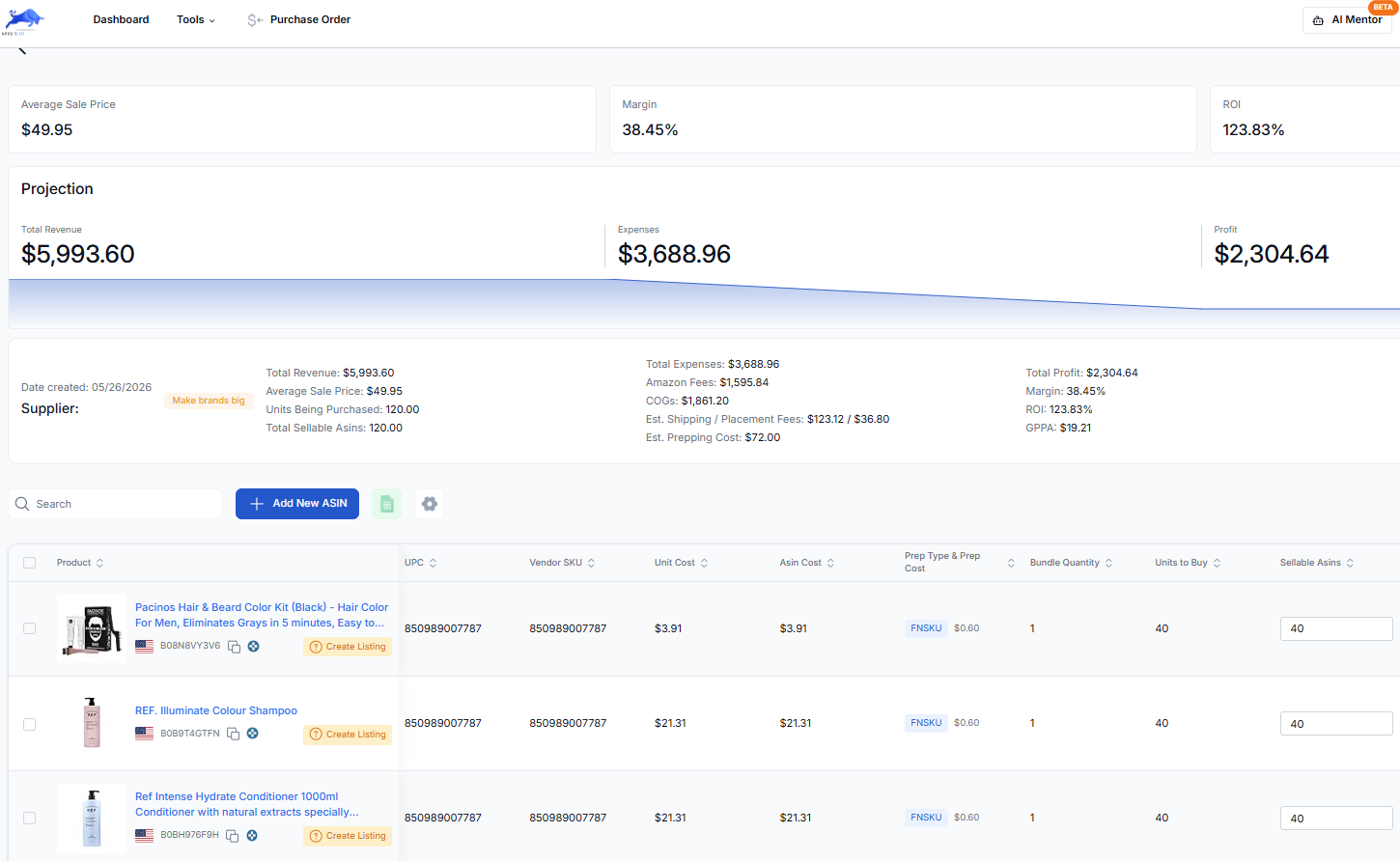
A spreadsheet does the same job on a first order. Software starts to pay off when you are juggling several suppliers and reorders at once, which our purchase order workflow covers.
After it ships
The order is not done when you pay. It is done when the units are selling and you know which ones to buy again.
- Count what arrives against the purchase order before anything goes to Amazon. Report shortages, damage and wrong items to the supplier right away. A short shipment is much easier to settle before the units are checked in at Amazon.
- Prep and send to Amazon. Label every unit and build the shipment in Send to Amazon. If you would rather not do the prep yourself, the prep center guide covers how to choose a prep center.
- Watch the first few weeks. Compare each product's daily sales with what you expected, keep an eye on your share of the Buy Box, and notice price moves.
- Decide what to reorder. The winners become restock orders, sized from your own sales instead of the listing's. The slow ones sell through, and you learn from them.
From Stef's lesson (Restocking, 10:52 to 11:15): when a product is sitting on more than 60 days of stock, he does not take it as a bad product. He says it "just means that we're probably not priced correctly to be getting the sales within the buy box," and he looks at the price first.
The reorder is also the moment to negotiate. In the same lesson, Stef calls a restock your opportunity to ask the supplier for discounted volume rates, because you have already paid them once. Apex University's Restocking lesson walks through the reorder math, and you can find it with the rest of the course on the course page.
Questions about a first wholesale order
How many products should a first wholesale order include?
There is no set number. Use enough products that one slow seller cannot sink the order, and few enough that each line still gets a real test of around 24 to 48 units. In practice the supplier's minimum often decides it. In the Purchasing lesson the supplier's minimum was $5,000, and Stef's order spread across around a dozen products. That is one supplier's minimum, not a typical one, so ask yours before you plan.
Should my first order ship to a prep center or to my home?
Either works, as long as every unit arrives at Amazon prepped and labeled to Amazon's requirements. Prepping at home costs time and a label printer and suits a small first order. A prep center costs a fee per unit but saves the time. Do not have a supplier ship straight to Amazon unless it labels and preps to Amazon's requirements. Our prep center guide compares the options.
Should I buy before I am approved in a gated category?
Sometimes the first order is how you get approved, because one way to apply is with an invoice from a manufacturer or distributor. If that is the plan, check what Amazon looks for on the invoice before you order, so the paperwork is right the first time. Amazon decides each application, so never treat the order as a sure thing, and only buy products you would still be happy to sell elsewhere or keep if Amazon says no.
What if the supplier's minimum order is more than I can spend?
Ask whether the minimum applies to a first order. Some suppliers lower it for a new account, and some have a minimum per order rather than per product, which you can meet across several products. If neither works, it may be the wrong supplier for now. Do not fill a minimum with products you have not checked just to reach it. Our guide to minimum opening orders covers how to start small with a distributor.
Apex for Amazon Sellers is free to install, and its numbers open when you finish Apex University. Create a free account, work through the lessons, then install it from the Chrome Web Store.
New sellers under $5,000 a month in Amazon sales. 2 supplier price lists a month, up to 20,000 lines, 500 products, purchase orders and profit and loss.
7 days free, then $49.99 a month, plus tax where applicable. Card required, nothing charged until day 8. Cancel any time before then.
Sources
- How to find wholesalers, Amazon
- Inventory management techniques and best practices, Amazon
- Amazon announces new streamlined FBA capacity management system, Amazon
- FBA capacity limit for new professional accounts (reply from an Amazon staff member), Amazon Seller Forums
- Low-inventory-level fee further explained (Bryce_Amazon), Amazon Seller Forums
- SP-API changelog: US FBA prep and labeling services end, Amazon Selling Partner API
- Commingling practices will end effective March 31, 2026 (US notice), Amazon Seller Forums (News_Amazon)
We build software for Amazon sellers who buy from wholesale suppliers, and we write these guides from what we see in that work.