What is an ASIN? And how it differs from a UPC
An ASIN (Amazon Standard Identification Number) is the 10-character code Amazon gives each product page in its catalog. A UPC is the barcode number the brand prints on the package, and it identifies the product in any store. Resellers match a supplier's UPCs to ASINs, then sell on the ASIN that is exactly the item they buy.
- An ASIN belongs to Amazon's product page, not to a seller. Everyone who sells that product sells on the same ASIN.
- A UPC or EAN belongs to the product. It's how your supplier's price list connects to Amazon, but it isn't the code Amazon tracks your units by.
- One UPC can bring up several ASINs: the single unit, multipacks, or a duplicate page. Buy for the one that is exactly what you'll send in.
- Your SKU is your own code for your offer, and the FNSKU is Amazon's barcode for your units. Neither is the supplier's item number.
- Products that come in sizes or colors have a parent ASIN and child ASINs. You sell on a child; nobody can buy the parent.
The ASIN is where a supplier's price list meets Amazon's catalog, in stage 6 of the Amazon wholesale roadmap. The definitions below come from Amazon's own US seller guides and from GS1 US, the organization that issues barcodes in the United States. Each one is linked in the sources at the end.
What an ASIN looks like, and where to find one
An ASIN is 10 characters, letters and numbers. Amazon's guide to ASINs says most start with B0, as in B07FZ8S74R. Books are the exception: Amazon's guide to creating an ASIN says books are identified by their ISBN, and the ASIN guide adds that a book's ASIN begins with a number.
You never make an ASIN up. When a seller creates a new product page and Amazon approves it, Amazon assigns the page its ASIN. From then on, anyone who sells that exact product adds an offer to the same page. That's the heart of reselling on Amazon: you join a page that already exists, next to everyone else who sells the item, and Amazon decides whose offer wins the Buy Box.
On amazon.com you can find any product's ASIN in two places:
- In the address bar. It's the 10 characters right after
/dp/in the product page's URL. - On the page. Scroll to the Product details or Product information section, where it's usually listed as ASIN.
ASIN vs UPC, EAN, GTIN, SKU and FNSKU
A wholesale reseller handles up to six codes for the same product. They come from different places and do different jobs, and most matching mistakes come from mixing two of them up.
| Code | What it looks like | Who gives it | What it points to | Same for every seller? |
|---|---|---|---|---|
| ASIN | 10 letters and numbers, usually starting B0 | Amazon | One product page in Amazon's catalog | Yes |
| UPC | 12 digits | The brand, from GS1 | The product, in any store | Yes |
| EAN | 13 digits | The brand, from GS1 | The product, in any store; used mostly outside North America | Yes |
| GTIN | 8, 12, 13 or 14 digits | GS1, the standards body | The family name for UPC, EAN and the rest | Yes |
| SKU | Whatever you choose | You (your supplier has its own) | Your offer, in your own inventory | No |
| FNSKU | Amazon's barcode, starting with X | Amazon | Your units of the product in Amazon's warehouses | No |
Sort them into two piles and they get easier. The UPC, EAN, GTIN and ASIN name the product itself, the same for everyone. Your SKU and your FNSKU name your own stock of it. Amazon's GTIN guide puts the key difference in one line: an ASIN doesn't identify a product outside Amazon, while a GTIN does, whichever store sells it.
UPC and EAN: the barcode on the box
A UPC is the 12-digit number printed under the barcode on most products sold in the US. GS1 US, which issues them, explains the structure: the first 6 to 10 digits identify the company, the next digits identify the item, and the last digit is a check digit calculated from the ones before it. An EAN is the 13-digit version used mostly outside North America. Amazon's GTIN guide lists both as product IDs, along with ISBN for books and JAN for Japan.
Your supplier thinks in UPCs. Their price list is a column of them, and when you send an order, the UPC is how the rep knows which item you mean. Amazon's shoppers think in product pages. The match between the two is the first check on every line you buy.
GTIN: the family name
GTIN (Global Trade Item Number) is GS1's name for all of these numbers. GS1 US says a GTIN can be 8, 12, 13 or 14 digits: a UPC is a 12-digit GTIN, an EAN a 13-digit one, and the 14-digit kind identifies a grouping such as a case, not something scanned at a checkout. So a 14-digit code on a price list is usually the case barcode, and searching with it may not bring up the single-unit page on Amazon.
GS1 US also says each distinct option of a product, such as a different size, flavor or packaging, needs its own GTIN. Keep that in mind for the next section, because Amazon's catalog doesn't always follow it.
SKU: your own code
A SKU (stock keeping unit) is a code a business makes up to track its own stock. Amazon's GTIN guide points out that the same product can have a different SKU at every company that sells it. You'll meet two of them: the supplier's item number, often labeled SKU or vendor SKU on their price list, and the SKU you give your own offer in Seller Central. They're unrelated, and neither one tells Amazon which product you mean. The ASIN does that, or the UPC you search with.
Send your units to FBA and Amazon adds one more code, the FNSKU, the barcode that marks units in its warehouses as yours. Our FNSKU guide covers when you need the label and how to put it on.
Why one UPC can match several ASINs
In a tidy catalog, one UPC would lead to one ASIN. Real lookups don't always work out that way. Search a supplier's UPC and you may get:
- The single unit you expected. Still open it once and compare the picture, the size and the count with the supplier's line.
- Multipacks. A 2-pack or a 6-pack page that another seller created can come up for the single unit's barcode, even though GS1 gives a different package its own number.
- A duplicate page. The same item listed twice. Compare the offers, the sales rank and the reviews before you choose.
- Nothing. The product isn't on Amazon under that code. Creating a new page is a different job from reselling, so as a reseller you'd usually leave these lines off your order.
The multipack case is the one that costs money. Stef, who teaches Apex University, explains why the pack size on the Amazon page matters so much:
"When we buy from suppliers, we don't buy based on the ASIN level, we buy on a unit level."
From Stef's lesson, Apex walkthrough at 11:38
If the page you match is a pack of two, every unit you sell on Amazon takes two of the supplier's units. Your cost per Amazon unit doubles, and each case makes half as many sellable units. Our price list guide works through the math with a real example from Stef's Purchasing lesson.
Profit, ROI and break-even calculator: unlimited, no sign-in.
Parent and child ASINs
Products that come in sizes, colors or flavors are usually grouped on one page. Amazon's guide to variations describes two levels:
- The parent is a product shoppers can't buy. It shows up in search results and ties the family together.
- The children are the products shoppers can buy, one for each size, color or other difference.
Amazon's guide to creating an ASIN says each variation has its own ASIN. So a shampoo sold in two sizes, for example, has a parent ASIN and a child ASIN for each size.
For a reseller the rule is short: your offer goes on a child, the exact size or color your supplier ships. The parent has nothing to sell on. When a UPC lands you on a family page, check that the selected option is the one on your supplier's line. Then be careful when you judge how fast it sells: the sales rank on a family page can describe the whole family, not the one size or color you'd buy. Our guide to reading Keepa charts shows how to check.
Where you see it in Seller Central
You meet ASINs in three places in Seller Central:
- Adding a product. Go to Catalog, then Add Products, and search by product ID: the UPC or EAN from your supplier's list, or the ASIN. Amazon's GTIN guide says that if the product is already in the catalog it comes up, and you select it to add your offer. Amazon's guide to creating an ASIN says the result shows Sell this product, or Apply to Sell when the brand or category needs approval first. Our ungating guide covers that approval.
- Your inventory. Amazon's guide to ASINs points to the Manage All Inventory page for the ASINs of your listings. Each listing there also carries the SKU you gave it.
- Bulk listing files. When you add many offers at once, Amazon's listing templates can find each product by its ASIN or its GTIN.
We couldn't open Amazon's Seller Central help pages on product IDs and the ASIN creation policy, because they need a sign-in. So the steps above come from Amazon's public sell.amazon.com guides, and the policy is listed in the sources with that note.
Where you see it in Apex
In Apex, the ASIN is the key everything else hangs on. Your supplier speaks UPC and Amazon speaks ASIN, so most of the work is translating between the two.
Matching a price list. Apex Green takes a supplier's price list with UPC or EAN codes and matches each code to Amazon, using 98M+ UPC and EAN codes across 122M+ products. Each match is an ASIN, shown with its price, Amazon's fees, profit, sales rank and seller count. Scanning price lists is part of every paid plan, and Beginner scans 2 price lists a month.
Ordering from the supplier. Once a product is on a purchase order, the supplier still needs its own codes. In his Purchasing lesson at 27:48, Stef downloads an order for his rep with the UPC, the vendor SKU, the case pack, the unit cost and the number of cases. The product names on it are Amazon's, he points out, but the supplier recognizes each item by its UPC and its own item number. Our purchase order workflow follows an order from there to delivery.
On a supplier's website. Apex for Amazon Sellers, the Apex Chrome extension, puts the matching ASIN next to each barcode on a supplier site you switch it on for. When one barcode matches more than one Amazon listing, hovering over its badge lists the others. On Amazon's own pages it shows the parent ASIN and copies the ASIN for you. It's free to install, and its numbers open when you finish Apex University.
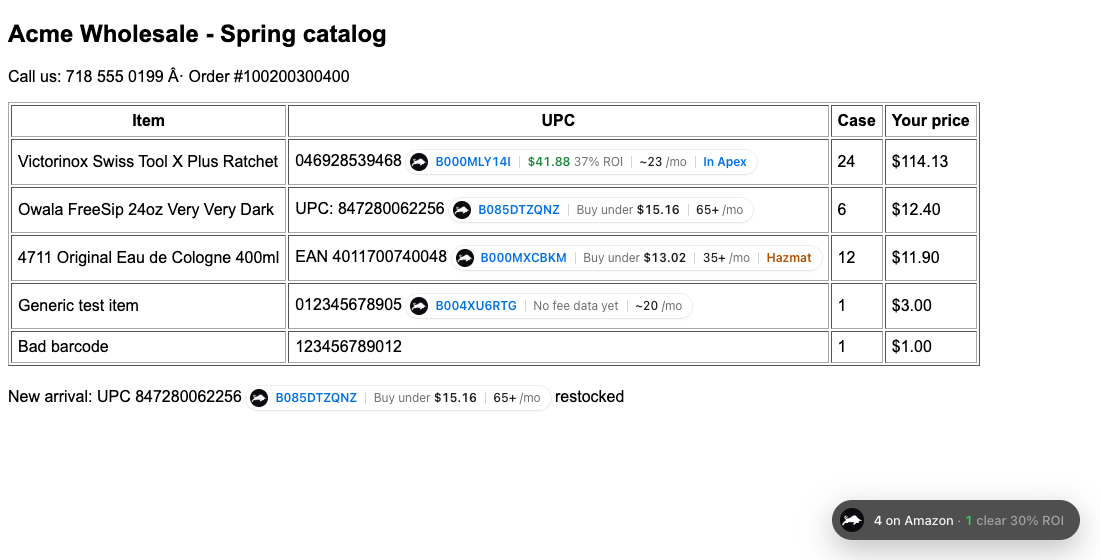
A worked example
Here's one line from the test page in the capture above, followed through every code it touches. It's one example, chosen because the capture shows it, not a product we recommend.
- The supplier's line. A Victorinox multitool with the UPC 046928539468. That's 12 digits, starting with a zero.
- The spreadsheet trap. Paste that column into a spreadsheet as numbers and the zero disappears: 46928539468, 11 digits, which is no longer a valid UPC. With the zero in place, it matches ASIN B000MLY14I, as the badge shows.
- Check the page. Open amazon.com/dp/B000MLY14I and compare the title, the picture and the count with the supplier's description. If the page were a 2-pack, your cost per Amazon unit would be twice the supplier's price.
- Check you can sell it. Search the UPC or the ASIN in Add Products. Sell this product means you can list it; Apply to Sell means approval comes first.
- Add your offer. You give it a SKU of your own making, say VX-MULTITOOL-01. It names your offer in your own inventory and reports, and the supplier never sees it.
- Ship it to FBA. Amazon assigns an FNSKU for your offer, and that label goes on each unit.
One product, four codes: the UPC on the box (the brand's), the ASIN (Amazon's page), the SKU (your offer) and the FNSKU (your units in Amazon's warehouses).
The 4711 cologne line on the same page shows the other two things you'll meet. Its barcode is a 13-digit EAN rather than a UPC, and it matched just the same, because both are GTINs. Its badge also says Hazmat, which is a reason to stop and read before buying. Our guide to products to avoid explains why.
Common mistakes
Buying for the wrong pack size. A match to a multipack page makes every number after it wrong by the pack size: cost, profit and how many units a case makes. Read the count in the title and the pictures before anything else, then work out your landed cost per Amazon unit.
Letting a spreadsheet eat the leading zero. Format the barcode column as text before you paste. If the zeros are already gone, pad a UPC back to 12 digits and an EAN back to 13 with zeros at the front.
Searching with the case barcode. A 14-digit code usually belongs to the case, so it may not find the single unit. Ask your rep for the unit UPC.
Mixing up the supplier's SKU, your SKU and the FNSKU. The supplier's item number goes on your purchase order. Your SKU is for your inventory. The FNSKU goes on the unit. None of them replaces the ASIN or the UPC when you're matching.
Selling on the parent. The parent ASIN of a variation family can't be bought. Find the child that is exactly your size or color.
Creating a new page for something already listed. If the product is in the catalog, add your offer to its page. For a brand enrolled in Brand Registry, Amazon's guide to creating an ASIN says only the brand's own representatives and the resellers it authorizes can create a new page through the standard process. Our guide to letters of authorization covers how a brand gives you that role.
Trusting a match without opening it. A barcode lookup is a starting point. The page you sell on has to be the exact item, size and count your supplier ships, or the units you send in won't match what buyers ordered.
Thinking the ASIN is yours. You share it with every other seller on the page, and you compete with them on price, stock and service rather than on the listing itself.
Related terms
- UPC
- Universal Product Code: the 12-digit barcode number on most products sold in the US. Suppliers list products by UPC, which is how a price list is matched to Amazon.
- EAN
- European Article Number: the 13-digit barcode number used in much of the world. It does the same job as a UPC.
- GTIN
- Global Trade Item Number: the family name for product barcode numbers, including UPC and EAN.
- SKU
- Stock keeping unit: your own code for a product in your inventory. On Amazon, each of your offers has a SKU you choose.
- Variation
- One version of a product, such as a size or a color, grouped with its siblings under a parent listing on Amazon.
- Parent ASIN
- The ASIN that groups a product's variations. Shoppers see the parent page, and each size or color has its own child ASIN that sellers sell on.
- Keepa
- A third-party service that tracks the history of a product's Amazon price, rank and offers. Resellers read its charts to judge how steadily a product sells.
- Price list
- A supplier's list of the products it sells, usually with UPCs, case packs and your cost per unit. Matching it against Amazon shows which products could make a profit.
Apex for Amazon Sellers is free to install, and its numbers open when you finish Apex University. Create a free account, work through the lessons, then install it from the Chrome Web Store.
New sellers under $5,000 a month in Amazon sales. 2 supplier price lists a month, up to 20,000 lines, 500 products, purchase orders and profit and loss.
7 days free, then $49.99 a month, plus tax where applicable. Card required, nothing charged until day 8. Cancel any time before then.
Sources
- Understanding ASINs: your guide to Amazon's product identification system, Amazon
- How to create a new ASIN on Amazon, Amazon
- What are product IDs or GTINs?, Amazon
- How to create Amazon product variations, Amazon
- ASIN creation policy, Amazon Seller Central
- What is a UPC code?, GS1 US
- What is a GTIN?, GS1 US
Some of Amazon's pages need a Seller Central sign-in to read, and we have not yet checked their current wording for this version of the page. If Amazon's page and this guide disagree, Amazon's page is the one that counts.
We build software for Amazon sellers who buy from wholesale suppliers, and we write these guides from what we see in that work.
Ten checks that turn a supplier price list into a buy list: UPC matches, landed cost, fees, ROI, sales, competition, approval and when to walk away.