Amazon wholesale products to avoid: Amazon on the listing, hazmat, expiry and complaint risk
Walk away from a wholesale listing when Amazon holds most of the Buy Box, when your share of the sales won't move a case in time, when it's hazmat or meltable and you aren't set up for it, when the stock is short-dated, when the brand polices resellers or needs Transparency codes you can't get, or when prices keep falling.
- Run these checks on your short list, after the profit math and before the purchase order. Most take a minute on the listing itself.
- Amazon on the listing and a crowded listing are judgment calls. Look at how the sales are shared, not just at who's there.
- Hazmat, meltables, short dates and Transparency are logistics stops. Walk away unless you're set up for them.
- Brand complaint risk is checked by hand. Apex doesn't flag it, and no tool we've seen predicts it reliably.
- A line that looks too good usually has a reason. Find the reason before you buy.
You've run a supplier's price list through the numbers, and you have a short list of lines that make money on paper. This guide, part of stage 6 of the Amazon wholesale roadmap, is the step a lot of new sellers skip: asking what could still go wrong with each line before it goes on a purchase order. Our guide to analyzing a wholesale price list puts every check in order. This is the long version of the last few.
Some signals are hard stops: Amazon won't take the product, or you can't get units it will accept. Others are judgment calls that rule out one listing and are fine on another, and we say which is which. The buying calls come from Apex University, where Stef, who teaches the course, works through real supplier lists on screen; we link the minute in each lesson. Amazon's rules link Amazon's own US pages, and we say so when a page needed a Seller Central sign-in we didn't have while writing.
The walk-away signals at a glance
| Signal | Where to check it | Hard stop? | Walk away when |
|---|---|---|---|
| Amazon is on the listing | The offer box and the other sellers | No | Amazon holds most of the Buy Box, or its price is below your break-even |
| Too many FBA sellers | The offers priced near the Buy Box | No | Your likely share won't sell what you have to buy in the time you'll wait |
| Hazmat | Amazon's dangerous goods review | For most new sellers | You aren't set up for dangerous goods, or can't get a safety data sheet |
| Short-dated stock | The dates on what your supplier ships | Often | The stock won't arrive with enough shelf life for how slowly it sells |
| Meltables | The time of year | In the warm months | You'd be selling into the months Amazon won't accept them |
| Brands that file complaints | The listing's history, the brand's website, your supplier | Often | The brand restricts Amazon sellers and you aren't authorized |
| Transparency | Your supplier, and the units themselves | Yes, without codes | Your supplier can't send units with the brand's codes |
| Looks like private label | Who sells it, and for how long | Usually | The brand is the only seller and won't sell to you |
| Price war | The price and seller count over the last few months | No | It only makes money at today's price |
Amazon is on the listing
How to tell if Amazon is selling a product
You can check in three places, quickest first.
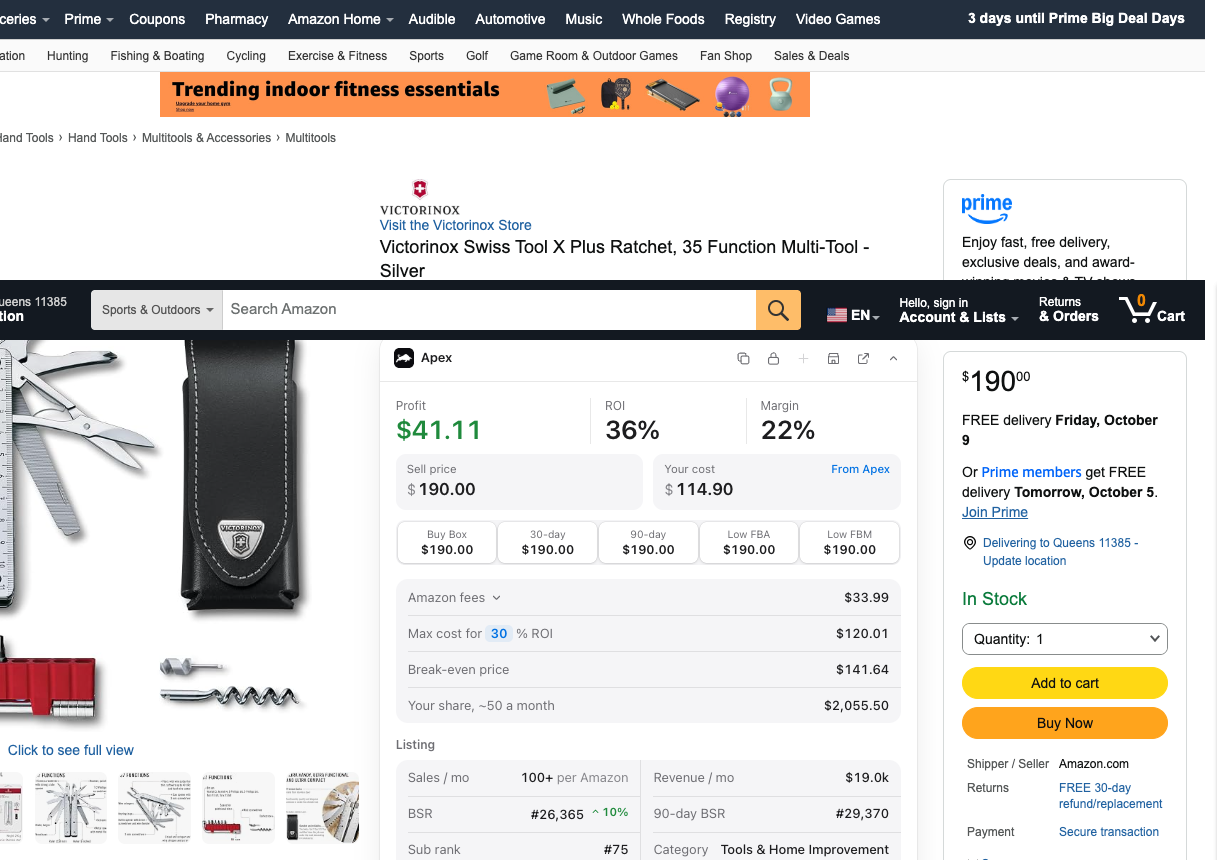
- The offer box. On the product page, the box with Add to Cart names who ships the featured offer and who sells it. When both are Amazon.com (some layouts show a single "Shipper / Seller" line), Amazon is the seller shoppers see first at that moment.
- The other sellers. Amazon's Featured Offer guide explains that shoppers can open "Other sellers on Amazon", below the offer box, to see more offers. If Amazon.com is in that list but not featured, Amazon is on the listing, just not winning right now.
- The price history. Keepa's chart has a line for Amazon's own offer, and the gaps in it show when Amazon ran out of stock. Our guide to reading Keepa charts shows how to read it, and how to see Amazon's share of the Buy Box in Keepa's Buy Box statistics, which come with Keepa's paid subscription.
When it rules a product out
Plenty of new sellers drop every product Amazon sells. That throws away good products, because Amazon being on a listing tells you who's there, not how the sales are shared. In the Purchasing lesson, Stef looks at a product where Amazon had just moved into the Buy Box and the price had come down from where it used to be.
"Right now, there's a drop, but that's okay because we're actually able to still be profitable."
From Stef's lesson, Purchasing at 15:03
He kept it on the order because his numbers still worked at the lower price, and he adds that there could be more room to make money on it if other sellers sell out. The test is the numbers at Amazon's price, not Amazon's presence.
Walk away when:
- Amazon holds the Buy Box most of the time, with few gaps. Its share in Keepa's Buy Box statistics tells you how much is left for everyone else.
- Amazon's price is at or below your break-even. Amazon's Featured Offer guide says Featured Offer prices are commonly at or below the lowest priced alternatives, so to be featured you'd have to match a price that loses you money.
- The product only makes money while Amazon is out of stock. You can't see when Amazon will restock, so a profit that depends on its gaps is a bet on timing.
It can still work when Amazon holds a small share of a product that sells well, or when the product still makes your profit at Amazon's own price.
Too many FBA sellers for your share
On a wholesale listing everyone sells the same product, and the sale goes to whichever offer is featured at that moment. So the seller count on the listing overstates the competition. The ones who matter are the FBA sellers priced near the Buy Box.
"So all the people that are doing FBM are not your competitors."
From Stef's lesson, Purchasing at 16:06
On that listing there were about forty sellers, and roughly five were FBA sellers at a competitive price. Sellers who ship orders themselves, and sellers priced well above the Buy Box, mostly aren't taking your sales.
Work out your share before you buy
The rough math takes a minute:
- Estimate monthly sales. Amazon's "bought in past month" figure on search results, a sales estimate from the rank, or Keepa. All of them are rough, so treat the result as a range.
- Count the FBA sellers near the Buy Box price, then add yourself.
- Divide. That's an even share. The real split follows price, stock and how the Buy Box rotates, which Keepa's Buy Box statistics show listing by listing.
- Compare it with the least you can buy. Usually that's one case pack, sometimes a minimum order.
One example with made-up numbers. A listing sells around 300 units a month, and 5 FBA sellers sit near the Buy Box price. With you that's 6, so an even share is about 50 a month, and a case of 24 sells in about two weeks. Now put 14 FBA sellers on the same listing. With you that's 15, about 20 a month each, so one case takes more than a month. If the supplier only sells two cases at a time, you're waiting over two months for that line to sell through.
Whether that's too long is your call, but slow stock costs you twice. It ties up cash you could spend on lines that sell, and it gets more expensive in Amazon's warehouses. Amazon's FBA page says aged inventory is charged monthly for all items stored in a fulfillment center for more than 181 days, and our guide to FBA storage fees explains that surcharge. When a product has more than sixty days of stock at its current pace of sales, Stef reads it as a pricing problem first: the offer probably isn't priced to win the Buy Box (Restocking at 10:52).
On the forty-seller listing, Stef's own call was to aim for about a quarter of the sales. The product sold around 400 units a month and one seller held about 23% of the Buy Box, so he raised his order toward 25% (Purchasing at 16:56). That was his judgment on one listing he could size, not a target for every product.
Walk away when:
- your likely share won't sell what you have to buy in the time you're willing to wait,
- the number of FBA sellers keeps climbing month after month,
- one or two well-stocked sellers hold most of the Buy Box and price hard to keep it.
Hazmat and dangerous goods
Amazon's seller blog defines dangerous goods, also called hazardous materials or hazmat, as products that could pose a risk if not stored, shipped or handled properly, because they contain flammable, pressurized, corrosive or otherwise harmful substances. The surprise for most wholesale sellers is how ordinary they are. Amazon's own examples include:
- whipped cream and cooking sprays in aerosol cans, and spirits with high alcohol content,
- dishwashing and laundry detergents, and hand sanitizers,
- perfumes and deodorant sprays, nail polish, mouthwash with alcohol, shaving cream in pressurized containers, essential oils and hair dyes,
- anything with lithium batteries,
- flea and tick treatments, printer cartridges, strong glues, pool chemicals and weed killers.
Products like these turn up on ordinary grocery, household, health and beauty price lists, so don't be surprised to find hazmat lines in a scan.
The same Amazon guide sets out what selling one through FBA involves. When you create or convert a listing for FBA, you're asked for dangerous goods information. You may have to upload a safety data sheet or exemption sheet. Amazon's dangerous goods team then reviews the product and decides whether the inventory is safe for FBA. Every shipment has to follow Amazon's packaging standards and quantity limits for dangerous goods, and some types need you to enroll in the FBA dangerous goods program. Amazon warns that falling short can mean blocked listings or product removal. Its dangerous goods identification guide has the detail by product type, but it needs a Seller Central sign-in, so we couldn't open it while writing this.
Stef's rule for beginners is simple. In the Purchasing lesson, the first thing he does with his filtered list is find the one hazmat product and delete it.
"If you are already selling hazmat products or you are already in the hazmat program, sending hazmat shipments requires a separate prepping type."
From Stef's lesson, Purchasing at 7:11
Right after, he says it's not something he recommends for new beginners. In the walkthrough lesson he gives the same advice: if you're not in the hazmat program, don't select hazmat items (walkthrough at 14:14).
Walk away when:
- you've never shipped dangerous goods and aren't set up to,
- your supplier can't get you the manufacturer's safety data sheet,
- the margin is too thin to carry a separate prep process and possible delays in review.
It can work once you're set up for it. Because many sellers stay away from dangerous goods, a hazmat listing can have fewer sellers on it. That's a choice for later, not for a first order.
Expiry and meltables
Short-dated stock
Anything with an expiration date, from snacks and supplements to some personal care products, has to reach Amazon with enough shelf life left. Amazon sets the minimum on its expiration-dated products page. That page needs a Seller Central sign-in, and we couldn't open it to check the current wording, so read it there before you buy anything with a date on it.
The clearest public statement of the rule is an Amazon staff post on the US Seller Forums, FBA and Expiration Dates: Here's what you need to know. It says units must arrive with enough shelf life left for the product to be used up, plus another 90 days. On that rule, a bottle of 240 daily vitamins needs at least 330 days left when it reaches Amazon. Our FBA prep requirements guide works through another example and how the date has to be printed.
That's only what gets a unit in the door. You still have to sell every unit well before its date, so the slower a product sells, and the longer one unit lasts the buyer, the more dating it needs when it arrives. A snack that sells through in three weeks can arrive with far less life left than a large tub of a daily supplement that sells a few units a month.
Before you order anything dated, ask the supplier:
- How much shelf life does this product usually have when you ship it?
- Is anything on this list a closeout or short-dated lot?
- Do you rotate stock so the oldest goes out first?
Walk away when the supplier can't answer, or when the dating they quote won't cover the trip to Amazon, check-in and your realistic sell-through. A cheap line on a price list is sometimes cheap because of its dates.
Meltables
Amazon only takes heat-sensitive products into its fulfillment centers during the cooler part of the year. In its announcement for 2025, posted by its News_Amazon account on the US Seller Forums, Amazon said it wouldn't accept meltable inventory between April 15 and October 15, 2025, and that meltable inventory still in its fulfillment centers after April 15 could be marked unfulfillable and disposed of for a fee from May 1. Its 2024 announcement used the same April 15 to October 15 window.
The same 2025 announcement defines meltable inventory as heat-sensitive products that can melt during prolonged heat, and names chocolate, gummies, and select jelly- and wax-based products among them.
Amazon announces the dates, so check the current year's notice and the Meltable FBA inventory page before you buy. That page needs a sign-in, and Amazon's 2025 notice says it's where you can download the list of meltable ASINs.
Timing is the whole question with meltables. Buying a case of chocolate in late winter can leave you only weeks to sell it before the window closes. Buying the same case in the fall puts the whole season in front of you. In the walkthrough lesson, Stef stops on a meltable in his scan results to point out that it can only be shipped in during part of the year (walkthrough at 14:05).
Walk away when you'd be shipping into, or close to, the months Amazon won't accept meltables, or when the product sells too slowly to clear before the window closes. Our grocery guide covers what the window means for seasonal stock.
Profit, ROI and break-even calculator: unlimited, no sign-in.
Brands that file complaints, checked by hand
This is the check you do yourself. Apex has no flag for it, and we haven't seen a tool that predicts it reliably. Some brands sell happily through distributors to anyone who keeps their price. Others don't want resellers on Amazon and act on it, and a complaint against your listing counts against your account health.
Here's a check that takes about fifteen minutes a brand. Do it on the short list only.
- Who sells it now? If only the brand, or only the brand and Amazon, sells a product that sells well, other sellers may have been pushed off. That's a warning sign, not proof.
- What happened to the sellers who left? In Keepa's offer count, sellers who vanish together and don't come back, while the product keeps selling, can mean the brand had them removed. Sellers running out of stock looks similar, so compare it with their stock and the price before you decide.
- What does the brand's website say? Look for a list of authorized retailers, a marketplace or minimum advertised price policy, or a page about unauthorized sellers.
- What does your supplier say, in writing? Ask whether they're authorized for the brand and whether the brand restricts selling on Amazon. Our distributor email templates include the wording.
- What do other sellers report? Search seller communities for the brand's name with words like "IP complaint." Treat what you find as other sellers' reports, not facts.
It also helps to know what a brand enrolled in Brand Registry can do. Amazon's Brand Registry page lists a Report a Violation tool for reporting suspected IP infringement, store policy violations and regulatory compliance concerns in one place. So an enrolled brand can report a listing it objects to straight to Amazon.
Walk away when:
- the brand says it doesn't allow unauthorized sellers on Amazon, and you aren't authorized,
- your supplier can't or won't confirm it's authorized for the brand,
- sellers report complaints from the brand, and your supplier can't trace its stock back to the brand.
Our guide to IP and inauthentic complaints explains what a complaint does to an account and the documents that answer one. If a brand on your list sells only to authorized resellers, the letter of authorization guide shows what that proof looks like, and whether reselling on Amazon is legal covers where the law stands. This is general information, not legal advice. Brand approval on your account is a separate question, covered in our page on gated brands.
Transparency-enrolled products
Transparency is Amazon's serialization program for brands. The brand puts a unique code on every unit of an enrolled product, and the codes are scanned through Amazon's supply chain to catch counterfeits.
The codes come only from the brand, so you can't add them yourself after you buy. The units have to arrive with them, which means buying through the brand's own supply chain. To check before you order:
- Ask your supplier whether the brand uses Transparency and whether its units ship with codes.
- Look at a unit, if you can get one, for a Transparency code on the pack. Some brands connect their own serial numbers to Transparency instead of using Amazon-issued codes, so a unit with no obvious code isn't proof. The supplier's answer counts for more.
- Ask again before each reorder. A brand can enroll products at any time, so a product you sold without codes last year may need them on this year's order.
This one is a hard stop. If your supplier can't send units with valid codes, walk away, however good the numbers look. If the units do come coded, our FNSKU label guide explains how to label them without covering the code.
Listings that look like private label
Private label is the other way to sell on Amazon: a seller creates a product under their own brand. Stef sums it up in the first lesson of the course:
"You own the brand, you own the trademark, and you are the only seller selling that product."
From Stef's lesson, The Game at 0:47
That last part is the trouble for a wholesale buyer. A listing built for one seller tends to stay that way: the brand is the only source of stock, and it has its own tools for reporting listings it objects to. Signs a listing is private label:
- One seller, and it's the brand. The seller's name matches the brand, and nobody else has sold it in Keepa's offer history, even though it sells steadily.
- The product only exists on Amazon. You can't find it at other retailers or on any distributor's list except the one in front of you.
- Your supplier is the seller. Some distributors carry house-brand lines of their own. If the seller on the listing is your supplier, you'd be competing with the company selling you the stock.
A Brand Store on its own isn't a warning sign. Our guide to finding brands to wholesale explains why, and what a brand-only listing can still lead to: some smaller brands will sell to you directly if you ask, and then the listing is a conversation to have with the brand, in writing, before you buy.
Walk away when the brand is the only seller and hasn't agreed to sell to you.
Price wars
A product can pass every other check and still lose you money if its price is on the way down. Amazon's own reselling guide warns about it: "Some sellers find themselves in a race to the bottom with prices, which can hurt your profitability." The same guide suggests setting a minimum price so you keep a healthy margin.
The signs, all visible before you buy:
- The price is stepping down while the seller count climbs. More sellers arrived than the sales can support, and they're undercutting each other to move stock. Our Keepa guide shows what that pattern looks like on the chart.
- The lowest FBA offer is already below your break-even. Someone there is willing to sell at a price that loses you money.
- Big retailers sell it for less. Amazon's Featured Offer guide tells sellers whose offers aren't eligible to be featured to consider pricing at or below the competitive external price. If that price is below your break-even, you may never be featured at a price that works.
Stef's habit is to check the bad case before he buys: he runs each line at its recent low, as in this Purchasing lesson example, so he knows what happens to his profit if the price falls before he spends anything.
Before each reorder, he checks again: whether new sellers are joining, whether the price is dropping, and whether he can still compete at that price (Restocking at 4:31).
Run any line you're unsure about at the lowest price it has sold for recently, not at today's price. The calculator below uses Amazon's referral fee table. Type the FBA fulfillment fee from Amazon's Revenue Calculator.
Profit and most-you-can-pay calculator
Per unit, from Amazon's FBA fulfillment fees page or Amazon's Revenue Calculator. Leave it empty if you ship orders yourself.
Per unit.
Per unit: storage, returns, ads, anything else you count.
Per unit.
Type what you pay the supplier.
Runs in your browser from Amazon's published US fee tables. Nothing you type is sent anywhere.
Walk away when the product only makes money at today's price, or when the price trend and the seller count both point the wrong way. A single dip that recovers within days is different. That's usually a deal or one seller clearing stock, not a war.
Too good to be true? Check these first
Every seller eventually finds a line with a huge return and asks what the catch is. Usually there is one, and it's one of these:
- The match is wrong. The barcode matched a 2-pack or a bigger size, so the price you're comparing with isn't for the unit you'd send. Step 1 of our price list guide covers matching.
- The price is a spike. Amazon or the main sellers are out of stock, and the Buy Box price jumped while they're gone. Judge it at its usual price.
- There's no Buy Box at all. Stef notes in the walkthrough lesson that when a product shows no 30, 60 or 90 day average price, there was no Buy Box or it was suppressed (walkthrough at 13:53). Not a bad buy on its own, but look closer.
- Few sellers, for a reason. The brand removes resellers, the product needs Transparency codes, or it's gated and most accounts can't sell it. Our guide to gated categories shows how to check your own account.
- Hazmat or meltable. Fewer sellers can ship it in, or nobody can at this time of year.
If you find the reason and it doesn't apply to you, because you're approved, you're set up for hazmat or the brand sells to you directly, it may be a real opportunity. If you can't find the reason, pass or buy the smallest amount you can.
What a scanner flags, and what you check by hand
A price list scanner can carry some of these checks for every line at once. Apex Green, Apex's scanner, shows each match's seller count and whether Amazon is on the listing, and flags hazmat and meltables, so you can drop those lines first the way Stef does. The rest are yours to check, on the short list:
| Check | In a Green scan | By hand |
|---|---|---|
| Amazon on the listing | Shown | Buy Box share in Keepa |
| Seller count | Shown | Which sellers are FBA and near the Buy Box |
| Hazmat | Flagged | Amazon's review, and the safety data sheet |
| Meltable | Flagged | The current year's window |
| Expiry dates | Not shown | Ask the supplier |
| Brand complaint risk | Not shown | The five questions above |
| Transparency | Not shown | Ask the supplier, look at a unit |
| Private label look | Not shown | The listing and its offer history |
| Price war | Profit at today's price, and average prices on plans that include them | The price and seller count over time |
On a single listing, the Chrome extension puts Amazon's numbers next to the product page as you browse. It's free to install, and its numbers open when you finish Apex University.
- Amazon doesn't hold most of the Buy Box, or the product still makes money at Amazon's price
- Your share of the FBA sellers near the Buy Box sells what you have to buy in the time you'll wait
- It isn't hazmat, or you're set up for dangerous goods and have the safety data sheet
- The supplier's dating covers the trip to Amazon and your sell-through
- It isn't meltable, or you'll sell through before Amazon's window closes
- The brand doesn't restrict Amazon sellers, or you're authorized in writing
- It isn't in Transparency, or your units will arrive with valid codes
- Other resellers sell it, or the brand has agreed in writing to sell to you
- It still makes money at its lowest recent price
Walking away from a line isn't a loss. Every line you skip keeps cash free for the ones that pass. When your short list has survived all of this, the next step is sizing it: your first wholesale order.
Questions about products to avoid
How many FBA sellers is too many on a wholesale listing?
There's no fixed number, because it depends on how much the product sells and how much you have to buy. Count the FBA sellers priced near the Buy Box, add yourself, and divide the monthly sales by that number. If your share won't sell a case pack in the time you're willing to wait, the listing is too crowded for you, whatever the count.
Can a new seller sell hazmat products through FBA?
Some hazmat products can be sold through FBA, but each one goes through Amazon's dangerous goods review, may need a safety data sheet or exemption sheet, and has to follow Amazon's packaging and quantity limits. Some types need enrollment in the FBA dangerous goods program. Stef's advice is to leave hazmat alone until you're set up for it.
What happens to meltable inventory left in FBA when the summer window starts?
In its 2025 announcement, Amazon said meltable inventory still in its fulfillment centers after April 15 could be marked unfulfillable and disposed of for a fee, starting May 1. Its 2024 notice suggested submitting removal orders or running sales to sell through before April 15. Check the current year's notice, because Amazon announces the dates each year.
Is a product with only one other seller an opportunity or a warning sign?
It can be either. If the one seller is the brand and nobody else has sold it in months, it's probably private label or a brand that removes resellers, so walk away unless the brand sells to you. If other sellers come and go and it's simply under-served, it may be a real opportunity. Check the offer history before you decide.
Apex for Amazon Sellers is free to install, and its numbers open when you finish Apex University. Create a free account, work through the lessons, then install it from the Chrome Web Store.
New sellers under $5,000 a month in Amazon sales. 2 supplier price lists a month, up to 20,000 lines, 500 products, purchase orders and profit and loss.
7 days free, then $49.99 a month, plus tax where applicable. Card required, nothing charged until day 8. Cancel any time before then.
Sources
- What Amazon FBA sellers should know about dangerous goods (hazmat), Amazon
- Dangerous goods (hazmat) identification guide, Amazon Seller Central
- Expiration-dated products, Amazon Seller Central
- Meltable FBA inventory, Amazon Seller Central
- Request to remove meltable FBA inventory by April 15, 2025 (Amazon announcement), Amazon Seller Forums (News_Amazon)
- Request to remove meltable FBA inventory by April 15 (Amazon announcement for 2024), Amazon Seller Forums (News_Amazon)
- Transparency, Amazon
- How to find wholesalers, Amazon
- Amazon Brand Registry, Amazon
- Maximize your sales potential with the Amazon Featured Offer (formerly Buy Box), Amazon
- Reselling in Amazon stores: guidelines and tips for success, Amazon
- Fulfillment by Amazon, Amazon
- FBA and Expiration Dates: Here's what you need to know (Amazon staff post), Amazon Seller Forums (TaylorR_Amazon)
Some of Amazon's pages need a Seller Central sign-in to read, and we have not yet checked their current wording for this version of the page. If Amazon's page and this guide disagree, Amazon's page is the one that counts.
We build software for Amazon sellers who buy from wholesale suppliers, and we write these guides from what we see in that work.
How to test small across several products, size each line from sales and case packs, plan the cash beyond the order, and build your first purchase order.