Amazon FBA fees: every fee a seller pays, explained with examples
Every FBA sale pays two main fees: a referral fee, a percentage of the price set by the product's category, and a per-unit fulfillment fee set by size, weight and price. On one real $190 multitool they came to $33.99, about 18% of the price. Cheaper items lose a bigger share, and storage and plan fees come on top.
- Two main fees hit every FBA sale: the referral fee, a share of the price set by the product's category, and the fulfillment fee, a set amount per unit set by size tier, weight and price.
- Because the fulfillment fee is a flat amount per unit, the share Amazon keeps falls as the price rises. A cheap product gives up a much bigger slice than an expensive one.
- Storage, the inbound placement fee and your selling plan sit on top, and most of them depend on choices you make: how much stock you send, how you split shipments and which plan you pick.
- Every figure lives on Amazon's own pages, and some of them change every year. Check the fees for a product at the price you expect to sell at, before you buy it.
What Amazon took from one real sale
The fastest way to understand Amazon's fees is to watch them come out of one real sale. So here is one.
The screenshot below shows our Apex for Amazon Sellers extension open on an Amazon product page. The product is a Victorinox Swiss Tool multitool, selling for $190.00. That was the price when we took the screenshot, and it will have moved since.
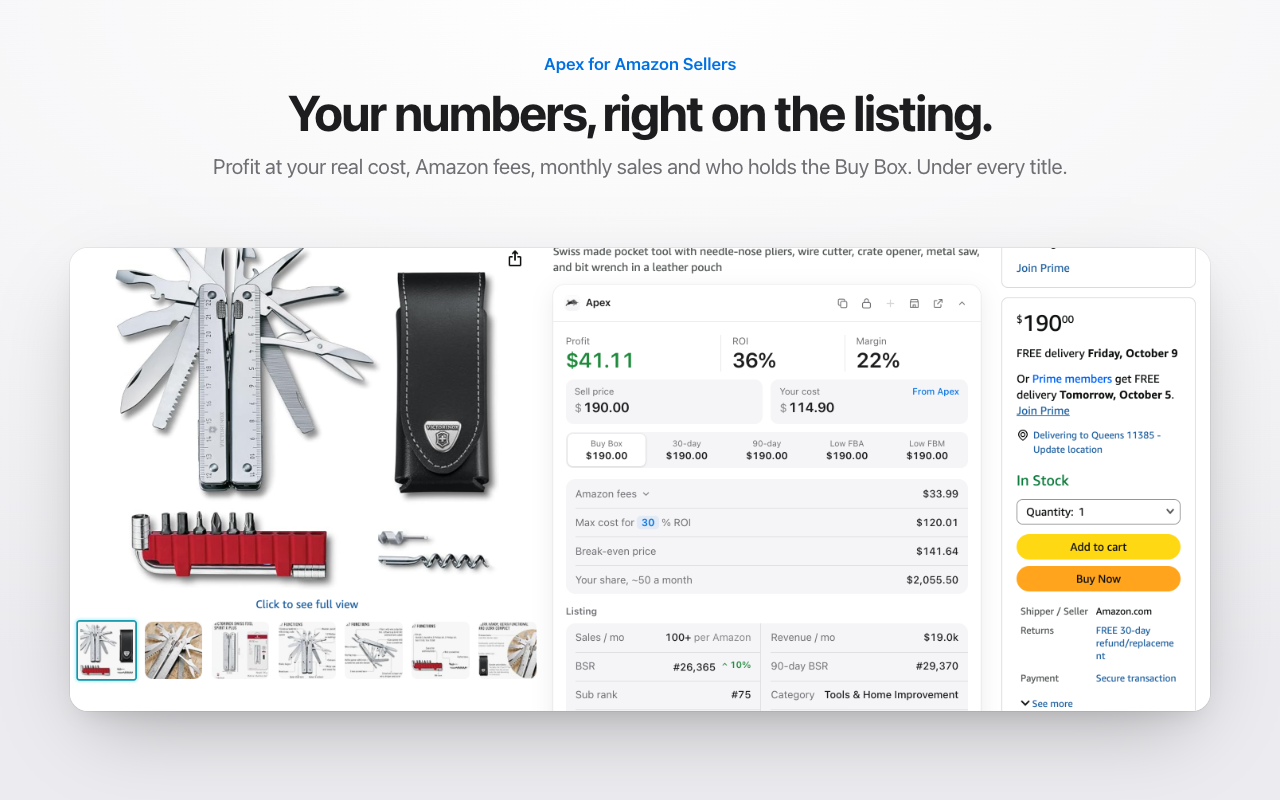
Look at the line that says Amazon fees: $33.99. That number is two fees added together.
1. The referral fee. The panel lists this product under Tools and Home Improvement, and that category's rate fits the fee it shows. Here is the row from Amazon's fee table:
| Category | Referral fee | Minimum |
|---|---|---|
| Tools and Home Improvement | 15% | $0.30 |
- A product's fee category may not be the same as the category shoppers see in the Amazon store.
Source: Selling plans and pricing, Amazon
At $190.00, that rate comes to $28.50.
2. The FBA fulfillment fee. The other $5.49 is what Amazon charges to pick, pack and ship one unit of a pocket tool this size and weight, in the over $50 price band.
Add them up and Amazon keeps $33.99, which is 17.9% of the price. It pays out $156.01 per unit. What you pay the supplier, your prep and your shipping to Amazon all come out of that $156.01.
The panel's "Max cost for 30% ROI" line starts from the same payout: $156.01 divided by 1.3 is $120.01. That's the most you could pay for this tool and still make a 30% return, before prep and inbound shipping.
One caveat. These are the fees for this listing at that moment. If the price changes, the referral fee changes with it, and if Amazon measures the product differently, so does the fulfillment fee.
Why the share changes with the price
About 18% is low, and the price is the reason. The referral fee is a percentage, so it grows and shrinks with the price. The fulfillment fee is a set amount per unit. On a $190 tool it barely shows. On a $15 product that costs a similar amount to pick, pack and ship, the same kind of flat fee is a far bigger slice of the sale.
So when someone asks what percentage Amazon takes, the answer is that it depends on three things: the price, the fee category and the size. Work it out for the product in front of you. The calculator further down this page does it in a few seconds.
That estimate counts advertising and storage across a whole business. The example above counts only the two fees on one sale. When you add up your own share, count your ad spend and your storage too.
Every Amazon fee at a glance
Here is the whole stack in one place. The figures themselves are on Amazon's pages and on our guide to each fee, linked in the last column.
| Fee | Who pays it | What sets it | Full guide |
|---|---|---|---|
| Referral fee | Every seller, on every item sold | The fee category and the total price | Referral fees by category |
| Closing fee | Media items only: books, music, video, DVDs and software | A set amount per item | Referral fees by category |
| FBA fulfillment fee | FBA sellers, on every unit Amazon ships | Size tier, shipping weight and price | Size tiers and fulfillment fees |
| Monthly storage fee | FBA sellers | The space your stock takes up, and the time of year | Storage fees |
| Aged inventory surcharge | FBA sellers with stock that has sat a long time | How long the stock has been there, and its volume | Storage fees |
| Low-inventory-level fee | FBA sellers whose stock runs low against sales | Days of supply | Storage fees |
| Inbound placement fee | FBA sellers who send stock to fewer locations than Amazon would choose | Size tier, weight, the split you pick and the region | Inbound placement fee |
| Selling plan | Every seller | Per item sold (Individual) or a monthly subscription (Professional) | On this page |
| Returns processing, removal and disposal, refund administration | Sellers when those events happen | A charge per unit, or per refunded order | On this page |
Two of these hit every FBA sale: the referral fee and the fulfillment fee. On the Individual plan, so does the per-item plan fee. The rest depend on how you run your stock. That's good news, because it means a lot of your Amazon fees are in your hands.
Work out your fees for one product
This calculator runs in your browser from Amazon's published US fee tables. Pick the fee category and type the price, and it works out the referral fee for you, including the minimum and any price tier.
Type the FBA fulfillment fee yourself. We haven't copied Amazon's fulfillment table onto this site yet, so the calculator asks for the figure rather than guessing it. Then add what you pay for prep and shipping to Amazon. It shows your profit per unit, or switch to "Most I can pay" to see the highest supplier cost that still makes the return you want.
Profit and most-you-can-pay calculator
Per unit, from Amazon's FBA fulfillment fees page or Amazon's Revenue Calculator. Leave it empty if you ship orders yourself.
Per unit.
Per unit: storage, returns, ads, anything else you count.
Per unit.
Type what you pay the supplier.
Runs in your browser from Amazon's published US fee tables. Nothing you type is sent anywhere.
Three places to get the fulfillment fee for one product:
- Amazon's Revenue Calculator. Search the product and Amazon estimates its fees.
- Our FBA calculator. Paste an ASIN and it shows the Buy Box price, Amazon's fees and your profit at your cost (3 free lookups, then sign in with a plan).
- The Apex for Amazon Sellers extension. It shows the fees right on the listing, like the example above. Free to install, and its data opens once you finish Apex University.
The profit calculator is a version you can bookmark. It counts the FBA fee as part of your cost when it works out return on investment, so its ROI reads a little lower than the calculator above.
Referral fee
The referral fee is Amazon's charge for the sale itself. You pay it on every item you sell, whether Amazon ships the order through FBA or you ship it yourself.
Three details catch new sellers out:
- The total price counts, not just the item price. Shipping and gift wrap the buyer pays are part of it.
- Amazon picks the fee category. It isn't always the category shoppers see on the listing, so confirm it before you price a product.
- In a few categories, the price changes the rate. In Grocery, for example, the price decides one rate for the whole sale. Here is that row:
| Category | Referral fee | Minimum |
|---|---|---|
| Grocery and Gourmet | 8% at $15.00 or less; 15% above $15.00 | None listed |
- A product's fee category may not be the same as the category shoppers see in the Amazon store.
Source: Selling plans and pricing, Amazon
So a grocery item priced just over that line pays the higher rate on its whole price, not only on the part above the line. A few cents of extra price can cost you more in fees than it earns. Books, music, video, DVDs and software also pay a closing fee on every item, on top of the referral fee.
Our guide to referral fees by category has Amazon's full table, every price tier and a lookup that does the math at any price.
Fulfillment fee and size tiers
The fulfillment fee is what you pay Amazon to handle each order for you. On its FBA page, Amazon says it covers "picking, packing, and shipping orders, as well as handling customer service and returns," and that it is "based on the product's price, weight, and dimensions."
Here is how those three pieces fit together, from Amazon's fulfillment fee page:
That page needs a Seller Central sign-in, so we couldn't check its current wording here. What it means for your math:
- Size tier. A product that is a little too long or thick for its tier moves up to the next one, and the fee jumps with it.
- Weight. Within a tier, the fee climbs with shipping weight. Because of dimensional weight, a long, light box can cost more than its weight suggests.
- Price band. The same product can pay a different fee at $9.99 than at $10.00. Amazon's own fee guide points out that Low-Price FBA rates "can help reduce your fulfillment costs for low-priced products (under $10)."
Older guides still use names like pick and pack, weight handling or Small and Light. Today there is one fulfillment fee per unit, and our size tiers guide shows what replaced each old name and this season's holiday peak dates.
In the example above, the fulfillment fee was the smaller of the two fees, because the price was high. For a cheap product, it's often the bigger one.
Our guide to FBA size tiers and fulfillment fees shows how Amazon picks a tier, step by step, with three worked examples on real products.
Storage fees
FBA storage is rent for the shelf space your stock takes up in Amazon's warehouses.
Amazon's public supply chain page shows the standard-size storage rate for January to September beside a much higher one for October to December. Its fee guide tells sellers to "watch seasonal storage rates" and to sell through stock faster in high-demand months. Two more charges sit on top of plain storage:
There is also a low-inventory-level fee, for stock that runs low compared with sales. When Amazon launched it, a staff member explained on the Seller Forums that it only applies when a product's historical days of supply are below 28 days. So Amazon charges you for holding too much stock and for holding too little. The goal is the middle: enough stock to keep selling, not so much that it sits.
From Stef's lesson (Restocking, at 6:58), on what restocking is really about:
"So we're gonna learn the right balance on how many units we need to have to not miss out on daily sales and how not to buy excess inventory that's going to result in storage fees crawling into your profits."
Amazon's storage pages need a Seller Central sign-in, and we haven't copied the rates yet. Our guide to FBA storage fees links each one, explains the aged inventory and low-inventory rules, and has a storage calculator.
Inbound placement fee
This fee comes from one choice you make in Send to Amazon: how you split a shipment.
The fee depends on the size tier, the weight, the split you pick and where your stock ends up. Amazon's help page for it needs a Seller Central sign-in, so we couldn't check its current wording here. Send to Amazon quotes the fee for each split option before you confirm, so compare them every time.
Wholesale has an edge here. When a seller asked why the no-fee option was missing, an Amazon staff member on the Seller Forums listed what decides it, including whether every box holds the same items and how many boxes there are of each. Distributor stock arrives in identical case packs, so a normal wholesale shipment often looks exactly like that.
Treat the placement fee as part of what it costs to land each unit at Amazon, next to prep and freight. Stef does exactly that in the Purchasing lesson (at 4:38): the placement fee is its own line in landed cost, beside the prep cost and a shipping estimate by weight.
Our guide to the inbound placement fee explains what Amazon looks at when it offers each split, and has Amazon's ranges, the exemptions and a calculator by region.
Selling plan fee
Every seller pays for a selling plan, FBA or not. There are two, and Amazon prices them very differently:
| Plan | Fee |
|---|---|
| Individual | $0.99 per item sold |
| Professional | $39.99 a month |
Source: Selling plans and pricing, Amazon
The plan fee is on top of every other fee on this page. Neither plan includes any referral or FBA fees.
Individual or Professional?
Amazon's own answer comes down to volume. On its plan comparison, Amazon says the Individual plan is "tailored to new sellers with lower sales volumes, under 40 items per month." The Professional plan "is designed for sellers who expect higher sales volumes and can benefit from advanced selling tools," like "bulk listings, brand management tools, detailed sales reports, advertising tools, and more."
The math backs that up. Divide the Professional subscription by the Individual fee per item in the table above, and you land at about 40 items a month. Sell more than that, and Professional costs less.
Wholesale is built on cases, not single units, so once your first order is selling, you're likely past that line.
There's a second reason, and it matters if you plan to use any seller software:
That's how outside software, such as a repricer or an inventory tool, connects to your Amazon account. Stef puts the Professional plan on his checklist of things to finish before your first order. From Stef's lesson (The Checklist, 1:42 to 2:15): without it, he explains, those tools can't connect, which makes the business hard to track. He also notes that anyone who has already connected Apex to their Amazon account is on the Professional plan already.
You don't have to get it right the first time. Amazon says you can switch between the two plans as many times as you need, with no fee for switching. If you upgrade to Professional, the subscription starts right away.
Other fees
A few more fees only show up when something specific happens. None of them hits every sale, but each one adds up across a business.
Returns processing fee. On its FBA page, Amazon describes this as a charge "on orders when Amazon provides a customer with free return shipping."
Amazon publishes the current figures on its Returns processing fee page, which needs a Seller Central sign-in. We have not copied them here yet, so check them there before you price a product.
Source: Returns processing fee, Amazon Seller Central
Removal and disposal fees. When stock won't sell, Amazon's FBA page says you can have Amazon "return, dispose of, or liquidate your inventory in a fulfillment center for a per-item charge." Amazon's removal and disposal fee page has the figures and needs a Seller Central sign-in. Our storage fees guide covers when removing stock beats paying to store it.
Refund administration fee. Amazon lists it on its fee schedule, a Seller Central page we couldn't open signed out, so we haven't confirmed its current wording.
Advertising. Sponsored ads aren't a fee you have to pay, but they are money that goes to Amazon, and the Marketplace Pulse estimate above counts them. If you advertise, include ad spend when you work out your real share.
FBA or ship it yourself: which fees change
Is Amazon FBA free? No, but it doesn't add a subscription of its own. Amazon's FBA page says you can use FBA "with either an Individual or a Professional selling plan." Instead you pay as you go: a fulfillment fee for each unit Amazon ships, storage for the space you use, and the placement fee if you pick a minimal split.
If you ship orders yourself instead (Amazon calls it fulfilled by merchant, or FBM), the referral fee and your selling plan stay exactly the same. The FBA fulfillment, storage and placement fees go away. In their place you pay for your own packaging, postage, storage space and time, on every order.
What FBA buys you is reach. Amazon's FBA page says "FBA products are also eligible for free, two-day shipping through Prime." From Stef's lesson (The Game, at 6:28):
"Also, having those products being in the hands of Amazon means that they will become Prime eligible, meaning you will be getting more sales than if you were doing FBM."
That's his experience, not a promise. Whether FBA pays for itself on a product comes down to the numbers, which is exactly what the calculator above is for. For the bigger question of whether the business is worth starting, read is Amazon FBA worth it.
When Amazon changes its fees
Amazon has announced its recent US fee changes for the year ahead in a letter on its Selling Partner blog. The letter for 2026 said, in Amazon's words, that "FBA fees will increase by an average of $0.08 per unit sold, or less than 0.5% of an average item's selling price," and that "there will be no new FBA fee types in 2026." Unless the letter noted otherwise, the changes started on January 15, 2026.
Fees can also change mid-year, like the surcharge reported above. An average change of a few cents sounds small, and on a product with a thin margin it can take a real bite out of your profit.
When Amazon announces its next changes, our FBA fee changes page shows each fee old versus new and what it costs per unit. We re-check this guide, every fee guide and the calculators whenever Amazon announces a change, and because they all read the same fee tables, they change together. Rule changes that aren't fees, like labeling and prep, are in our log of Amazon rule changes, and our editorial policy explains how we check fee pages against Amazon's own.
Check the fees before you buy, not after
The most common money mistake in wholesale isn't a bad product. It's doing the math in the wrong order. A new seller sees a product they can buy for $10 that sells for $25, and treats the gap as profit. It isn't. Amazon's fees come out first, then prep, then shipping to Amazon, then storage, and only what's left is yours.
So put the fees in the first pass, right next to the price check, not at the end. A product should never reach a purchase order before you know what Amazon will keep and what it will pay out. Our guide to analyzing a wholesale price list shows that first pass step by step, and our guide to wholesale profit margins covers the margin worth aiming for once every cost is in. When you're ready to buy, your first wholesale order walks through sizing it.
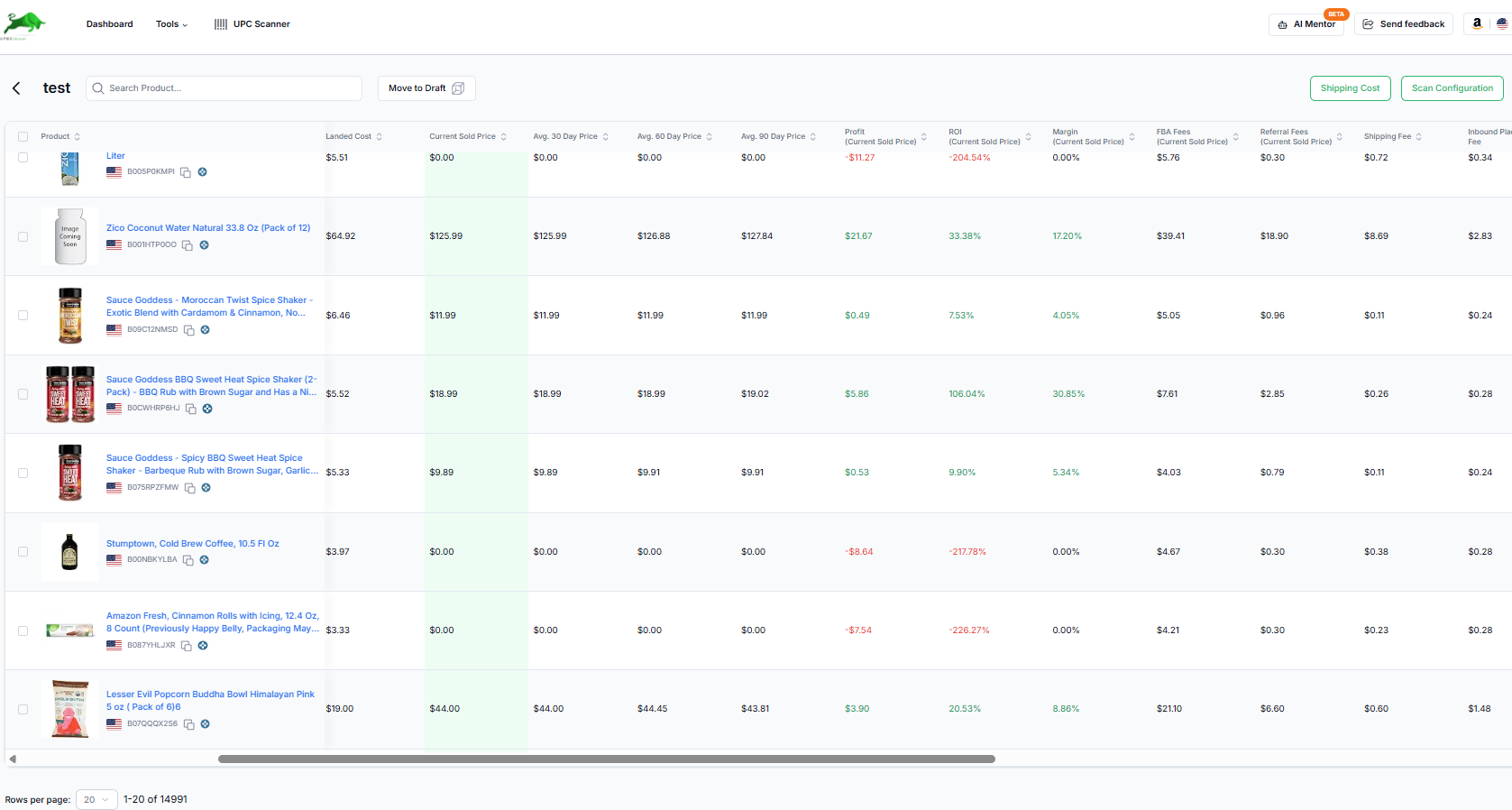
Doing this one product at a time is fine for a test buy. A distributor's price list can have thousands of lines, though. Apex Green matches each line to Amazon and works out the Amazon fees and profit for every match, so you only look closely at the products that clear your numbers.
Questions about Amazon FBA fees
How much does Amazon FBA cost per sale?
On every FBA sale you pay two fees: the referral fee, a percentage of the price that depends on the category, and the FBA fulfillment fee, a set amount per unit that depends on the size tier, weight and price. On top of those come monthly storage, the inbound placement fee if you choose a minimal split, and your selling plan. The example at the top of this page shows the two main fees on one real product.
What percentage does Amazon take from FBA sales?
It depends on the price, the category and the size. On the $190 multitool above, the referral and fulfillment fees came to about 18% of the price. On a cheaper product the share is higher, because the fulfillment fee is a flat amount per unit. Across a whole business, counting storage and advertising, Marketplace Pulse estimated in 2023 from a sample of sellers that Amazon keeps more than half of their revenue. Work it out for your own product with the calculator on this page.
Is Amazon FBA free to use?
No. FBA doesn't add a subscription of its own, and you can use it with either selling plan, but you pay a fulfillment fee on every unit Amazon ships, plus monthly storage and, depending on how you split shipments, the inbound placement fee.
Is there a monthly fee to sell on Amazon?
Only on the Professional plan, which is a monthly subscription. The Individual plan has no monthly fee and charges per item sold instead. Both plans pay the referral fee on every sale, and FBA fees if you use FBA. The selling plan section shows both fees from Amazon's pricing page.
Should a new wholesale seller pick the Individual or Professional plan?
Amazon says the Individual plan suits sellers under 40 items a month, and the plan fees break even at about the same point. Wholesale orders come in cases, so most wholesale sellers pass that line quickly. Amazon also lists selling with apps and APIs as a Professional plan feature, and that's how outside tools like repricers and inventory software connect. You can switch plans at any time.
How can I check Amazon's fees for one product before I buy it?
Search the product in Amazon's public Revenue Calculator, which estimates its fees. Or paste the ASIN into our FBA calculator, which shows Amazon's fees and your profit at your cost (3 free lookups, then sign in with a plan). To test prices and target returns, use the calculator on this page, which has no lookup limit.
How can I lower my FBA fees as a wholesale seller?
Choose products whose size tier and weight suit their price while you're sourcing. Watch the price lines in categories where the price changes the referral rate. Send Amazon-optimized splits when you can, which wholesale case packs make easier. And buy the right quantities, so stock neither sits long enough to age nor runs low enough to trigger the low-inventory-level fee.
Every guide in this part
- FBA calculatorPaste an ASIN for its Buy Box price, Amazon's fees and your profit at your cost.Read
- Amazon profit and ROI calculatorType a price, your cost and the fees to see profit, margin, ROI and the break-even price.Read
- Amazon referral fees by category, with a fee lookupEvery Amazon referral fee by category, with price tiers, per-item minimums and the media closing fee, plus a lookup that does the math at any price.Read
- Amazon wholesale profit margin and ROI: what's good, with the mathHow to work out profit, ROI and margin for Amazon wholesale, the rules of thumb sellers use and why, and the most you can pay for a target ROI.Read
- Amazon's inbound placement fee: how it works, with a calculatorMinimal split or Amazon-optimized splits: what the inbound placement fee costs, which items pay it, and an estimate for your shipment by region.Read
New sellers under $5,000 a month in Amazon sales. Unlimited supplier price lists a month, up to 50,000 lines, 500 products, purchase orders and profit and loss.
Beginner, $49.99 a monthUp to $5K/mo in revenue
Start my 7-day trial on Beginner7 days free, then $49.99 a month, plus tax where applicable. Card required, nothing charged until day 8. Cancel any time before then.
Profit, ROI and break-even calculator: unlimited, no sign-in.
Sources
- Selling plans and pricing, Amazon
- Individual vs Professional selling plan, Amazon
- Fulfillment by Amazon: how much does FBA cost?, Amazon
- A guide to Amazon FBA fees, Amazon
- Update to US referral and FBA fees for 2026, Amazon
- Revenue Calculator, Amazon Seller Central
- Selling on Amazon fee schedule, Amazon Seller Central
- FBA fulfillment fees, Amazon Seller Central
- FBA monthly storage fees, Amazon Seller Central
- Aged inventory surcharge, Amazon Seller Central
- Inbound placement service fee, Amazon Seller Central
- Returns processing fee, Amazon Seller Central
- Removal and disposal fees, Amazon Seller Central
- Amazon Supply Chain Services, Amazon
- Low-inventory-level fee further explained (Bryce_Amazon), Amazon Seller Forums
- Amazon staff reply on Amazon-optimized shipment splits, Amazon Seller Forums
Reported by others
- Amazon Takes a 50% Cut of Sellers' Revenue, Marketplace Pulse
- Amazon to add fuel and logistics surcharges, Digital Commerce 360
- Protecting your Amazon profit from the negative impact of returns, Sellerboard
Some of Amazon's pages need a Seller Central sign-in to read, and we have not yet checked their current wording for this version of the page. If Amazon's page and this guide disagree, Amazon's page is the one that counts.