How to start Amazon wholesale: a step-by-step guide
To start Amazon wholesale, set up a registered business with an EIN and a resale certificate, open a Professional Amazon seller account, and learn what Amazon's fees take from each sale. Then check which products need approval, open accounts with brands or authorized distributors, test a small first order, and ship it to Amazon, usually through a prep center.
- Do the steps in order. Distributors check your business before they open an account, and Amazon checks that your supplier invoices match your seller account when you apply to sell restricted products.
- Amazon doesn't require an LLC to sell, but its own wholesale guide says you'll typically need a registered business like an LLC to buy from a wholesaler.
- Amazon recommends the Professional selling plan for wholesale. The plan fee comes on top of the referral fee and, with FBA, the fulfillment fee on every sale.
- Check whether you're approved to sell a product before you buy it, and buy from the brand or its distributors, never from auctions or liquidation.
- There's nothing to buy at the setup stage. When you do buy, start with test orders small enough that a slow product can't sink you.
Amazon wholesale means buying name brand products from the brand or its authorized distributors and reselling them on Amazon, usually with Amazon storing and shipping your orders through Fulfillment by Amazon (FBA). If you're still deciding whether it's the right model, how Amazon FBA wholesale works and reselling on Amazon cover that first.
This guide takes you from nothing to your first products selling. Setting up the business and opening your seller account are covered in full, because that's where beginners lose the most time. Each later step gets a short summary and a link to the guide that covers it properly, and the Amazon wholesale roadmap shows the whole journey as ten stages.
Here are the eight steps at a glance:
- Set up the business: a business structure, an EIN, a resale certificate, a bank account and an email on your own domain.
- Open your seller account on the Professional plan and pass Amazon's identity verification.
- Learn the fees Amazon takes from every sale, before you look at a single product.
- Check approvals for the categories and brands you want, and apply where you need to.
- Find suppliers and open accounts with brands and authorized distributors.
- Analyze a price list and place a first order that tests a handful of products.
- Prep and ship your units to Amazon, usually through a prep center.
- Sell, protect your account and restock the products that work.
Before you start: what wholesale needs
Wholesale asks for three things before it gives anything back: money you can tie up in stock, time for paperwork and supplier applications, and approvals that only Amazon can give.
Money
Wholesale is a buy-first business. You pay your supplier before Amazon pays you, so what matters isn't only your first order but everything you pay before the first sale comes back:
- Setting up the business, including state filing fees if you form an entity. These vary by state.
- Amazon's selling plan, a monthly subscription on the Professional plan. The fees guide has Amazon's current figure.
- Your first inventory order, often with a supplier minimum to meet.
- Prep, labels and shipping into Amazon, including Amazon's inbound placement fee on some shipments.
- Amazon's fees on each sale, taken before your payout.
- Money held back to reorder the products that sell.
How much that adds up to depends on your suppliers' minimums and the products you pick. What it costs to start Amazon wholesale works through budgets line by line.
Time
Amazon says verifying a new seller account typically takes about three business days when your documents meet its requirements, and longer when it needs clarification. Opening wholesale accounts is usually the slow part: suppliers answer on their own schedule, and expect a few of them to say no before the first yes. None of it needs full days, just steady follow-through.
Approvals
Some categories, brands and products need Amazon's approval before you can sell them, and Amazon decides each application. That shapes which suppliers are worth opening, which is why step 4 comes before you buy anything.
The mistakes this order prevents
Many of the costliest beginner mistakes are steps done out of order:
- Buying inventory before the seller account is verified, then paying to store boxes you can't list.
- Buying from a store or a warehouse club and expecting the receipt to work for approvals. Amazon asks for invoices from a manufacturer or distributor.
- Using one name on supplier invoices and another on Seller Central.
- Ordering deep on a product that hasn't sold for you yet, or working out profit without prep, shipping and Amazon's fees.
- Choosing a prep center after the supplier has already shipped.
- Chasing new products instead of restocking the ones that already sell.
Stef, who teaches Apex University, sums up the job in The Checklist lesson:
"This work is a work of consistency and also repetition. We will do the same type of product research for every single SKU that comes in our hands. So the more familiar we get with how we analyze and place orders, the much easier it's going to get."
From Stef's lesson (The Checklist, at 7:16)
Still unsure it's for you? Is Amazon FBA worth it answers that, and the challenges of Amazon wholesale covers what makes it hard.
Step 1. Set up the business
Distributors sell to businesses. Before a sales rep opens an account, they check that you're a real one. Amazon checks the same business name and address later, on your supplier invoices, when you apply to sell restricted products. So the business comes first, under one name and one address, in this order.
If you'd rather watch it first, this is Stef's lesson on the setup. One note before you press play: he calls Amazon's Individual plan the starter plan and rounds the plan fees, so check Amazon's current figures in the fees guide.
- Decide on the business structure
You can sell on Amazon as an individual. Amazon's registration guide says you don't need to be an LLC or registered business to sell in its store. Buying wholesale is a different question. Amazon's own guide to finding wholesalers says you'll typically need a registered business like an LLC to buy products from a wholesaler, and you might also need a reseller license or permits.
Some distributors will open an account for a sole proprietor with a registered trade name, and others won't. Do you need an LLC? covers both answers, and the SBA explains how the business structures differ on liability and tax.
- Get an EIN in the business's name
Your Employer Identification Number (EIN) is the federal tax ID that supplier applications ask for. The IRS issues it online, and its EIN page says you never have to pay a fee for one, so skip any site that charges. If you're forming an LLC, the IRS says to form it with your state first, or the EIN application may be delayed.
- Register for sales tax and make a resale certificate
A resale certificate is the form that lets a distributor sell to you without charging sales tax, because you're buying to resell. Stef calls it a mandatory step for most suppliers, so have it ready before you apply. You get one by registering with your state's tax department, then filling in your state's certificate, or a multistate one, for each supplier. The resale certificate guide walks through it state by state.
- Open a business bank account
Stef's next step after the EIN, in The Checklist at 1:21, is a business checking account, to keep business money apart from personal money from the first dollar. Amazon pays your sales into an account that must be in your name or your business's name, so one business account can receive payouts and pay your suppliers.
- Get an email on your own domain and a simple website
Distributors screen applications. In Stef's experience, they receive hundreds a month and filter out anyone writing from a Gmail or Yahoo address. You need an email at your own domain, like
you@yourbusiness.com, and a one-page site that says who you are, what you sell and how to reach you. - Pick an address that can receive freight
Wholesale orders arrive in cartons and on pallets, and some distributors won't ship an opening order to a house. The usual answer is your prep center's receiving address, so it's worth choosing one now rather than after the inventory ships (step 7). If it's in another state, tell your distributors, because it can change which resale certificate they need.
Keep one name and one address everywhere
This rule saves the most trouble later. Use exactly the same business name and address on your state registration, EIN, resale certificates, bank account, supplier applications and Seller Central, because of what Amazon checks when you apply to sell a restricted product.
An invoice made out to a different name than your seller account is a problem you can't fix after the fact. The supplier would have to reissue it, and some won't.
The last two items on the list, the domain email and a business address, are what Stef's next lesson is about:
Step 2. Open your seller account
Seller Central is where you list products, send shipments and get paid. Opening it is mostly paperwork, and the paperwork goes faster when step 1 is done.
Choose the Professional plan
For wholesale, Amazon's own article on how to sell wholesale says you'll want the Professional plan. Its seller FAQ suggests the Individual plan if you plan to sell fewer than 40 items a month, and notes that some categories require a Professional plan. Wholesale is bought by the case, so a single product can carry you past 40 items a month. Amazon's pricing page also lists bulk listing tools and selling with apps and APIs as Professional plan features. Stef's reason in The Checklist lesson is a practical one: he says the Individual plan won't let you connect the third-party software wholesale sellers rely on, like a repricer or inventory tools. The plan fee itself is in the fees guide.
If your first order is months away, you don't have to pay for months of nothing. Amazon says you can switch between the Individual and Professional plans as many times as you need, with no fee for switching, and your listings stay as they are. Switching to Professional starts the subscription right away.
What Amazon asks for when you register
Amazon's registration guide lists what you'll need:
- A government-issued ID
- An email address
- A credit card that can be charged internationally
- A bank account and routing number, in your name or your business's name
- Your business license or registration, and its registration number, if you have a registered business
- Proof of your address dated within the last 180 days, such as a bank or credit card statement
- Your tax information
- A phone number
For the business name, Amazon asks for the exact name you used to register with the government office, and for the address, the one that appears on your business license. That's step 1's rule again: one name, one address.
Pass identity verification
After you submit, Amazon verifies your identity. Its registration guide says you'll upload your government-issued ID and the proof of address, then either take a photo of your face and your ID or join a video call with an Amazon associate. Amazon says this usually takes three business days or less. Its help page on seller identity verification sits inside Seller Central and needs a sign-in, so we couldn't check its current wording: follow the instructions in your own registration flow, and make sure every document carries the names from step 1.
Use the wait well. Amazon suggests spending the verification period learning its programs and tools, and it's a good time to learn the fees (step 3) and research suppliers (step 5). Just don't buy inventory until the account is verified.
Lock it down
Once you're in, make sure two-step verification is on, and send your Amazon payouts to the business bank account from step 1, so the same account pays your suppliers. Stef's reason, from The Checklist:
"This is a very serious business. Treat it like it's a bank account."
From Stef's lesson (The Checklist, at 2:42)
Before you move on, tick these off:
- Business structure decided, and the LLC formed if you chose one
- EIN issued in the business's name
- Registered for sales tax, with a resale certificate ready to send
- Business bank account open
- Email on your own domain, and a one-page website
- A shipping address that can receive freight, usually your prep center
- Seller Central open on the Professional plan, or on Individual until your first order is close
- Identity verification passed
- Two-step verification on, and payouts going to the business account
- The same business name and address on every item above
Step 3. Learn the fees
Learn what Amazon keeps before you look at a single price list. Wholesale margins are thin, and fees are why a product that looks cheap on a supplier's list can lose money on Amazon. Every sale pays a referral fee, a percentage of the price that depends on the category. FBA orders also pay a fulfillment fee set by size and weight, stored inventory pays monthly storage, and some shipments pay an inbound placement fee. Here's Amazon's referral fee for Grocery and Gourmet, a common wholesale category, as an example:
| Category | Referral fee | Minimum |
|---|---|---|
| Grocery and Gourmet | 8% at $15.00 or less; 15% above $15.00 | None listed |
- A product's fee category may not be the same as the category shoppers see in the Amazon store.
Source: Selling plans and pricing, Amazon
Amazon FBA fees explained covers every fee with Amazon's own figures, and referral fees by category and FBA size tiers and fulfillment fees go deeper on the two biggest. To try the math on a real product, the profit calculator is free to use (unlimited, no sign-in), and the FBA calculator looks up a product's fees for you: 3 free lookups, then sign in with a plan.
Step 4. Get approved
Some products need Amazon's approval before you can sell them: a whole category, a single brand or one product.
Amazon's help page on approvals sits inside Seller Central too, so we couldn't check its current wording. Its public seller FAQ says the same thing: some categories are open to every seller, and some require approval from Amazon.
Check before you buy, not after. In Seller Central, go to Catalog, then Add products, and search for the item. Amazon says a Sell this product button means you're already approved, and Apply to sell means you need approval first. Approval usually rests on paperwork from your supply chain, like a recent invoice from a manufacturer or distributor, or a letter from the brand, which is one more reason the supplier you pick in step 5 matters.
How to get ungated on Amazon covers checking, applying and what to do if you're denied. The gated categories list shows which categories need approval, the letter of authorization guide covers approval through the brand, and selling grocery on Amazon walks through one category end to end.
Step 5. Find suppliers and open accounts
Wholesale suppliers are the brands themselves and the distributors authorized to sell their products. Stef's lesson on finding suppliers starts with how goods move: a manufacturer sells to large redistributors, who sell on to smaller distributors and wholesalers, who sell to retailers. Brands that won't sell to a new account are still worth contacting, because they can tell you which distributors carry their products. When you're starting out, those distributors and wholesalers are usually the right place to buy:
"So when you are just starting out and you don't have a ton of upfront capital, it is very important to find yourself some wholesalers and distributors."
From Stef's lesson (Finding Suppliers, at 2:15)
Amazon wholesale suppliers covers where to find them and how to vet one. Opening the account means an application, your EIN and resale certificate, often an opening order minimum, and paying up front until you've built some history: how to open a wholesale account covers what distributors check, distributor email templates has the first message ready to copy, and negotiating with distributors covers better terms later.
The Distributor Vault is Apex's directory of US wholesale distributors. Every subscription, trial included, opens 3 US wholesale distributors from the Distributor Vault when it starts and 3 more each month. Yearly billing, on Starter and Pro, opens the whole Vault at once.
Step 6. Analyze a price list and place a first order
Once a distributor approves you, it sends a price list, often hundreds or thousands of lines of UPCs and unit costs, and your job is to find the few worth buying. For each product, match the UPC to the right Amazon listing, work out the cost per sellable unit including shipping and prep, subtract Amazon's fees, and check profit and ROI at a price you can realistically sell at. Then check how well it sells, who else sells it (including Amazon itself) and whether you're approved. How to analyze a wholesale price list walks through all ten checks.
Your first order is a test, not a bet. Stef's rule of thumb in the Purchasing lesson is a test buy of roughly 24 to 48 units of each product:
"I always recommend, especially when doing test buys, to buy roughly twenty-four to forty-eight units of a product. That is because you wanna give Amazon enough data on your account for actually testing out the items."
From Stef's lesson (Purchasing, at 14:05)
Your first wholesale order covers how to size each line, the money you need beyond the order, and why that first invoice matters for approvals.
Checking by hand works for a short list. For longer ones, the Chrome extension shows Amazon's price, fees and sales beside products on Amazon and on supplier websites. It's free to install, and its numbers open when you finish Apex University.
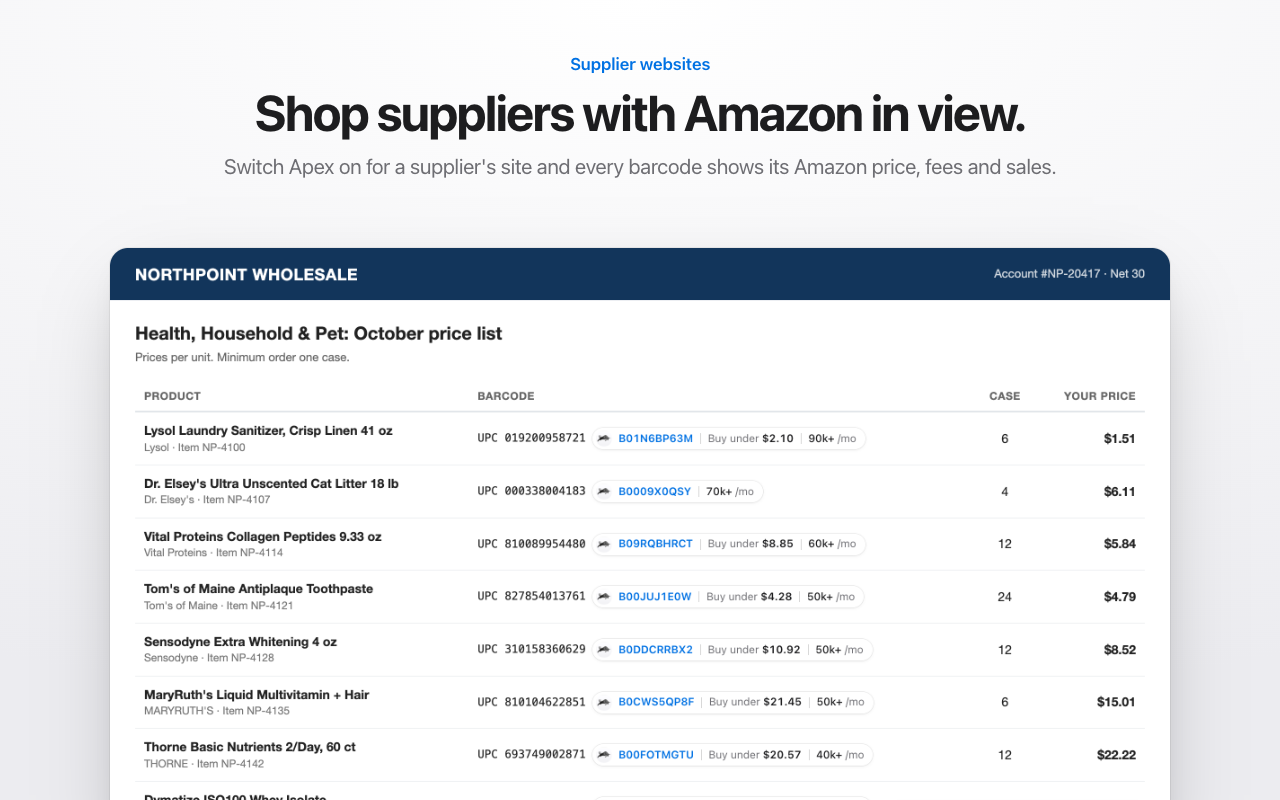
When you're scanning whole price lists every month, Apex Green matches a list to Amazon by UPC and filters it by profit, ROI, rank and competition. The Beginner plan, at $49.99 a month, is built for that stage: new sellers under $5,000 a month in Amazon sales. You don't need it before then.
Step 7. Prep and ship
Every unit you send to FBA has to be prepped and labeled to Amazon's requirements before it arrives. Amazon ended its own prep and item labeling services for US FBA shipments on January 1, 2026, so that work is now yours or your prep center's. And for inventory shipped on or after March 31, 2026, when Amazon ended commingling, sellers who don't hold the Brand Representative role in Brand Registry have to put an Amazon barcode on each unit, even when it already carries a manufacturer barcode.
A prep center receives your supplier's cartons, labels each unit with its FNSKU, packs it to Amazon's rules and sends it in. You can prep small orders at home, but then your home is the receiving address. Amazon FBA prep centers covers how to choose one, FNSKU labels explained covers the labels, and the inbound placement fee explains what Amazon charges for how you split a shipment.
Step 8. Sell, protect and restock
Once your units are checked in, your offer goes live on a listing you share with other sellers. Amazon chooses which offer shoppers see first, the Featured Offer, and it says your price, your delivery speed, whether you're in stock and how well you look after buyers all play a part. Reselling on Amazon explains how a shared listing works.
Protect the account from the first sale. Keep every supplier invoice, because it's your proof of where your products came from if a brand complains or Amazon asks. Amazon account health covers the numbers Amazon watches and the records to keep, and Amazon rule changes for resellers tracks what has changed. For reviews, automating review requests explains Amazon's own Request a Review button and what's allowed.
Then restock. A product that sells out stops earning until it's back. From Stef's Restocking lesson:
"We're gonna learn the right balance on how many units we need to have to not miss out on daily sales and how not to buy excess inventory that's going to result in storage fees crawling into your profits."
From Stef's lesson (Restocking, at 6:58)
Reorder before you run out, add suppliers one at a time, and let the products that already work carry the business while you test new ones.
Where Apex fits along the way
You don't need software for steps 1 to 4. When you get there, this is where each part of Apex fits:
- Learning the steps: Apex University, part of Apex Black, comes with a free Apex account: nine lessons, no card.
- Finding suppliers: the Distributor Vault of US wholesale distributors.
- Price lists: Apex Green scans a supplier's price list against Amazon by UPC.
- Purchase orders and profit: Apex Blue keeps suppliers, purchase orders, landed cost, profit and loss and restock planning in one place.
- Pricing: Apex Gold is the repricer, in beta. The repricer is part of the Pro plan. Prices change when you run your strategies from Apex. Repricing automatically the moment a competitor changes price is built but not switched on yet.
- Prep and shipments: Apex Red is in beta and opened by invitation.
Questions about starting Amazon wholesale
How long does it take to start Amazon wholesale?
It depends mostly on suppliers and approvals, not on Amazon's setup. Amazon says verifying a new seller account typically takes about three business days when your documents are in order, and forming a business and registering for sales tax depend on your state. Opening wholesale accounts is usually the slowest part, because suppliers answer in their own time and many say no at first. Plan in weeks, not days.
Can I start Amazon wholesale part time?
Yes. The setup is paperwork you can do in the evenings, and once your units are at Amazon, FBA handles picking, packing, shipping, customer service and returns. What part time costs you is speed, because a slow reply to a distributor can hold up the next step. Set aside regular time each week for applications, follow-ups and price lists.
Should I contact suppliers before my Amazon seller account is ready?
Set up the business first, because that's what distributors check. You can research suppliers while Amazon verifies your seller account. Don't buy inventory until the account is verified and you've checked that you're approved to sell those products.
Do I need Amazon selling experience to start wholesale?
No. Wholesale is a reasonable first model, because you're selling products that already sell, and you can see their sales history before you buy. What you need is the setup in this guide and the habit of running the numbers on every product. Small test orders keep your early mistakes small while you learn.
Every guide in this part
Apex University comes with a free Apex account: nine lessons, no card.
Start Apex UniversityNothing to buy yet. When you start scanning supplier lists, the Beginner plan is built for new sellers.
Sources
- Selling plans and pricing, Amazon
- Individual vs Professional selling plan, Amazon
- Sell on Amazon: frequently asked questions, Amazon
- How to register as an Amazon seller, Amazon
- Prepare to sell during verification, Amazon
- Seller identity verification, Amazon Seller Central
- Categories and products requiring approval, Amazon Seller Central
- How to sell groceries in the Amazon store (checking whether a product needs approval), Amazon
- How to find wholesalers, Amazon
- How to sell wholesale on Amazon, Amazon
- The Featured Offer (formerly the Buy Box), Amazon
- SP-API changelog: US FBA prep and labeling services end, Amazon Selling Partner API
- Commingling practices will end effective March 31, 2026 (US notice), Amazon Seller Forums (News_Amazon)
- Get an employer identification number, IRS
- Choose a business structure, U.S. Small Business Administration
Some of Amazon's pages need a Seller Central sign-in to read, and we have not yet checked their current wording for this version of the page. If Amazon's page and this guide disagree, Amazon's page is the one that counts.