Landed cost for Amazon wholesale: the per-unit math that decides your profit
Landed cost is what one sellable unit costs you by the time it is in an Amazon warehouse and ready to sell: the supplier's price for every unit in the listing, plus its share of freight, prep and labels, shipping to Amazon and the inbound placement fee. Amazon's referral and FBA fees come later, out of each sale.
- Start from the cost per sellable unit: the supplier's unit price times the number of units in the Amazon listing. A two-pack listing costs you two units.
- Spread order-level costs, like freight from the supplier, across the units you can actually sell, not the units you ordered.
- Amazon no longer preps or labels US FBA shipments, so prep and labels belong in every unit's cost.
- Shipping to Amazon and the inbound placement fee are per-unit costs too, even though the placement fee is charged after the shipment arrives.
- Landed cost is a buying number. Amazon's fees come out of each sale, and your profit and loss statement counts what units cost when they sell.
When you go through a supplier's price list before your first order (stage 6 of the Amazon wholesale roadmap), almost every check leans on one number: what a unit really costs you. The supplier's price is the number on the invoice. Landed cost is the number that decides whether the product makes money.
Get it wrong and the mistake carries into everything after it: your profit, your return, the most you can pay, and how much you order. Below we go through each part of landed cost, then a real product from Stef's lesson, then a calculator for your own numbers.
What goes into landed cost
Landed cost adds up everything you pay to get one sellable unit from your supplier into an Amazon fulfillment center. Here's the whole formula in one line:
Landed cost per unit = supplier cost per sellable unit + its share of freight from the supplier + prep and labels + its share of shipping to Amazon + the inbound placement fee + any other per-unit costs
Stef, who teaches Apex University, puts it this way while he walks through a product's numbers in Apex:
"Then we have prep type and prep cost, shipping cost, placement fees, and we get the landed cost price. That means it is the exact dollar amount that it takes to bring an item inside Amazon's doorsteps."
From Stef's lesson (Walkthrough, at 12:14)
Each part is charged in its own way, which is why the math trips people up. Some costs come per unit, some per order and some per shipment, and all of them have to end up per unit.
| Cost | How it's charged | Where the number comes from |
|---|---|---|
| Supplier cost per sellable unit | Per unit | The price list, times the units in the Amazon listing |
| Freight from the supplier | Per order | The supplier's quote or invoice |
| Prep and labels | Per unit, plus some charges per box or pallet | Your prep center's rate sheet, or your own supplies and time |
| Shipping to Amazon | Per shipment | Send to Amazon's estimate, or your carrier |
| Inbound placement fee | Per unit | Send to Amazon's quote, or our estimate from Amazon's table |
| Other costs | Varies | A card surcharge from the supplier, sales tax a supplier charged you, import duties if you import |
On sales tax: a supplier usually charges it when it has no resale certificate on file for you. Whatever you paid is part of what the unit cost you. And if you import, duties and customs fees go in too. This guide sticks to buying from US distributors and brands, where they usually don't apply.
What landed cost leaves out
Some costs belong to the sale, not to getting the unit into Amazon, so they stay out of landed cost:
- The referral fee and the FBA fulfillment fee. Amazon takes them out of each sale, and the referral fee moves with your selling price. Our Amazon FBA fees guide covers both.
- Monthly storage and aged inventory charges. They depend on how long the unit sits in Amazon's warehouse. See Amazon FBA storage fees.
- Returns, ads, software and your own time. These are costs of running the business. They belong in your profit and loss statement, not in each unit's cost.
Keeping these apart is what makes the math work. Landed cost answers "what did this unit cost me to get there?" Profit is what Amazon pays you after its fees, minus that.
Case packs and cost per sellable unit
Every landed cost starts with three numbers from the price list and the Amazon listing:
- Unit cost: what the supplier charges for one unit.
- Case pack: how many units come in one case, which is usually the smallest amount you can buy.
- Bundle quantity: how many units are in the Amazon listing you'll sell on. A single is 1, a two-pack is 2.
From those:
- Cost per sellable unit = unit cost × bundle quantity.
- Sellable units per case = case pack ÷ bundle quantity.
So a case of 24 singles sold as a two-pack listing gives you 12 sellable units, not 24, and each one costs twice the unit price. Our price list guide covers matching each line to the right listing in the first place.
Where the per-unit number goes wrong
- The price is per case, not per unit. Some price lists show only a case price. Divide it by the case pack before you do anything else.
- The case doesn't divide evenly. Say a case of 24 costs $72.00 and the listing is a five-pack. That's four sellable five-packs and four units left over. If those four don't sell somewhere else, the whole $72.00 sits on four units: $18.00 each, not $15.00. (Made-up numbers, to show the math.)
- Units arrive damaged or short. Your cost is spread over the units you can sell. Order 48 units at $5.00 ($240.00), lose two to damage with no credit from the supplier, and each of the 46 left costs about $5.22. Check every delivery against the order, as our purchase order workflow describes, so you can ask for that credit.
- The price tier doesn't match your order. If the supplier charges less at higher quantities, use the price for the quantity you'll really buy, not the best tier on the sheet.
- The price list is old. Use the price on your purchase order. Suppliers change prices, and a landed cost built on last quarter's list is last quarter's landed cost.
Freight to your prep center
Freight from the supplier is the easiest cost to forget, because it doesn't appear on the price list. Ask how a supplier charges for it before you order. You'll usually hear one of these:
- freight included once the order passes a set size,
- a flat shipping charge per order,
- the carrier's actual charge added to your invoice, which for pallets usually means a freight carrier,
- or you arrange the pickup yourself.
If you use a prep center, ask the supplier to ship straight there. That saves you a leg of freight. Our guide to negotiating with distributors covers asking for a lower threshold for included freight.
Spreading freight across an order
The simple way is to divide the freight by the number of sellable units. That's fine when every product on the order weighs about the same. When it doesn't, spread it by weight, or the light products end up paying to move the heavy ones.
One example, with made-up numbers: a $150 freight charge for 100 units of a one-pound product and 100 units of a five-pound product.
| Split by units | Split by weight | |
|---|---|---|
| One-pound product | $0.75 a unit | $0.25 a unit |
| Five-pound product | $0.75 a unit | $1.25 a unit |
| Total | $150 | $150 |
Split by units, the heavy product looks 50 cents a unit cheaper to land than it is. Carriers also charge for space, so a light but bulky product can cost more to move than its weight suggests. If one product fills most of the pallet, give it more of the freight.
Small orders feel freight the most. A shipping charge that hardly shows on a pallet order can take a real bite out of each unit on a two-case test buy, as the worked example below shows. Put the freight into the math before you decide a small first order works.
Prep and labels
Every unit you send to FBA needs to be prepped and labeled to Amazon's rules, and in the US Amazon no longer does that work for you.
So you, your prep center or your supplier preps and labels each unit before it ships, and that work has a cost even when you do it yourself.
What goes into this line:
- The label. An Amazon barcode label, the FNSKU, on each unit. Our FNSKU labels guide covers why a reseller needs one on every unit, who applies it and what it adds.
- Prep: a poly bag, bubble wrap or a sold-as-set sticker, depending on the product.
- Bundling, if you make a multipack from single units. This usually costs more than a label alone, so check it on every multipack line.
- The prep center's other charges, such as receiving per pallet and storage. They don't show in a per-unit rate, but they're part of what each unit costs.
Use those ranges for a sense of scale only. For your landed cost, take a month of your prep center's invoices and divide the total by the units they covered. That gives you an all-in rate with receiving and storage inside it, which is the number that matters. Our prep center guide shows how two quotes with different headline rates can come out the other way round on the invoice.
Prepping yourself costs money too:
At minimum, put the materials in. Whether you count your time is up to you, but leaving it out flatters the product.
Runs in your browser, no sign-in, as often as you like.
Inbound shipping and the placement fee
Two more costs land on each unit between the prep center and Amazon's shelves: what you pay to ship the boxes in, and Amazon's inbound placement fee.
Shipping to Amazon
You create the shipment in Send to Amazon, where boxes travel by small parcel delivery or on pallets by less than truckload freight. Amazon's own guide to Send to Amazon says "You'll see estimated shipping costs after making selections," and that you can choose "an Amazon partnered carrier, which offers discounted shipping rates" (Amazon). Your prep center may use its own carrier instead, so ask whose rates you'll pay and whether they add a handling charge.
Divide the shipment's cost across its units the same way as supplier freight: evenly when the products are alike, by weight when they aren't.
Before you have real quotes, a per-pound budget does the job. In his Purchasing lesson (3:49 to 4:14), Stef budgets inbound shipping at a rate per pound that he sets above what he usually pays, on purpose, so a product that clears his numbers on paper still clears them when the bill comes. That's his experience on his own shipments, not a rate anyone is promised, so switch to your own figure once you have a few shipments behind you.
The inbound placement fee
The fee per unit depends on the product's size tier and shipping weight, the split you choose and the region your boxes are sent to. Send to Amazon shows the fee for each split option before you confirm. Amazon's help page for the fee needs a Seller Central sign-in, so we couldn't check its current wording for this guide.
Two things make it easy to leave out of landed cost:
- It's charged after the shipment arrives, not on the day you ship. When Amazon announced the fee, it said the fee would be charged 45 days after the products are received. We couldn't confirm that timing on the current help page, but either way the charge comes after you've stopped thinking about that order.
- It's not part of shipping. You pay it on top of whatever the carrier charges, partnered carrier included.
So count it when you buy. If you're weighing a minimal split against Amazon-optimized splits, compare the fee you'd avoid with the extra shipping to several warehouses. Our inbound placement fee guide has Amazon's table, the exemptions and a step-by-step way to compare the two.
Worked example: one real product from Stef's lesson
In the Purchasing lesson of Apex University, Stef builds a purchase order for a personal care supplier. At 4:15 (watch from there) he stops on one product and reads its numbers line by line. The lesson was recorded on an older version of Apex and under the fee table Amazon used at the time, so treat the placement figure as that day's estimate.
The product is a two-pack listing. The supplier charges $6.59 a unit and ships 24 units in a case.
| Line | Per sellable unit | Where it comes from |
|---|---|---|
| Supplier cost | $13.18 | $6.59 × 2, because the listing is a two-pack |
| Prep and labeling | $0.60 | The prep cost Stef set for the product |
| Shipping to Amazon | $1.48 | His per-pound budget applied to the product |
| Inbound placement fee | $0.34 | Apex's estimate when the lesson was recorded |
| Landed cost | $15.60 |
What this one line shows:
- The pack size matters most. Reading $6.59 off the price list as the cost would understate this product by $9.01 a unit, more than half of what it really costs.
- The extras add up. Prep, shipping and placement come to $2.42 a unit, about 18% on top of what Stef pays the supplier. On a cheaper product the same extras would be a bigger share.
- A case makes 12 sellable units, not 24. One case costs $158.16 from the supplier. Two cases give 24 sellable two-packs with a landed cost of $374.40.
The lesson has no separate line for freight from the supplier. If this supplier charged, say, $30 to ship two cases to the prep center, that's $1.25 more on each of the 24 two-packs, and the landed cost becomes $16.85. One extra line, and the unit costs about 8% more.
Prep can move too. The $0.60 is the prep cost Stef set for this product. If the two units arrived loose and your prep center had to bundle them into a two-pack, expect that line to be higher.
Work out your own landed cost
Fill in your own product below. It runs in your browser and works out the placement fee from the same Amazon table as our placement fee calculator.
- What you pay the supplier: per sellable unit. For a multipack listing, multiply the unit price by the pack size first.
- Units in the order: sellable units, the ones that each get their own Amazon label.
- Freight for the order: what the supplier or carrier charges to get the whole order to you or your prep center. The calculator shares it evenly across the units, so for a mixed order, work out this product's share first.
- Prep and labeling: your all-in rate per unit.
- Other costs: per unit. Put shipping to Amazon here, plus anything else you count, such as a card surcharge.
- Inbound placement fee: choose the size tier, the shipping weight, the split and the region for our estimate. If Send to Amazon has already quoted the fee, type it in the last box and it replaces the estimate.
To check it against the lesson, type 13.18 as the supplier cost, 24 units, 0.60 for prep, 1.48 in other costs and 0.34 as the quoted fee, and leave freight empty. You should see $15.60 a unit, and $374.40 when you switch to the whole order.
Landed cost calculator
Per unit, after any discount.
Shipping from the supplier to you or your prep center, for the whole order.
Per unit: what your prep center charges, labels, bags.
Per unit: shipping to Amazon, payment fees, anything else you count.
Inbound placement fee
Per unit, packaged.
Per unit. When you type it, it replaces the estimate.
Type what you pay the supplier per unit to start.
Runs in your browser. The placement estimate reads Amazon's published US inbound placement fee table. Nothing you type is sent anywhere.
From landed cost to profit
Once you have landed cost, the rest is short:
- Profit per unit is what Amazon pays you for the sale after its referral and FBA fees, minus your landed cost.
- ROI is that profit divided by what you put into the unit, which is your landed cost.
Our profit calculator does this from a selling price, and its "Most I can pay" mode works backward from the return you want to the highest price you can pay the supplier. Type your supplier cost per sellable unit as the unit product cost, and put the rest of your landed cost (freight, prep, shipping to Amazon and placement) in its "Other per-unit costs" box. It also counts the FBA fee as part of your cost when it works out ROI, so its ROI reads a little lower than profit divided by landed cost. Our guide to wholesale profit margins covers what return is worth aiming for.
Landed cost vs cost of goods on your P&L
The two sound alike and get used as if they were the same. They answer different questions.
| Landed cost | Cost of goods sold | |
|---|---|---|
| What it answers | What does one unit cost me to get into Amazon? | What did the units I sold this month cost me? |
| When you use it | Before you buy, to decide and to set the most you'll pay | After the sales, on your profit and loss statement |
| Counted | Per unit, per purchase order | When units sell, not when you buy them |
| Amazon's fees on the sale | Not included | Not included. They're a separate line |
Landed cost feeds cost of goods. What it feeds depends on how you book freight, prep and placement:
- Inside each unit's cost. Freight, prep and placement become part of what the unit cost, so your cost of goods includes them and they hit your profit in the month the unit sells. Your profit per product reads true.
- As expenses when you pay them. Simpler, but a month you buy heavily looks worse than it was, the months that follow look better, and your profit per product reads higher than it is.
Two habits keep the numbers clean whichever way you book:
- Count each cost once. Amazon charges the placement fee to your seller account, so it can turn up among Amazon's charges in your reports. If your profit and loss statement already takes Amazon's charges from your account, and you also put the placement fee into each unit's cost, you count it twice. Pick one place for each cost.
- Work it out per order. Freight, supplier prices and placement fees change, so each purchase order has its own landed cost. When two orders of the same product cost different amounts, your bookkeeping needs a rule for which cost each sale uses. Our Amazon FBA bookkeeping guide covers that, and the rest of a monthly profit and loss.
How Apex handles it
Apex Green works out a landed cost for every product it matches on a supplier price list, with the shipping you set, so the profit and ROI you filter on already include it. Its numbers use the cost in your file, so check case packs and bundles before you order.
Apex Blue carries those costs into each purchase order. In the example order below, each line shows the unit cost, the cost for the Amazon listing, the prep cost and the bundle quantity, and the order's summary keeps cost of goods apart from estimated shipping, placement fees and prep.
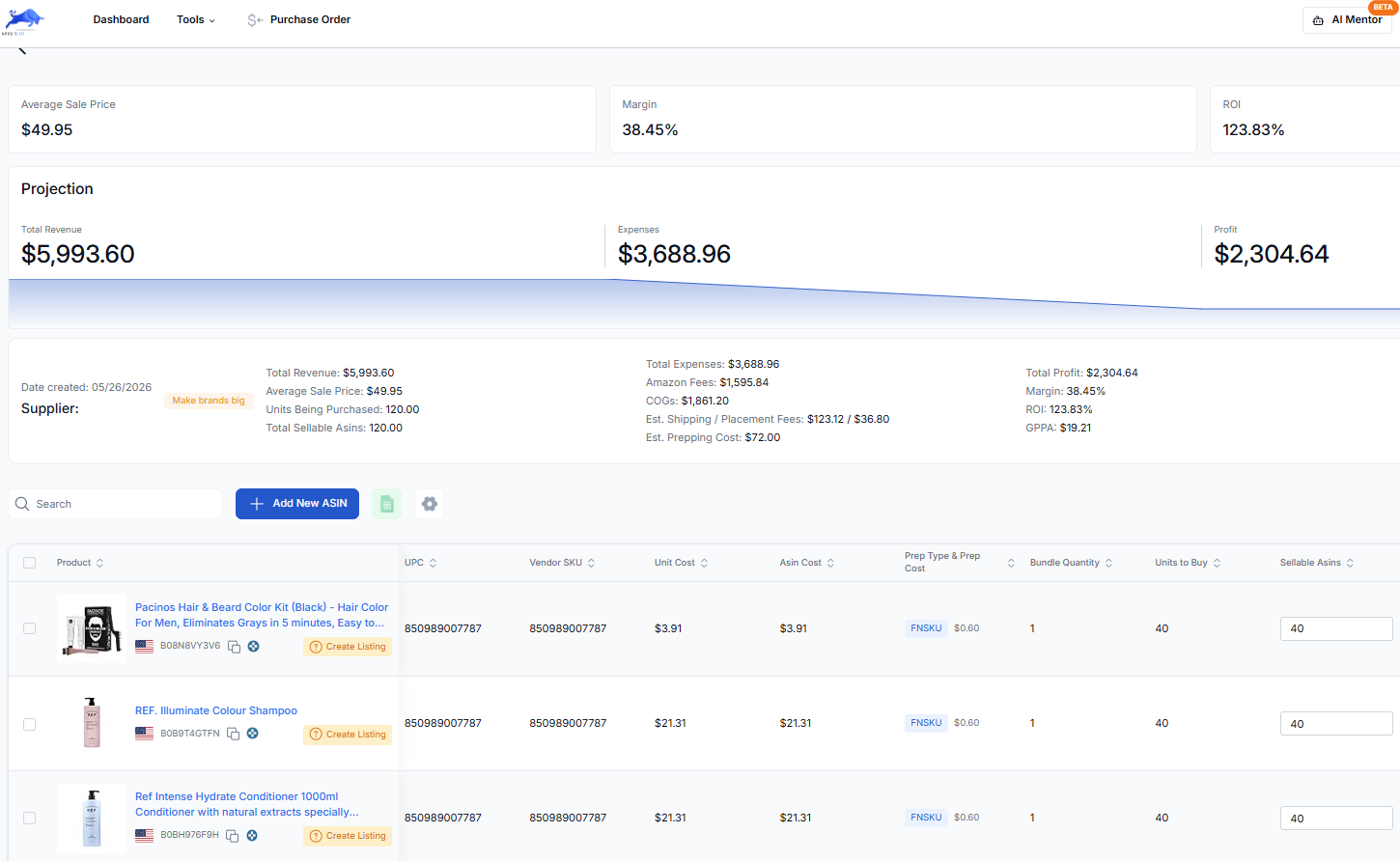
On that one order, shipping, placement and prep added about 12% on top of the cost of goods. When you submit a purchase order in Apex Blue, its unit costs become the cost of goods for those products in your profit and loss statement, and you add inbound shipping and prep so they count in profit too. A cost you type in yourself always wins over the one from the order. For what to put on a first order and how big to make it, see your first wholesale order.
Questions about landed cost
Does landed cost include Amazon's referral and FBA fees?
No. Landed cost stops when the unit is in Amazon's warehouse and ready to sell. The referral fee and the FBA fulfillment fee come out of each sale, so you subtract them from the selling price, then subtract landed cost from what's left to get your profit.
How do you work out landed cost for a multipack listing?
Multiply the supplier's unit price by the number of units in the listing, then add freight, prep and inbound costs per sellable multipack. A case of 24 sold as two-packs makes 12 sellable units. Remember the bundling charge if you or your prep center make the multipack from singles.
How should freight be split across different products on one order?
Evenly by unit works when the products weigh about the same. When they don't, split it by weight, so each product carries the freight it caused. A light but bulky product may deserve more than its weight suggests, because carriers charge for space too.
Should the inbound placement fee go into landed cost?
Yes, when your shipment pays one. It's a per-unit cost of getting the unit into Amazon, and it's set when you choose the shipment split. It's charged after the shipment arrives, so count it when you buy, and don't count it a second time if your reports already show it among Amazon's charges.
How often should you recalculate landed cost?
On every purchase order. Supplier prices, freight, prep rates and Amazon's placement fees all change, so the landed cost on a reorder can differ from the first order. Check it before each reorder, the same way you did before the first.
Profit, ROI and break-even calculator: unlimited, no sign-in.
New sellers under $5,000 a month in Amazon sales. 2 supplier price lists a month, up to 20,000 lines, 500 products, purchase orders and profit and loss.
7 days free, then $49.99 a month, plus tax where applicable. Card required, nothing charged until day 8. Cancel any time before then.
Sources
- Inbound placement service fee, Amazon Seller Central
- SP-API changelog: US FBA prep and labeling services end, Amazon Selling Partner API
- Send to Amazon simplifies shipments for Fulfillment by Amazon sellers, Amazon
- Update to US referral and Fulfillment by Amazon fees (announcing the inbound placement service fee), Amazon
- Fulfillment by Amazon, Amazon
Reported by others
- Amazon ended FBA prep services: what it costs to replace them in 2026, FreightFigures
- FBA prep center vs. prepping it yourself: the real cost math, FreightFigures
Some of Amazon's pages need a Seller Central sign-in to read, and we have not yet checked their current wording for this version of the page. If Amazon's page and this guide disagree, Amazon's page is the one that counts.
We build software for Amazon sellers who buy from wholesale suppliers, and we write these guides from what we see in that work.
How to test small across several products, size each line from sales and case packs, plan the cash beyond the order, and build your first purchase order.