FBA size tiers and fulfillment fees, explained with examples
An FBA fulfillment fee is the per-unit charge Amazon takes to pick, pack and ship each order. Three things set it: the product's size tier, which comes from its packaged dimensions and weight; its shipping weight, the greater of unit or dimensional weight for most tiers; and its price band: under $10, $10 to $50, or over $50.
- Amazon measures and weighs each product in its packaging, then puts it in the smallest tier whose limits it fits: Small standard, Large standard, Small Bulky, Large Bulky or Extra-large.
- Every tier except Small standard and the heaviest Extra-large items is charged on the greater of real weight and dimensional weight, so a long, light box can cost far more than its weight suggests.
- Price matters too. Under $10 gets Low-Price FBA rates automatically, exactly $10 or $50 pays the middle rate, and standard-size items over $50 pay more.
- Pick and pack, weight handling and Small and Light are old names. Today there is one fulfillment fee per unit, read from Amazon's table by tier, weight and price.
- When Amazon's measurements and yours differ, Amazon's win. Check the size tier it has on file, and ask for a remeasurement when it is wrong.
How Amazon picks your size tier
Every product you send to FBA gets a size tier. Amazon works it out from the product as it ships: the box, bag or bottle with everything inside, measured and weighed. Its Product size tiers page describes a tier as a measurement category built from three things: the unit weight, the dimensions and the dimensional weight of the packaged item.
The tier matters more than most new sellers expect. It sets the fulfillment fee on every unit you sell, and the same Amazon page lists it as an input to monthly storage, the aged inventory surcharge, removal and disposal orders, Multi-Channel Fulfillment and the inbound placement fee. Put a product in the wrong tier in your math, and every one of those numbers is off.
If you want the big picture first, our guide to Amazon FBA fees walks through every fee Amazon charges. This page is about the one that depends most on size: the fulfillment fee.
Here is how Amazon sorts a product, step by step.
- Measure the packaged unit
Measure the product in the packaging it ships in, at its widest points. If you sell a set or a multipack as one product, Amazon measures and weighs the whole set packaged together, not one item from it.
- Sort the three sides
The longest side is the length and the shortest side is the height. The one in between is the median side. For the bulky tiers you also need length plus girth: the longest side, plus twice the sum of the median and shortest sides.
- Weigh it
The unit weight is what one packaged unit weighs on a scale.
- Work out the dimensional weight
Dimensional weight is what a box of that size is treated as weighing. Multiply the three sides in inches and divide by the number in Amazon's rule below. A big, light box ends up with a dimensional weight well above its real weight.
- Find the smallest tier it fits
Start at Small standard and work up. A product belongs to the first tier where none of its measurements go over the limits, and every limit counts. A product that passes on weight but is too long on one side moves up a tier.
That last part surprises people. Two products can weigh the same on your kitchen scale and pay different fees, because one ships in a bigger box. The aquarium light in the examples below is a good case: it weighs under 3 pounds, but Amazon charges it as if it weighed more than 5.
Amazon's measurements are the ones that count
When your numbers and Amazon's disagree, Amazon bills on its own. Its dimensional weight page says so plainly, and adds that it may check a product's size and weight using samples and update its measurements over time. Fees are worked out from whatever Amazon has on file when the fee is charged.
Two habits follow from that. Measure a product yourself before you buy a case of it, instead of trusting the listing. And once it is in FBA, check what Amazon has on file. We show you where further down.
Size tier table
Amazon groups its tiers in two families. Small standard and Large standard are called standard size. Everything bigger is a bulky or Extra-large tier, and Amazon's pages still use "oversize" as the name for that whole group.
Here are the tiers from smallest to largest. The examples are the ones Amazon uses on its own fee pages, except for Large Bulky, where we use a product from our worked examples.
| Size tier | What fits, with an example | Weight Amazon charges on |
|---|---|---|
| Small standard | Flat, light items, like a mobile phone case | Unit weight only |
| Large standard | Items too thick, heavy or long for Small standard, like a T-shirt or an iron | The greater of unit and dimensional weight |
| Small Bulky | Bigger boxes, like a baby cot | The greater of unit and dimensional weight |
| Large Bulky | Long or large items still inside the bulky limits, like the 48-inch aquarium light in our examples | The greater of unit and dimensional weight |
| Extra-large, in four weight bands | Anything past the bulky size or weight limits, like a large monitor or a TV | The greater of the two, except the band over 150 pounds, which uses unit weight |
The exact limits for every tier (longest side, median side, shortest side, length plus girth and weight) are on Amazon's Product size tiers page.
Amazon publishes the current figures on its FBA fulfillment fees page, which needs a Seller Central sign-in. We have not copied them here yet, so check them there before you price a product.
Source: FBA fulfillment fees, Amazon Seller Central
A few things worth knowing about the tiers:
- The bulky tiers changed in 2026. Since January 15, 2026, Amazon's size tiers have split bulky items into Small Bulky and Large Bulky. A guide that lists only "Large Bulky" is out of date.
- Very long items pay extra. Extra-large items that go past Amazon's Overmax limits, on the longest side or on length plus girth, pay an Overmax handling fee on top of the fulfillment fee.
- Apparel and dangerous goods have their own fee tables. The size tiers are the same, but clothing and hazmat items are priced from separate tables on Amazon's fulfillment fee page.
Fulfillment fees by size tier and price band
Amazon's seller site sums up what the fulfillment fee pays for: picking, packing and shipping each order, plus customer service and returns. It also says the fee is set by the product's price, weight and dimensions (Amazon's FBA page). The weight and dimensions give you the size tier and the shipping weight. The price gives you the column.
To read Amazon's fee table for one product:
- Pick the table. Most products use the main table. Apparel and dangerous goods use their own.
- Pick the season. There is a regular table and a holiday peak table, which we cover just below.
- Find the row. Go to the product's size tier, then the band its shipping weight falls in. Standard sizes step up in small weight bands. Heavier Large standard items and every bulky tier pay a base amount plus a charge for each extra step of weight.
- Find the column. That is the price band.
Amazon publishes the current figures on its FBA fulfillment fees page, which needs a Seller Central sign-in. We have not copied them here yet, so check them there before you price a product.
Source: FBA fulfillment fees, Amazon Seller Central
Three things to watch when you read it:
- The price edges. At $9.99 a product pays the lower Low-Price FBA rate. At $10.00 it pays the middle rate. If you are pricing close to $10 or $50, work out the total fees on both sides. Referral fees have their own price thresholds in some categories, so check those in the referral fee guide at the same time.
- The weight edges. A product near the top of a weight band is one extra ounce of packaging away from the next row.
- Why standard-size items over $50 cost more. Amazon says products above $50 need more handling and faster processing, and that it is improving returns and removals for those products. In the bulky tiers, the $10 to $50 and over-$50 columns are the same.
Holiday peak fees
If you are working out profit on stock that will sell between mid-October and mid-January, use the peak table, not the regular one.
The fuel and logistics surcharge
The surcharge is not in our own fee tables, so when a calculator on this site asks for your fulfillment fee, type the figure Amazon actually charges, from its Revenue Calculator or your Fee Preview report.
Old fee names and what replaced them
Search for FBA fees and you will still find names Amazon stopped using years ago. Here is what each one means now.
| Name you may see | What it is now | Source |
|---|---|---|
| Pick and pack fee | Folded into one fulfillment fee per unit in 2017 | Reported by Feedvisor |
| Weight handling fee | Part of the same per-unit fulfillment fee since 2017, which is why the fee still depends on shipping weight | Reported by Feedvisor |
| Order handling fee | Part of the same per-unit fulfillment fee since 2017 | Reported by Feedvisor |
| FBA Small and Light | Closed on August 29, 2023. Products priced under $10 get Low-Price FBA rates instead, with nothing to enroll in | Amazon |
| Low-Price FBA | Not a program you join. It is the under-$10 rate in the fulfillment fee table | Amazon |
| Small, medium, large and special oversize | Replaced by Large Bulky and Extra-large in Amazon's 2024 fee changes. Small Bulky was added on January 15, 2026 | Reported by EcomCrew (2024 changes); Amazon (Small Bulky) |
| Oversize | Still Amazon's umbrella name for every tier above Large standard | Amazon |
| FBA shipping fee | Amazon doesn't list a separate fee by this name. Shipping to the buyer is part of the fulfillment fee. Getting stock into Amazon is your own freight, plus the inbound placement fee if you pick fewer locations | Amazon |
| FBA fee schedule | Amazon's Selling on Amazon fee schedule covers the selling plan, referral and closing fees. The FBA fulfillment tables are on a separate page, the fulfillment fee page linked above | Amazon |
If you were searching for Small and Light fees
Amazon's Small and Light page now carries only a short note: the program closed on August 29, 2023, and Low-Price FBA rates started the same day. Amazon's announcement at the time explained the trade. Small and Light had lower rates because it shipped more slowly than standard FBA. The new lower rates went to every item priced below $10, automatically, with the same FBA delivery speeds as everything else.
So a small, cheap product today is simply a Small standard or Large standard item that happens to sit in the under-$10 column. Amazon's Low-Price FBA page adds two details: these products follow the normal FBA packaging rules, and every other selling fee still applies.
Runs in your browser, no sign-in, as often as you like.
Three worked examples on real products
These three products come from a scan of PrimeWell Distribution's catalog, the same scan our referral fee guide uses. Each one lands in a different place for a different reason.
The measurements come from Amazon's catalog as held in Apex's product database, or from the listing's product details where we say so. The prices are what each product was selling for when the catalog was scanned, and they will have moved since. We work out the tier and the shipping weight and show you which cell of Amazon's table to read, instead of typing a fee that will change.
One warning before we start: listing details are not measurements. When we checked, one listing from the same catalog, a 5-gallon bottle of aquarium water conditioner, gave its size as 1 x 1 x 1 inches and its weight as 1 pound. Amazon bills on its own measurements, and nobody ships five gallons in a one-inch cube.
Example 1: a jar of fish food that is too thick for Small standard
Hikari Vibra Bites XL color-enhancing sticks, a 14.6-ounce jar, selling for $41.79. Amazon's catalog lists the package at 3.95 x 3.95 x 2 inches and 0.9 pounds.
- Sides: longest 3.95 inches, median 3.95 inches, shortest 2 inches.
- Unit weight: 0.9 pounds, which is about 14.4 ounces.
- Dimensional weight: 3.95 x 3.95 x 2 is about 31.2 cubic inches. Divided by 139, that is about 0.22 pounds.
- Tier: it is light enough for Small standard, and its length and width fit. But Small standard only takes thin items, no more than three quarters of an inch on the shortest side (Amazon's own example is a phone case), and this jar is 2 inches deep. So it is Large standard.
- Shipping weight: Large standard uses the greater of the two weights. The real weight, 0.9 pounds, easily beats the dimensional weight.
- Price band: $41.79 is in the $10 to $50 band.
The fee: the Large standard row for its shipping weight, in the $10 to $50 column. Or paste the ASIN into the FBA calculator.
What would change it: the weight. The catalog says 0.9 pounds, which is a little less than the 14.6 ounces of food the title promises, before you count the jar. One of those figures is off. Up to 3 pounds, Large standard moves to a new row every quarter pound, and this jar sits close to the one-pound line, so a couple of ounces could move it up a row. Once it is in FBA, the Fee Preview report shows the weight Amazon actually measured.
Example 2: a 5-pound bag of taffy, where real weight wins
Taffy Town Saltwater Taffy, Sassy Sour, an 80-ounce bag, selling for $39.49. The listing's product details give 16.93 x 9.84 x 3.15 inches and a package weight of 2.36 kilograms, about 5.2 pounds.
- Sides: longest 16.93 inches, median 9.84 inches, shortest 3.15 inches.
- Unit weight: about 5.2 pounds.
- Dimensional weight: 16.93 x 9.84 x 3.15 is about 524.8 cubic inches. Divided by 139, that is about 3.78 pounds.
- Tier: far too heavy and too thick for Small standard. Every side and the weight fit within Large standard, so it is Large standard.
- Shipping weight: about 5.2 pounds. Here the real weight wins, because candy is dense: the bag weighs more than its size suggests.
- Price band: $39.49 is in the $10 to $50 band.
The fee: the Large standard row for a 5.2-pound shipping weight, in the $10 to $50 column. Above 3 pounds, Large standard charges a base fee plus a small amount for each extra step of weight, so on a heavy product every few ounces show up in the fee.
What would change it: the length. A longer bag could go past Large standard's longest-side limit and into Small Bulky. Check the longest side against Amazon's size tier table before you list a bigger pack. The referral fee guide works through the other big fee on this same bag.
Example 3: a long, light aquarium light that is billed as Large Bulky
Aquatop SkyAqua LED aquarium light for 48 to 54 inch tanks, selling for $219.59. Amazon's catalog lists the package at 48.2 x 5.2 x 3 inches and 2.8 pounds.
- Sides: longest 48.2 inches, median 5.2 inches, shortest 3 inches.
- Unit weight: 2.8 pounds.
- Dimensional weight: 48.2 x 5.2 x 3 is about 751.9 cubic inches. Divided by 139, that is about 5.41 pounds. Both short sides are over 2 inches, so Amazon's 2-inch minimum changes nothing.
- Length plus girth: 48.2 + 2 x (5.2 + 3) = 64.6 inches.
- Tier: at 48 inches, it is too long for both standard tiers and for Small Bulky. It fits within Large Bulky on every limit, including length plus girth, so it is Large Bulky. Apex's own fee engine puts it there too.
- Shipping weight: about 5.41 pounds, nearly twice what it really weighs, because Large Bulky is charged on the greater of the two weights.
- Price band: $219.59 is in the over-$50 band.
The fee: the Large Bulky row in the over-$50 column: a base fee plus a charge for each pound above the first, counted on the 5.41-pound shipping weight, not the 2.8 pounds on the scale.
What this shows: shape, not weight, set this fee. And a bulky tier costs you more than the fulfillment fee. The same size tier feeds into monthly storage fees and the inbound placement fee, so long products deserve a closer look before you buy a case.
Weight costs you twice
Weight also drives what it costs to get the product into Amazon in the first place. If you budget your freight to Amazon by the pound, a heavy or bulky product costs you twice before it earns anything.
In the Purchasing lesson of Apex University, Stef suggests budgeting by the pound unless you already ship by the truckload, and sets the inbound shipping estimate on a supplier scan to sixty cents a pound, a little above what his own shipments cost:
"On average, we're paying roughly forty-two, forty-eight, sometimes even fifty-two cents per pound. So doing sixty cents per pound is gonna make sure that if a product is making us money, it could make us even more than what these numbers are going to reveal for us."
From Stef's lesson (Purchasing, at 4:01)
That is his rule of thumb from his own shipments, not a carrier's price. Use what your freight really costs, but keep the habit: pad the per-pound estimate a little, so a product only looks good when it really is.
How to check the tier and fee for any product
You don't have to do the measuring by hand for products that are already on Amazon. Here are the places to look, from before you buy to after the stock is in.
- Before you buy: Amazon's Revenue Calculator
Search the product in Amazon's public Revenue Calculator. Amazon's dimensional weight page points sellers there for a listed product's package dimensions, and its fee page says the calculator previews both regular and peak fulfillment fees.
- Before you buy, faster: our FBA calculator or the extension
Paste the ASIN into our FBA calculator. It shows the size tier, weight, dimensions and the fulfillment fee held for that product in Apex's database, then your profit once you type your cost. It gives you 3 free lookups, then sign in with a plan. For a close call, or during the holiday peak, check the fee against Amazon's Revenue Calculator, which Amazon says includes the peak rates and the surcharge.
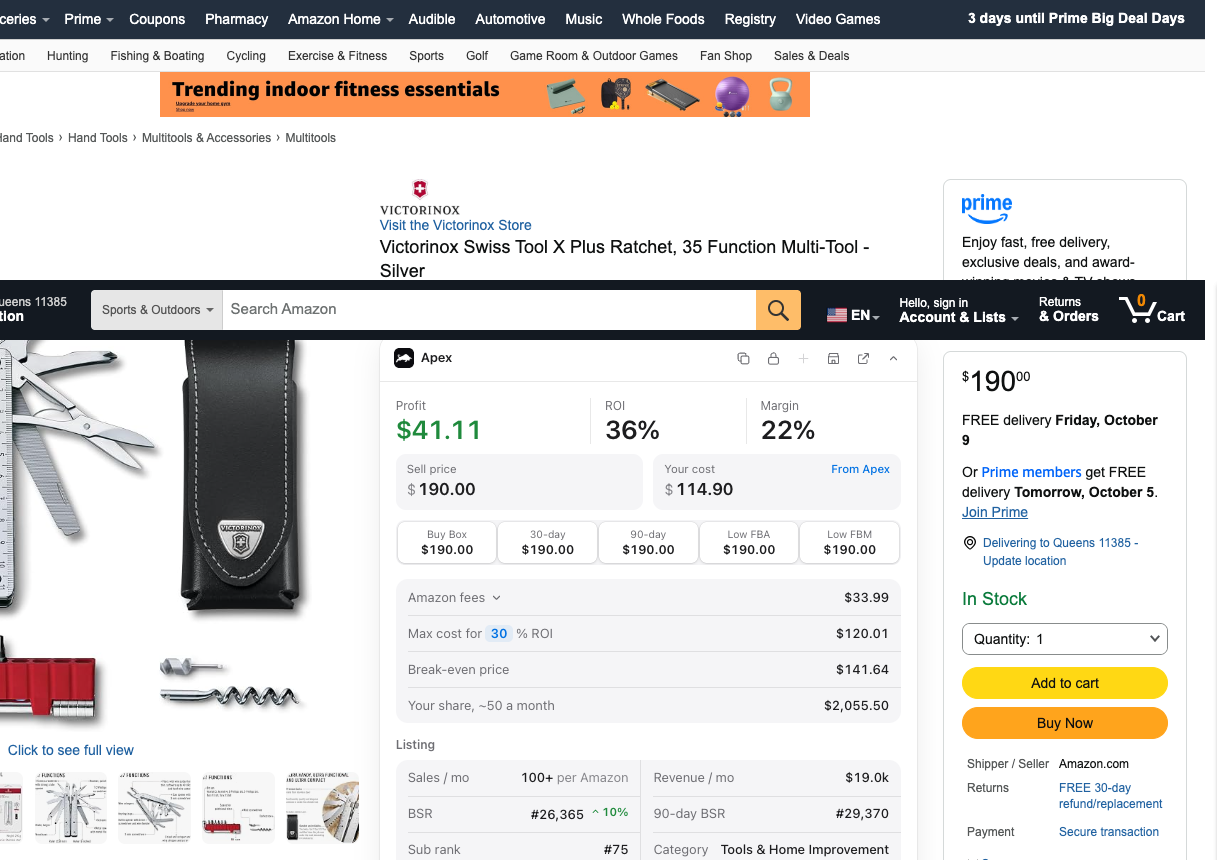
If you check products one at a time on Amazon's site, the Apex for Amazon Sellers extension shows the size tier and weight right on the listing and splits the FBA fee out of Amazon's fees. Free to install, and its data opens once you finish Apex University.
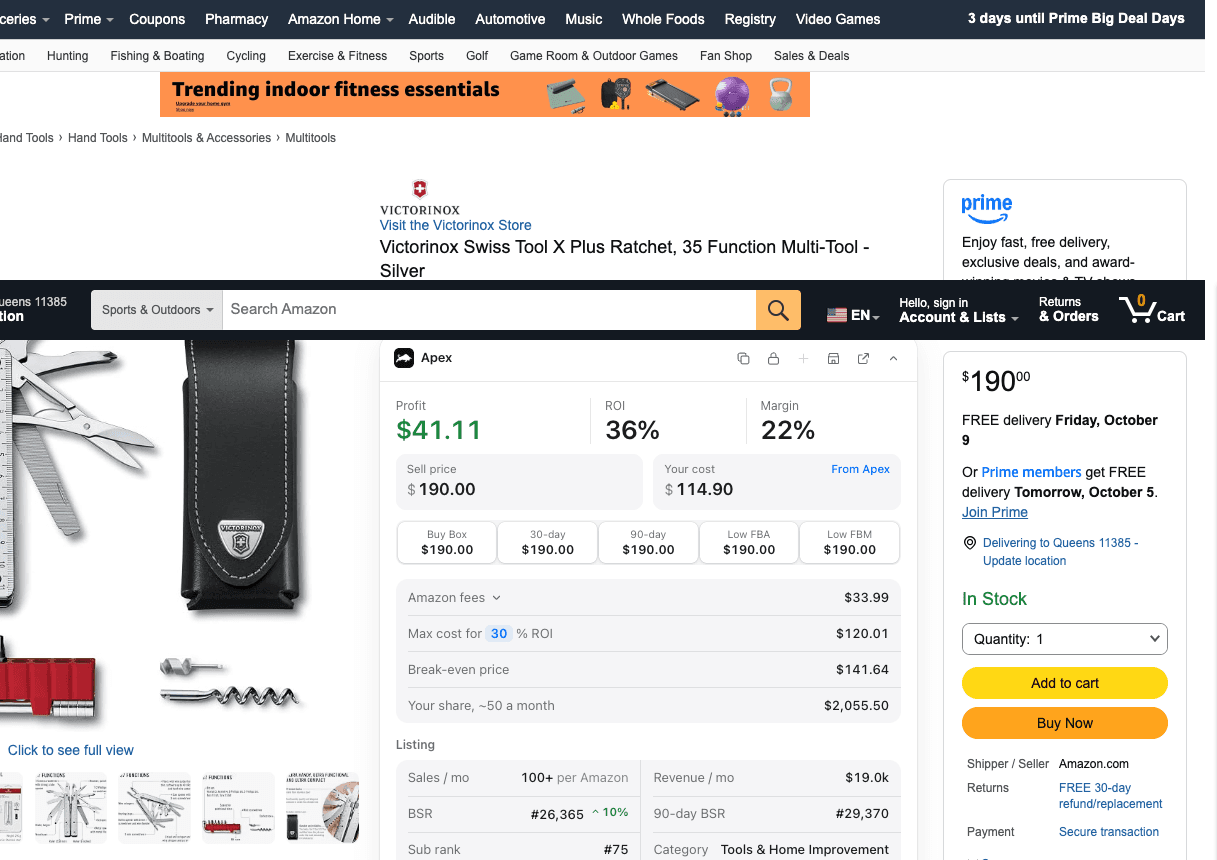
On an Amazon product page, the extension totals Amazon's fees for the listing. Open the fees line to see the FBA fee on its own. - After it is in FBA: the Fee Preview report
In Seller Central, Amazon's fee guide says to open Reports, then Fulfillment, and download the Fee Preview report from the Payments section. Newer Amazon pages call it the Fee and Economics Preview report. Find your product by its FNSKU: Amazon's help pages say the report shows its size tier and the longest, median and shortest sides Amazon measured. The report needs a Seller Central sign-in and we could not open one for this guide, so column names in your account may read a little differently.
- If Amazon measured it wrong
Amazon's fee page points sellers to its FBA Remeasurement and Reimbursement Tool in Seller Central. It checks whether a product can be remeasured and whether you are owed a reimbursement for fees charged on the wrong size.
Checking a whole supplier price list instead of one product? Apex Green matches each line to Amazon and works out the Amazon fees for every match, so you only look closely at the products that clear your numbers.
Put the fee into your numbers
Once you have the fulfillment fee, run the whole sale through. The calculator below takes the price, the fee category and the fulfillment fee you found, then gives you profit per unit, or the most you can pay the supplier for the return you want. Type the fee with the surcharge included, and use the peak fee for stock that will sell between mid-October and mid-January.
Profit and most-you-can-pay calculator
Per unit, from Amazon's FBA fulfillment fees page or Amazon's Revenue Calculator. Leave it empty if you ship orders yourself.
Per unit.
Per unit: storage, returns, ads, anything else you count.
Per unit.
Type what you pay the supplier.
Runs in your browser from Amazon's published US fee tables. Nothing you type is sent anywhere.
The profit calculator is a version you can bookmark. It counts the FBA fee as part of your cost when it works out return on investment, so its ROI reads a little lower than the calculator above.
Ways to keep the fulfillment fee down
You can't negotiate Amazon's table, but you can choose where your products land on it.
- Keep packaging away from the tier edges. A product sitting right at a limit is one extra layer of bubble wrap or one size up in box away from the next tier. Amazon's own fee guide suggests lighter, more compact packaging, such as polybags instead of boxes, and flat packaging for products that don't need protection (Amazon's fee guide). Prep has to follow Amazon's rules, so ask your prep center what they can change.
- Think before you bundle. Amazon measures a set as it is packaged together. Two products that are each Large standard can become Small Bulky once they are bagged as a pair, so work out the tier of the bundle, not of one item.
- Check both sides of $10 and $50. A small price change can move a product into a different column. Run the total fees at both prices before you settle on one.
- Watch the bulky tiers closely. Bulky products pay higher fulfillment fees and are charged on dimensional weight. Amazon's fee page also says standard-size products certified for its Ships in Product Packaging program get lower fees, while some bulky products that aren't certified pay extra.
- Plan the fourth quarter. Peak fees follow the ship date, so a unit that sits in a warehouse until November pays the peak rate, whenever you bought it.
Questions about FBA size tiers and fulfillment fees
Which FBA size tier has the lowest fulfillment fees?
Small standard. It is for flat, light items in their packaging, like a phone case. Many products are too thick or too heavy for it, so for most wholesale products the realistic goal is to stay inside Large standard and out of the bulky tiers.
Does Amazon use dimensional weight for Small standard items?
No. Small standard items, and Extra-large items over 150 pounds, are charged on unit weight alone. Every other tier is charged on the greater of unit weight and dimensional weight.
What fulfillment fee applies to an item priced at exactly $10?
The $10 to $50 rate. The same goes for a product priced at exactly $50. Products priced under $10 get the lower Low-Price FBA rates, and products priced over $50 get the over-$50 rates.
Is FBA Small and Light still available?
No. Amazon closed it in the US on August 29, 2023. Products priced under $10 now get Low-Price FBA rates automatically, so there is nothing to enroll in.
What happens if Amazon measures my product wrong?
Amazon bills on its own measurements when they differ from yours. Check the size tier and measurements in your Fee Preview report. If they are wrong, use Amazon's FBA Remeasurement and Reimbursement Tool in Seller Central.
Is a multipack measured as one unit for FBA fees?
Yes. When a set is sold as one product, Amazon uses the weight and dimensions of the whole set packaged together. Bundling two items can move the listing into a bigger size tier, so work out the tier of the bundle before you create it.
Paste an ASIN for its Buy Box price, Amazon fees and your profit at your cost.
New sellers under $5,000 a month in Amazon sales. 2 supplier price lists a month, up to 20,000 lines, 500 products, purchase orders and profit and loss.
7 days free, then $49.99 a month, plus tax where applicable. Card required, nothing charged until day 8. Cancel any time before then.
Sources
- FBA fulfillment fees, Amazon Seller Central
- Product size tiers, Amazon Seller Central
- Dimensional weight, Amazon Seller Central
- 2026 US Low Price FBA fulfillment fee, Amazon Seller Central
- FBA Small and Light, Amazon Seller Central
- Low-Price FBA rates to replace Small and Light on August 29, Amazon Seller Forums, News and Announcements
- Fulfillment by Amazon: FBA costs, Amazon
- Learn how Amazon FBA fees work to maximize your profit, Amazon
- Update to US referral and FBA fees for 2026, Amazon
- Selling on Amazon fee schedule, Amazon Seller Central
Reported by others
- What Amazon's New FBA Fee Changes Mean for You, Feedvisor
- Amazon Rolls Out Biggest and Most Complex Fee Increase Ever, EcomCrew
- Amazon announces 2026 holiday fulfillment fees, advises early shipping, Supply Chain Dive
Some of Amazon's pages need a Seller Central sign-in to read, and we have not yet checked their current wording for this version of the page. If Amazon's page and this guide disagree, Amazon's page is the one that counts.
We build software for Amazon sellers who buy from wholesale suppliers, and we write these guides from what we see in that work.