Inventory and purchasing
Amazon inventory management software for wholesale sellers
Restock decisions go wrong in the gap between two screens: what you have on hand lives in one place, what it costs and earns lives in another, and the order gets placed on a feeling. Apex keeps stock, cost and margin on the same row, and turns the decision straight into a purchase order.
7 days free, then $149 a month, plus tax where applicable. Card required, nothing charged until day 8. Cancel any time before then.
Amazon inventory management software for a wholesale seller should answer two questions per product: how many units to reorder, and when. That takes your recent sales, the stock at Amazon and on the way, each supplier's lead time and your prep days. Apex Blue puts those on one row and turns the restock list into purchase orders by supplier.
- A wholesale reorder depends on numbers Amazon can't see on its own: each supplier's lead time, your prep center's days, and units still on an open purchase order.
- Seller Central's own restock tools are a good start for a handful of products from one or two suppliers.
- Software earns its place once you buy from several suppliers and the restock list has to become purchase orders with the right costs and case packs.
- Apex's restock numbers are arithmetic on your stock, your last week of sales and the lead time and cover you set. They are not a demand forecast, so you can always see where a number comes from.
What inventory software has to do for a wholesale seller
Many inventory tools are built for brand owners: one product line, one factory, long lead times and a forecast for the season. Wholesale works differently. You buy many brands from several distributors, you share each listing with other sellers, and your stock often passes through a prep center on its way to Amazon. So the questions are different too.
For every product you sell, the software has to tell you:
- How fast it is selling right now. On a shared listing your pace moves when other sellers join, run out or change their price, so last quarter's average can mislead you.
- How much you already own. That means units available at Amazon, units in shipments on their way in, units at your prep center and units on purchase orders your supplier hasn't delivered yet. Miss any of them and you buy the same units twice.
- How long a reorder takes. Each supplier has its own lead time, and prep and the trip into Amazon add days to every order.
- Whether the product is worth buying again. A product that sells fast at a loss shouldn't top your restock list, so cost and profit belong on the same row as stock.
- What to send the supplier. The answer has to end as a purchase order, rounded to the supplier's case packs and above its minimum order.
The math behind the first three is in our guide on when to reorder on Amazon, with a calculator you can try on one product. This page is about doing it for every product at once, and what to look for in software that does it for you.
The restock inputs, and where each one comes from
Every restock suggestion, whether it comes from Amazon, a spreadsheet or Apex, is built from the same handful of inputs. What separates the tools is which inputs they can see and which ones you have to type in.
| Input | What it means | Where it comes from in Apex |
|---|---|---|
| Sales pace | Units sold a day, for each product | Synced from Amazon; the inventory view uses your last seven days |
| Stock at Amazon | Units available and reserved | Synced from Amazon every few minutes |
| Inbound | Units in shipments on their way into Amazon | Synced from Amazon |
| On order | Units on purchase orders that are still open | Your purchase orders in Apex |
| At your prep center | Units received there but not yet sent to Amazon | Counted when the warehouse or prep center is tracked in Apex Red |
| Supplier lead time | Days from placing an order until it reaches your warehouse or prep center | You enter it once, on each supplier's record |
| Prep days | Days your prep center takes before stock leaves for Amazon | You set it in Restock Settings |
| Target cover | How many days of stock you want to hold | You pick 15, 30 or 45 days in Restock Settings |
| Cost and case pack | What one unit costs you, and how the supplier sells it | Your product database. A submitted purchase order fills in unit costs, and a cost you type yourself always wins |
One gap to know about: Apex has a lead time on each supplier and a prep days setting, but no separate field for the days a shipment takes to reach Amazon and become available. Add those days to your prep days, or every reorder will land a few days late.
The sales pace is the input that moves fastest. In Apex University's Restocking lesson, Stef explains where the number comes from:
"the software is reading your current Amazon data, meaning we know exactly where your sale through velocity is being held on a seven-day period."
From Stef's lesson (Restocking, at 10:09)
A one-week pace reacts quickly when a competitor runs out or a price drops, which is what you want on a shared listing. It also means one odd week moves it. If the last seven days included a stockout or a one-off spike, compare them with your 30-day sales before you place a big order. The reorder guide explains which sales number to use and why.
What Seller Central already gives you
Before you pay for anything, know what your seller account already has.
- Restock Inventory. In a Seller Forums post on FBA inventory tools, Amazon staff describe it as showing days of supply, a recommended ship quantity and a recommended ship date for each product, and write that "Recommendations are based on your sales history, seasonality, and demand forecasts." You can adjust supplier lead times, case pack quantities and reorder frequency.
- Restock suggestions in Send to Amazon. Amazon's announcement describes them as SKU-level quantities based on past performance and four inputs you can set yourself: lead time, minimum order quantity, replenishment frequency and case pack quantity. It also says they "are a guide only."
- The Inventory Performance dashboard. Amazon's inventory management guide says it alerts you when stock runs low and suggests inventory levels and shipment timelines from its demand planning and forecasting.
If you also sell on your own website or another marketplace, the same Amazon guide calls Veeqo free inventory management software that syncs stock across channels. Veeqo is an Amazon company, and its own pricing page says its shipping features cost nothing and puts inventory sync and demand forecasting on its paid plans.
So for a few products from one supplier, you may not need anything else. The limits show up as you grow. Amazon's tools work from what Amazon can see, so a pallet at your prep center or an order you placed with your distributor last week doesn't count until it becomes a shipment. And they stop at a quantity: turning that number into an order for each supplier, at that supplier's price and case pack, is still your job.
Spreadsheet, Seller Central or software?
There is no fixed point where you have to buy software. This is our rule of thumb for wholesale sellers, not a line Amazon draws.
| Where you are | What usually works | What to watch |
|---|---|---|
| A few products from one or two suppliers | Seller Central's restock tools and a simple sheet with each supplier's lead time | Updating the sheet when a supplier slows down |
| Dozens of products, several suppliers and a prep center | Software that counts stock on order and at the prep center, and builds purchase orders per supplier | Keeping each product's cost and supplier up to date |
| Hundreds of products, or a team placing orders | The same, plus separate logins for each person and an order history everyone can see | Who checks an order before it goes to the supplier |
Guessing costs money on both sides. Run short and the sales go to the other sellers on your listing, and Amazon charges a low-inventory-level fee on some products it judges understocked. Buy too deep and you pay monthly storage, then the aged inventory surcharge on units that sit too long. The storage fees guide explains when each one applies.
Apex University comes with a free Apex account: nine lessons, no card.
How restocking works in Apex Blue
Restock planning lives in Analytics, in Apex Blue, beside your profit and loss. Here is the setup, following Stef's Restocking lesson.
- Give each product its supplier
Restocking starts in your product database. Each product carries the supplier you buy it from, and that is what lets a restock line become a purchase order for that supplier. A product you sell on Amazon but haven't added to your database shows without a supplier, and its lead time counts only your prep days, so add it before you rely on its restock line.
- Enter each supplier's lead time
Open the supplier's record on the Vendors page and enter its lead time in days, from the day you place an order until the goods reach your warehouse or prep center. Then tick Lead Time From Vendors in Restock Settings, so each product uses its own supplier's number. If you buy one product from two suppliers, Apex uses the shorter of their lead times.
- Add your prep days
Tick Days of Prepping in Restock Settings and enter how long your prep center takes. Count the trip into Amazon here as well, since there's no field of its own for it. Stef's advice is to stay on the safe side:
"So you wanna always be conservative. If your prep center says two days, maybe add three."
From Stef's lesson (Restocking, at 9:25)
- Choose how many days of stock you want
Pick your target cover under Recommended Restock in Restock Settings: 15, 30 or 45 days. In the same lesson (from about 9:44), Stef recommends keeping the 30-day default however much cash you have, and says 15 days helps when you would rather keep more cash in reserve.
- Read the inventory view
Switch Analytics from Profit and Loss to Inventory. Each product shows its sales velocity, days of inventory, days until reorder and a recommended restock, beside its stock value and profit. Sort by days of inventory both ways: the shortest are your next orders, and the longest often point to a pricing problem rather than a buying one (more on that below).
- Turn the list into a purchase order
Tick the products you want to reorder and choose Create New PO. For each product, pick the supplier, then move the recommended quantity across or type your own, rounded up to full cases. The order's value, cost and expected profit add up as you go, from the costs you have on record. Choose Create Restock PO and Apex makes one purchase order for each supplier. Open it to add other products from the same supplier, for example to reach the supplier's minimum, before you send it.
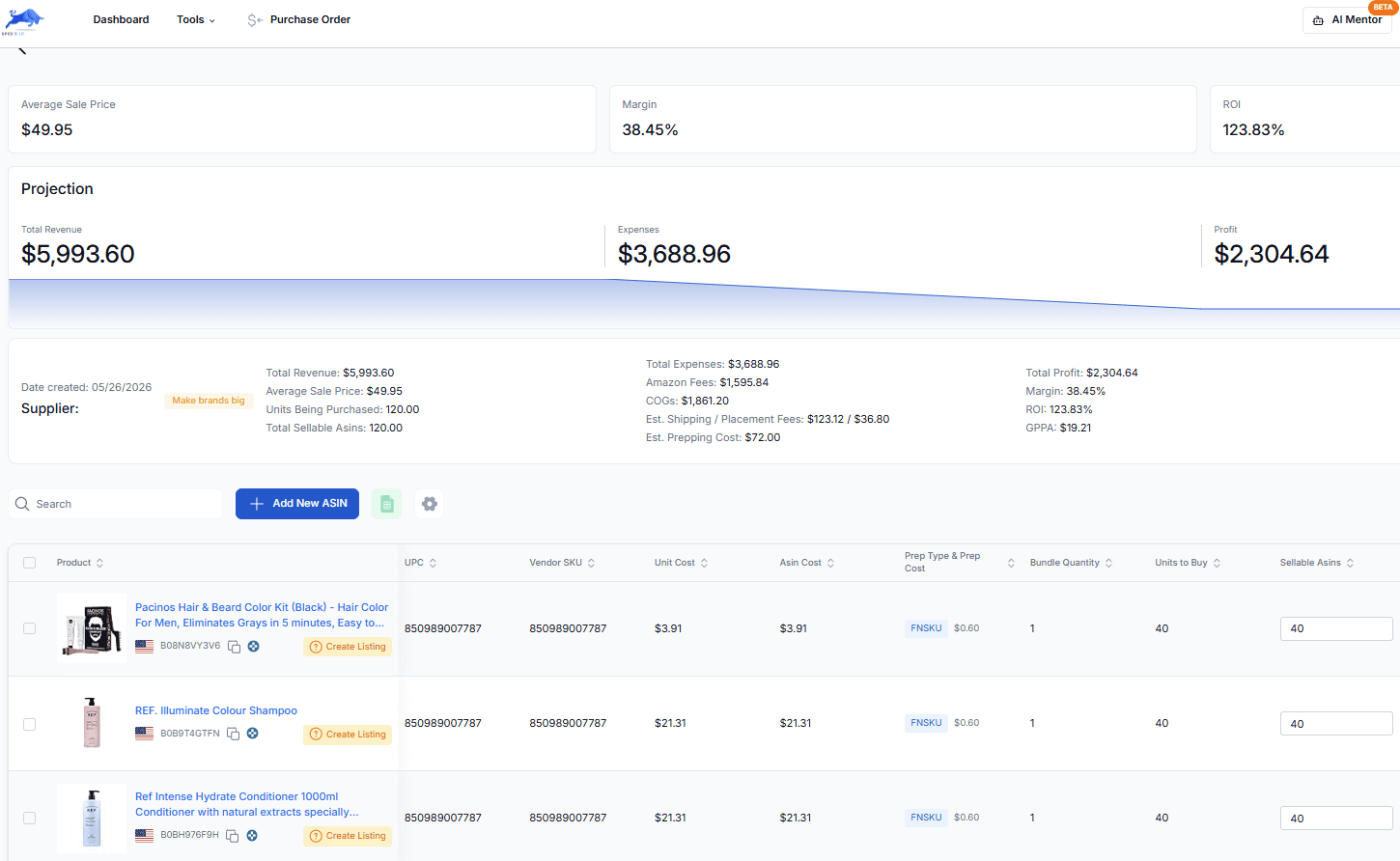
One example purchase order in Apex Blue with its product lines. The screen is an older version.
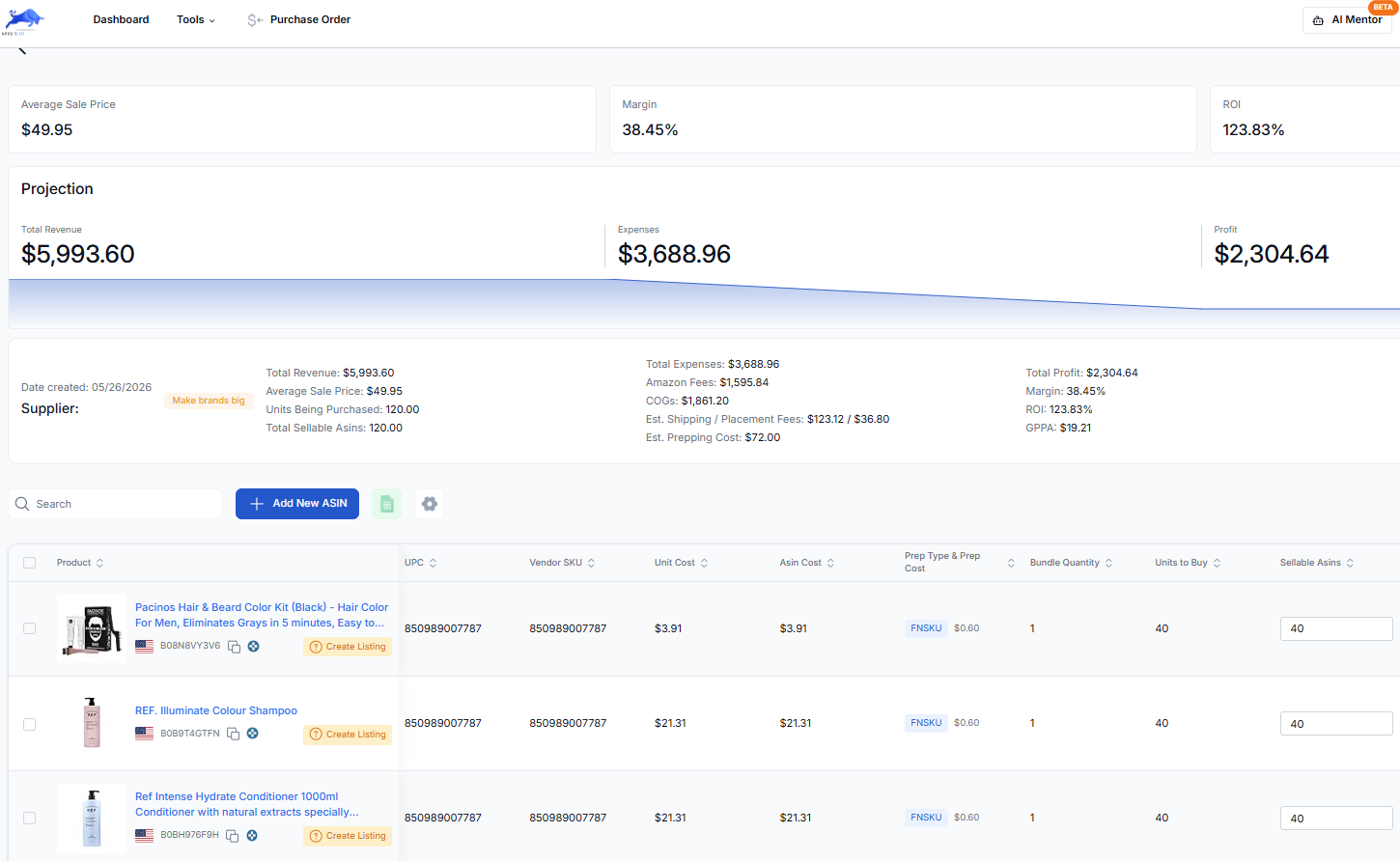
Apex doesn't place the order. You check it, then send it to your supplier the way you normally do. The purchase order workflow covers what happens from there, through receiving, and the landed cost guide covers the costs that belong on each unit.
Here is the whole view in a short tour. The inventory and restock part starts at 1:22.
If you connect Claude or ChatGPT to Apex, you can also ask it which profitable products are lowest on stock. It reads the same restock data, and it can't submit or send a purchase order.
How Apex works out the restock number
The recommended restock is arithmetic you can check by hand. For each product, Apex:
- Adds up your lead time: the supplier's lead time (when Lead Time From Vendors is ticked) plus your prep days.
- Works out how many units you would sell over that lead time plus your target cover, at your last seven days' pace.
- Takes off everything you already own or have coming: units available and reserved at Amazon, units inbound, units on open purchase orders, and units at a prep center tracked in Apex Red.
- Suggests what is left, but never more than one target cover's worth of sales in a single order.
Days of inventory is your stock at Amazon divided by your daily sales. Days until reorder is days of inventory minus your lead time, and when it drops below zero, you are already late.
A worked example
These are the example numbers from Stef's Restocking lesson (from 1:01), run the way Apex runs them. The product sells 12.5 units a day and has 81 units at Amazon. We assume nothing is inbound or on order. The supplier's lead time is 12 days, and the prep days setting is 7: three days of prep and four to reach Amazon. The target cover is 30 days.
| Step | Math | Result |
|---|---|---|
| Lead time | 12 + 7 | 19 days |
| Units for the lead time plus the target cover | 12.5 × (19 + 30) | 612.5 |
| Less what you own | 612.5 − 81 | 531.5 |
| One target cover's worth | 12.5 × 30 | 375 |
| Recommended restock | The smaller of the two | 375 units |
| Days of inventory | 81 ÷ 12.5 | About 6.5 |
| Days until reorder | 6.5 − 19 | About −12.5, so about 12 days late |
The cap matters most when you are late, as here. This product will be out of stock for about 12 days whatever you do now, so an order for the full 532 would buy stock for sales that can't happen, and it would sit longer than the cover you asked for. At 375, the new stock covers about 30 days once it lands. That is the same order the reorder guide arrives at when cash is tight in its worked example.
Two things are left to you. Round 375 up to full cases on the purchase order, and check it against the supplier's minimum. If the product came in cases of 12 (an assumption for this example), that is 32 cases, or 384 units.
When the list shows too much stock
Sorting the other way is just as useful. Products with far more days of stock than your target cover tie up cash, and every extra month at Amazon adds storage. Stef's reading of a long number is worth knowing before you cut an order:
"So we can see that we have some products that are even exceeding sixty days. This is not a bad sign. It just means that we're probably not priced correctly to be getting the sales within the buy box. So now you have a pricing issue."
From Stef's lesson (Restocking, at 10:52)
So before you cut your next order, check your price against the other offers on the listing. If a better price wins you more of the sales, the stock moves and the number comes down. The Buy Box guide explains what decides who wins the sale on a shared listing, and the storage fees guide covers your options when stock has sat too long.
What Apex doesn't do
Knowing the limits up front saves you a bad order.
- It doesn't forecast demand. Restock suggestions come from your stock, your sales pace and the cover you set. There is no seasonal model, so before October to December, choose the 45-day target cover or size those orders by hand.
- It needs recent sales. A product that hasn't sold in the last week has no pace, so its recommended restock stays at zero. For a product you have never sold, size a test buy with the guide to your first wholesale order.
- It doesn't place orders. A restock purchase order is yours to check and send. Apex doesn't send it to the supplier or pay for it.
- It's built around Amazon. It reads your Amazon listings and FBA stock. If you also sell on your own website or another marketplace, you'll need a multichannel tool for that side.
- Shipments are a separate module. Building FBA shipments and tracking stock at your prep center is Apex Red, which is in beta and opened by invitation. Without it, you create shipments in Seller Central, as the Send to Amazon walkthrough shows.
- It isn't accounting software. Costs from your purchase orders feed your profit and loss, and the bookkeeping guide covers the rest. Ask your accountant how to value inventory for taxes.
What comes with each plan
The inventory view, Restock Settings and restock purchase orders come with every plan. What grows with the plan is how many products your database holds, and a restock order can only draw on products that are in it: 500 on Beginner, 4,000 on Starter and 50,000 on Pro. The right plan follows your monthly Amazon sales, and every plan starts with a trial. On Beginner: 7 days free, then $49.99 a month, plus tax where applicable. Card required, nothing charged until day 8. Cancel any time before then. See plans and pricing, or compare Apex with InventoryLab and sellerboard if you are weighing other tools.
Not ready for software yet?
If you sell a handful of products, start with the math. The reorder guide has a calculator for one product at a time, and Apex University's Restocking lesson shows the whole routine. Here is everything you can use before you pay for anything.
- No account
- Guides and articles
- Profit, ROI and break-even calculator: unlimited, no sign-in
- FBA calculator: 3 free lookups, then sign in with a plan
- Calculators inside the guides: no product lookup, no sign-in and no counter
- Free account
- Apex University: nine lessons, no card
- Review Booster: free to switch on until October 31, 2026, 20 requests a month
- Apex Red (prep and shipments): when your prep center is approved on Apex
- Bundle Watch: every listing checked against Amazon's January 11 bundle rule, on every plan
- After Apex University
- Apex for Amazon Sellers (Chrome extension): free to install, and its data opens once you finish Apex University
- Paid plans
Supplier price list scans, Distributor Vault contacts, Purchase orders, Profit and loss, The repricer, on Pro.
- Beginner, $49.99 a month, plus tax where applicable. New sellers under $5,000 a month in Amazon sales.
- Starter, $149 a month, plus tax where applicable. Sellers building their first supplier catalog and purchase orders.
- Pro, $299 a month, plus tax where applicable. Teams running several suppliers and marketplaces at once.
Questions about inventory software for Amazon wholesale
How is Apex different from Amazon's Restock Inventory page?
Amazon's tool bases its recommendations on your sales history, seasonality and demand forecasts, and it only counts stock Amazon can see. Apex works from your last week of sales and the lead time and cover you set, counts units on open purchase orders, and turns the list into a purchase order for each supplier. It's worth checking one against the other.
Can I set a different lead time for each supplier?
Yes. Each supplier's record has its own lead time in days, and ticking Lead Time From Vendors in Restock Settings applies it to that supplier's products. Prep days are a single setting for your account, added on top.
Does Apex count stock sitting at my prep center?
It counts units on purchase orders that are still open, and units at a warehouse or prep center tracked in Apex Red. Units at a prep center that Apex doesn't know about can't be counted, so check them before you reorder.
Does Apex forecast demand for the holiday season?
No. Its suggestions follow your recent sales, so they don't rise ahead of a busy season on their own. Before October to December, choose the 45-day target cover in Restock Settings or size your holiday orders by hand, and send them early enough to be available before demand picks up.
When is a spreadsheet no longer enough for restocking?
A good sign is when you buy from more than two or three suppliers, or when you catch yourself reordering units that were already at your prep center or on order. At that point the sheet takes longer to update than the decisions it supports.
Profit, ROI and break-even calculator: unlimited, no sign-in.
Pick the plan that fits your monthly Amazon sales.
Starter: 7 days free, then $149 a month, plus tax where applicable. Card required, nothing charged until day 8. Cancel any time before then.
Pro: 7 days free, then $299 a month, plus tax where applicable. Card required, nothing charged until day 8. Cancel any time before then.
Sources
- Inventory management techniques and best practices, Amazon
- FBA Inventory Tools: Stay Stocked and Keep Selling (KJ_Amazon), Amazon Seller Forums
- New restock recommendation feature in Send to Amazon (News_Amazon), Amazon Seller Forums
- Low-inventory-level fee, Amazon Seller Central
- Fulfillment by Amazon, Amazon
- Veeqo pricing, Veeqo
- Veeqo, an Amazon company, Veeqo
Some of Amazon's pages need a Seller Central sign-in to read, and we have not yet checked their current wording for this version of the page. If Amazon's page and this guide disagree, Amazon's page is the one that counts.
Work out when to reorder from lead time, prep days, inbound days and daily sales, with a calculator and the fees for too little or too much stock.