Seller feedback vs product reviews: what wholesale sellers control
Product reviews rate the product and sit on the listing, shared by every seller on it. Seller feedback rates you: shipping, packaging, item accuracy and service, shown on your seller profile. As a wholesale seller you control the experience behind your feedback, not the reviews. Amazon removes feedback only in narrow cases, so prevention beats removal.
- Product reviews belong to the listing, so every seller on a shared ASIN adds to the same reviews. Seller feedback belongs to your selling account alone.
- Amazon's own Request a Review asks for a product review and seller feedback in one email, once per order. Never offer anything for feedback, and never ask only the buyers you expect to be happy.
- Amazon removes feedback for three reasons: obscene or profane words, your personal details, or a comment that is entirely a product review. It may strike through comments only about delivery on FBA orders, and about late or undelivered orders you shipped on time with Buy Shipping. Ask within 90 days, in Feedback Manager.
- Negative feedback is one of the three defects in your order defect rate, and your average rating shows beside your name on Amazon.
- For a reseller, most of what buyers rate happens before the unit ships: the right item, matching the listing, in date and packed well.
If you resell brand-name products, you've probably noticed that the review count on your listings barely moves, however many units you sell. It's one of the most common questions on seller forums. Part of the answer is that a product review was never yours to begin with. It belongs to the listing. What's yours is your seller feedback, and it's the rating anyone who looks you up will see.
This guide explains the difference, what Amazon lets you ask for, how feedback removal actually works, and which parts a wholesale seller controls. The companion guide on automating review requests covers the Request a Review button itself in depth.
Amazon's rules here come from its US help pages for shoppers, its Sell on Amazon pages, and replies Amazon staff posted on the US Seller Forums, each dated in the Sources list. Seller Central's own help pages on Feedback Manager and feedback removal need a sign-in, and we couldn't open them for this guide, so check them in your account before you rely on the details. Our editorial policy explains how we check sources.
Reviews belong to the listing, feedback belongs to you
Amazon runs two rating systems side by side, and buyers often mix them up. An Amazon staff member set out the difference on the US Seller Forums: a product review is about the product's quality, function and usefulness, and appears on the product detail page. Seller feedback is about the experience the seller provided, from reliability to the overall fulfillment experience, and it appears in your Feedback Manager.
| Product review | Seller feedback | |
|---|---|---|
| What it rates | The product: quality, function, usefulness | You: packing and shipping, getting the right item on time, service |
| Where buyers see it | The product detail page | Your seller profile, with your average rating beside your name |
| Whose it is | The listing's, shared by every seller on it | Your selling account's alone |
| Who can leave it, and when | Shoppers, under Amazon's Community Guidelines | Only a buyer who ordered from you, within 90 days of the order date |
| What you can do about a bad one | Report it if it breaks Amazon's Community Guidelines | Request removal if it qualifies, solve the buyer's problem, or reply publicly |
| Part of your order defect rate? | No | Yes, when it's negative (one or two stars) |
For a wholesale seller, that split decides where your effort goes. A five-star review from your buyer on a shared listing helps you and every competitor on it equally. A review that only complains about the seller, shipping, packaging or damage breaks Amazon's Community Guidelines, which send those comments to seller feedback instead, and you can report it from the product page. Until Amazon takes it down, it sits on the listing for every seller. Your seller feedback is the one rating that's about you alone.
It works the other way too. Buyers also leave product complaints in seller feedback, for example a comment that only says they didn't like the scent. That's one case Amazon removes, because a comment that's entirely a product review doesn't belong in seller feedback. More on that below.
What buyers are asked to rate you on
Amazon's guidelines for comments and ratings about sellers tell shoppers to focus on the buying experience, and suggest the questions to answer:
- Were they happy with how you packaged and shipped the order?
- Did it arrive on time, and did they get what they ordered?
- Were you professional, and if they needed help, did you fix it quickly?
- Would they buy from you again, and what would have made it better?
Ratings run from one to five stars, and Amazon shows a seller's average rating beside their name. Buyers have 90 days from the order date. Amazon's instructions for leaving seller feedback add that the option can take up to three days to appear after an order is completed or canceled, so a buyer whose order was canceled can still rate you.
The same guidelines list what seller feedback shouldn't contain. Keep this list in mind, because it decides what can come down later:
- promotional content, or links to other sellers or websites,
- offensive, abusive or illegal content,
- personal information such as phone numbers, email addresses or physical addresses,
- comments about the price of the item or the price of delivery,
- product reviews, which belong on the product page,
- spam, or text in a language the site doesn't support,
- feedback left for the wrong seller,
- feedback written, changed or removed in exchange for compensation, which Amazon says includes cash, discounts, free products, gift cards and refunds.
Amazon also lists feedback it won't allow from people with a financial interest, people with a close personal relationship to the product's owner, the manufacturer posing as a shopper, and sellers trading positive feedback with each other.
What you control as a reseller
You don't write the listing and you don't own the reviews. But most of what buyers rate you on happens before the unit ever ships, and much of it is in your hands. Here's how the usual complaints map back to a wholesale business.
| What the buyer says | Where it usually starts | What you control |
|---|---|---|
| Wrong item, wrong size or wrong count | A pack size or variation that doesn't match the listing, or a label on the wrong unit | Match the product to the listing before you buy, check case packs against the pack count on the page, and get FNSKU labels right |
| Arrived damaged, leaking or crushed | Prep that didn't protect the unit inside Amazon's box | Prep every unit to Amazon's FBA prep requirements, with extra care for liquids and fragile items |
| Expired or close to its date | Short-dated stock from the supplier | Check dates when stock arrives and ask suppliers how they date what they ship |
| Not genuine, or not what the photos show | Stock you can't trace to an authorized source, or an older version of the product | Buy from sources that give you invoices, and treat these comments as an early warning (IP and inauthentic complaints) |
| Opened, used or missing parts | A unit that wasn't new being sold as new | List units only in the condition they're really in |
| Slow or no reply | Buyer messages left unanswered | Answer messages promptly and solve the problem through the order |
| Late or never arrived, on orders you ship yourself | Late shipping or missing tracking | Ship on time with valid tracking; on-time Buy Shipping labels carry the protection described below |
Matching the listing deserves a closer look. Every product on Amazon has its own ASIN, and a 4-pack and a single unit of the same product usually have different ones. Sending the wrong one in is the fastest way to collect "not what I ordered" feedback on a product you priced correctly.
That row about missing parts matters more than it looks. An Amazon staff member explained on the US Seller Forums that when a buyer mentions missing parts, incorrect measurements, or how communication and refunds were handled, the comment crosses into the service experience, so it isn't removed as a product review. In Amazon's eyes, getting the item right is part of your service.
How feedback reaches your account and the Buy Box
Negative seller feedback, meaning one or two stars, is one of the three things counted in your order defect rate, alongside A-to-z Guarantee claims and credit card chargebacks. Amazon wants the rate under 1% over 60 days. Amazon's order defect rate help page has said the rate applies only to seller-fulfilled orders. It needs a sign-in and we haven't rechecked that wording, so confirm it on your own Account Health page. Our account health guide covers the other metrics.
On the product page, Amazon picks the Featured Offer on total price, delivery speed, stock and seller performance. Amazon's announcement of its 2026 change says customer reviews and star ratings don't count, and the seller performance it names is order volume, chargeback rate and complaints in Voice of the Customer. Feedback ratings aren't on its list. Still, the habits that earn good feedback (the right item, undamaged and as described) are the same ones that keep those complaints down. The Buy Box guide explains how the rest works on a shared listing.
Other sellers' software looks at feedback too. BQool's page for its rule-based repricer lists filters for a competitor's positive feedback rating and total feedback count, so a repricer can respond differently to sellers with weaker records. If you're weighing repricing tools, Automate Pricing vs a repricer compares them.
What Amazon lets you ask for
That's how Amazon's public pages sum it up. Its Customer Reviews page for sellers says to follow the community and communication guidelines and not to attempt to influence customer ratings, feedback and reviews, and its shopper guidelines treat refunds as compensation. The communication guidelines themselves sit in Seller Central behind a sign-in, and we couldn't open them for this guide.
Within those rules, here's what's open to you.
You can:
- Send Amazon's Request a Review. One email, written by Amazon, asks the buyer for a product review and seller feedback together. In a forum reply, an Amazon staff member called it the designated method for requesting seller feedback. It's one per order, and an Amazon staff reply and Amazon's API documentation both put the window at 5 to 30 days after delivery.
- Write your own buyer-seller message instead. Amazon's staff have listed requesting a product review, seller feedback or both among the permitted messages, next to resolving a fulfillment problem or sending an invoice. It has to follow the communication guidelines, and it doesn't add a second request: Amazon's API documentation allows one review request or one free-form proactive message per order.
- Contact a buyer to fix a problem with their order. That's what buyer-seller messages are for. The same staff post says you can contact buyers only to complete orders or answer customer service questions, never for marketing.
You can't:
- offer anything for feedback, or for changing or removing it, refunds included,
- ask only the buyers you expect to be happy, or ask for positive feedback,
- rate your own account, have people close to you or with a financial stake do it, or swap positive feedback with another seller,
- send a second request for the same order,
- market to buyers through their order messages.
Amazon's staff add that breaking the communication guidelines can lead Amazon to limit your proactive messages to its own templates, or to suspend your selling privileges.
Apex University comes with a free Apex account: nine lessons, no card.
Request a Review vs buyer-seller messages
| Request a Review | Your own buyer-seller message | |
|---|---|---|
| Who writes it | Amazon | You |
| What it asks for | A product review and seller feedback, together | What you write, within the communication guidelines |
| How many per order | One | It uses the order's one request too |
| Can the buyer reply to you? | No | Yes, in Buyer-Seller Messages |
| Where it goes wrong | Only if you pick which buyers get it | Wording that steers the buyer, links, anything that reads as an offer |
Our advice: send Request a Review to every eligible order, the same way, and keep your own messages for real order problems. Asking for feedback in the same message that fixes a problem can read as a trade, so keep the two apart. And don't skip the request on orders that went badly. Choosing who gets asked is exactly what Amazon tells sellers not to do, whether you or a tool does the choosing.
If you'd rather not press the button by hand every day, automating review requests compares the ways to send it for every eligible order.
Getting feedback removed
What Amazon removes, and what it strikes through
Amazon's staff have answered this the same way for years, most recently in a reply on the US Seller Forums. Amazon removes seller feedback in three cases and may strike it through in two more.
| The comment | What Amazon does |
|---|---|
| Contains words commonly understood to be obscene or profane | Removes it |
| Contains your personal details, such as an email address, full name or phone number | Removes it |
| Is entirely a product review | Removes it. If any part is about your service, it stays. |
| Is entirely about the delivery of an order Amazon fulfilled (FBA) | May strike it through |
| Is about a late or undelivered order you shipped on time with Buy Shipping | May strike it through |
| Is abusive, such as calling you a scammer | May qualify; Amazon's staff point to the Report a Violation tool |
| Is a star rating with no comment | Amazon checks it automatically when the buyer submits it |
The fine print is where resellers get caught.
"Entirely" is the word that matters. A comment that mixes a product complaint with anything about your service stays up. An earlier staff reply added that Amazon doesn't treat comments about a product's authenticity or a defect as product reviews. So "this is fake" or "arrived broken" reads like a product complaint, but Amazon counts it as feedback on you.
Strike-throughs are their own outcome. Amazon's staff describe them for the FBA delivery and Buy Shipping cases, but the replies we found don't say how a struck-through comment counts in your numbers. Feedback metrics update in batches, an Amazon staff member wrote, so give it two or three days before you check your rating.
Star-only ratings are handled differently. The same reply says ratings without a written comment are assessed for removal automatically when they're submitted.
Amazon's shopper guidelines go further than its removal list. They say Amazon may remove feedback that isn't about the buying experience or breaks the guidelines, which covers comments about price and feedback left for the wrong seller. Amazon's staff replies to sellers, though, name only the cases in the table. A comment that's clearly about another seller's order is still worth a request. Just don't count on it.
How to request removal
- Check the comment against the list
Read the whole comment. If any part of it is about you, the item you sent or your service, it stays, and your time is better spent on the buyer.
- Open Feedback Manager
Amazon's staff give the path as Performance, then Feedback Manager. Amazon's guide to Seller Central also points to Feedback Manager from the Customers workspace, which gives an overview of your feedback ratings.
- Choose Request removal next to the order
In the Recent Feedback table, find the order ID and choose Request removal in the Actions column. Do it within 90 days of the day the feedback was left.
- Keep the case ID
A case opens automatically when you request removal. If the answer looks wrong, Amazon's staff on the US Seller Forums have asked sellers to post that case ID so they can take a look. In one thread, a staff member reviewed a Buy Shipping case and removed the feedback.
When Amazon won't remove it
Most negative feedback doesn't qualify for removal, so the real work is with the buyer.
- Fix the problem first, with no strings attached. Replace, refund or answer the question under your normal policy, because the order went wrong. Never make anything depend on the feedback.
- Then you can ask. An older Amazon staff reply says you can contact the buyer to try to resolve the issue and ask them to remove the feedback, and that the decision is the buyer's. Ask once, and make it clear nothing depends on their answer.
- If they agree, send them Amazon's steps. Amazon's shopper help says to go to Your Submitted Feedback, open Completed Feedback, select Remove next to the feedback, pick a reason and select Remove again. Feedback can't be edited, only removed, and once it's gone the buyer can't leave new feedback for that order. That page gives no deadline; an Amazon staff guide from November 2024 says buyers have 60 days to remove it.
- If it stays, reply in public. Amazon's Seller app guide says you can post public replies to customer comments in Feedback Manager. Keep it short and factual, with no buyer details and no argument. One example: "We're sorry this case arrived damaged. We've sent a replacement and changed how we pack this item."
Everything above is about seller feedback. Amazon's seller pages say not to ask customers to remove negative product reviews, so never ask a buyer to change or take down a review.
- Read the whole comment and note the order ID.
- Check it against Amazon's removal cases. If it qualifies, request removal in Feedback Manager within 90 days.
- If it doesn't, find out what went wrong: the item, the match with the listing, the prep, the dates.
- Contact the buyer to fix it, with nothing tied to the feedback.
- Once it's fixed, ask once whether they'd consider removing it, and leave it there.
- If the feedback stays, post a short public reply.
- Fix the cause before the next shipment: prep, labels, the listing match or the supplier.
Why brands and distributors may look at your feedback
Your seller profile is public. Anyone can click your name on a listing and see your ratings and feedback, the same way you can read other resellers' storefronts when you look for brands to wholesale. When you ask a brand or a distributor to open an account for you, they can look you up in a minute.
What they'd notice isn't the count. It's what the comments say. A run of "arrived damaged," "not as described" or "not genuine" is what a brand protecting its listings worries about, because the same complaints can end up on its product page as reviews too. A record of orders that arrive right, on time and well packed tells them you handle their product the way they would.
What we're not saying: we don't know of any brand, distributor or Amazon approval that requires a number of feedback ratings, and we haven't found an Amazon page that ties category or brand approval to feedback. Sellers often ask how much feedback it takes before ungating "opens up." Our ungating guide covers what Amazon actually asks for, starting with the invoices.
Where Review Booster fits
Review Booster, part of Apex Black, is Amazon's own Request a Review button, pressed for you on eligible Amazon.com orders, after the wait you choose. Because it sends Amazon's own request, each one asks the buyer for a product review and seller feedback together, and each order is asked once.
It can't choose which buyers are asked, write reviews, ask only happy buyers, or promise you a review or a rating. Amazon decides which orders are eligible. You can leave out a listing, which leaves it out for every buyer alike, and every request goes in a log, so you can see which orders were asked. How many requests it sends a month depends on your plan.
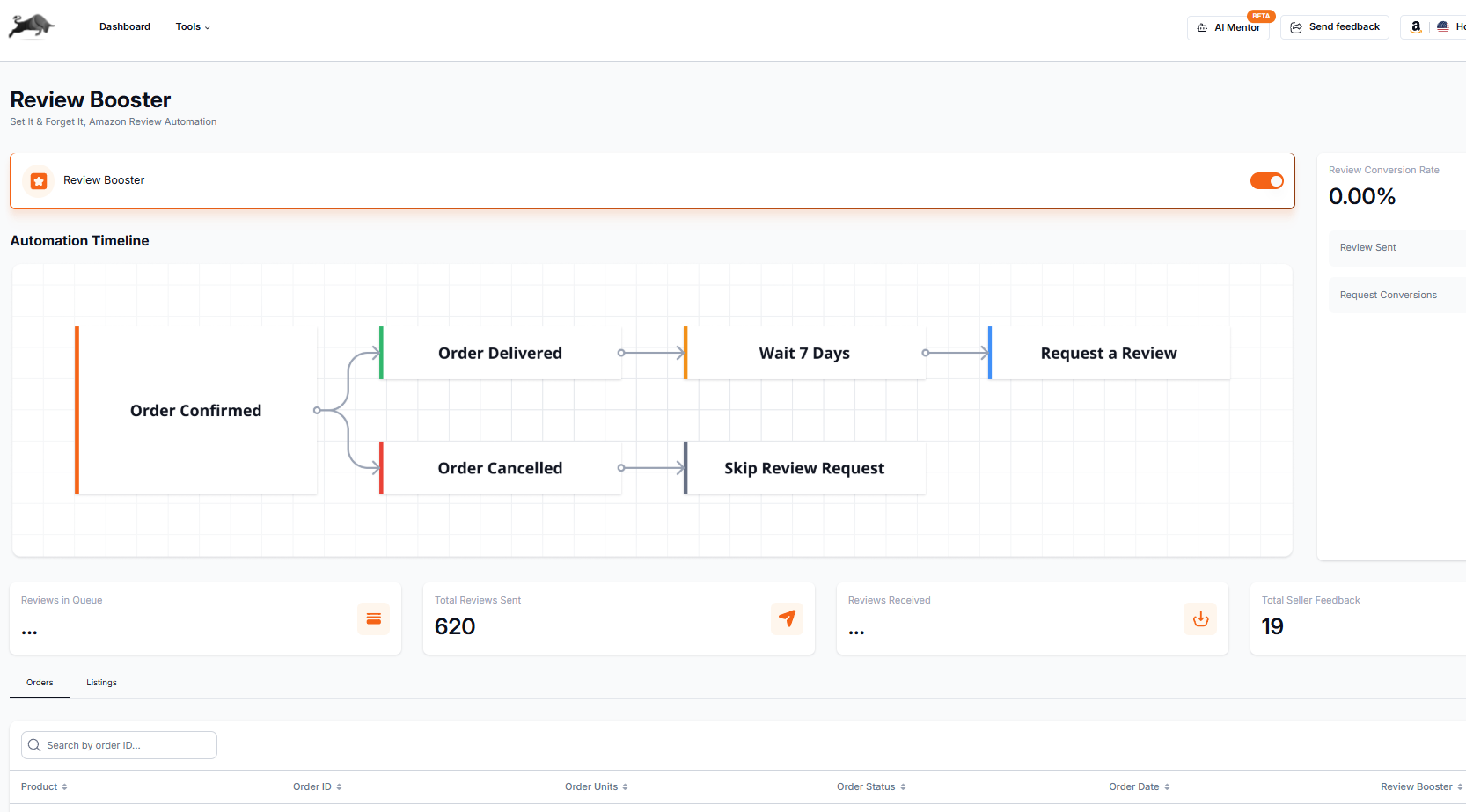
On a shared listing, the reviews those requests bring in go to the listing. The feedback is yours, which is why your feedback is the number to watch.
Reviews and feedback sit in stage 8 of the Amazon wholesale roadmap, next to the Buy Box. The next stage is protecting the account itself, starting with the account health guide.
Questions about Amazon seller feedback
How do I get more seller feedback on Amazon?
Send Amazon's Request a Review on every eligible order, the same way for every buyer, between 5 and 30 days after delivery. It asks for seller feedback and a product review in one email. Then make each order worth a good rating: the right item, matching the listing, in date and well packed. Never offer anything in return, and never ask only the buyers you expect to be happy.
How long does a buyer have to leave seller feedback on Amazon?
90 days from the order date, according to Amazon's shopper help. The option can take up to three days to appear in Your Orders after an order is completed or canceled, so canceled orders can be rated too.
Can a buyer edit seller feedback after posting it?
No. Amazon's shopper help says seller feedback can't be edited once it's posted, only removed. A buyer who removes it can't leave new feedback for that order, so there's no way to "update" a rating after the fact.
Does negative feedback on an FBA order count against me?
It depends on what it says. If the whole comment is about the delivery of an order Amazon fulfilled, request removal in Feedback Manager and Amazon may strike it through. If any part is about the item, its condition or your service, it stays on your feedback page. The order defect rate is a separate question: Amazon's help page has said the rate applies only to seller-fulfilled orders, but it needs a sign-in and we haven't rechecked it, so look at your own Account Health page.
Can I give a refund in exchange for removing negative feedback?
No. Amazon's guidelines don't allow feedback that is created, edited or removed in exchange for compensation, and they list refunds as compensation. Solve the problem on its own terms. If you later ask whether the buyer would remove the feedback, make it clear nothing depends on the answer.
Why can't I request removal of a rating with no comment?
An Amazon staff member has written that star-only ratings are assessed for removal automatically when they're submitted, and sellers report that the removal request isn't offered for them. With no text, there's nothing for Amazon to check against its removal reasons.
Paste an ASIN for its Buy Box price, Amazon fees and your profit at your cost.
Review Booster presses Amazon's own Request a Review button for you on eligible Amazon.com orders. It is free to switch on until October 31, 2026, with 20 requests a month. On a plan, Beginner sends 20 requests a month; Starter and Pro send unlimited.
7 days free, then $49.99 a month, plus tax where applicable. Card required, nothing charged until day 8. Cancel any time before then.
Sources
- Communication guidelines (buyer messages), Amazon Seller Central
- Comments, Feedback, and Ratings about Sellers, Amazon.com Help
- Leave Third-Party Seller Feedback, Amazon.com Help
- Remove Third-Party Seller Feedback, Amazon.com Help
- Community Guidelines, Amazon.com Help
- Solicitations API v1 reference, Amazon Selling Partner API
- Request a Review once per order, 5 to 30 days after delivery (staff reply, November 1, 2023), Amazon Seller Forums (Sandy_Amazon)
- Featured Offer Update: Every Seller's Offers Are Now in the Running (July 31, 2026), Amazon Seller Forums (Indy_Amazon)
- Customer Reviews tool (FAQ on communication guidelines and changing reviews), Sell on Amazon
- Amazon Seller Central (the Customers workspace and Feedback Manager), Sell on Amazon
- How to use the Amazon Seller mobile app (public replies in Feedback Manager), Sell on Amazon
- How the feedback removal process currently works (staff reply, May 28, 2026), Amazon Seller Forums (Josh_Amazon)
- Star-only ratings and feedback metric updates (staff reply, May 19, 2026), Amazon Seller Forums (Ken_Amazon)
- Product evaluation vs the service experience (staff reply, April 6, 2026), Amazon Seller Forums (Kam_Amazon)
- Buy Shipping protection applied on review (staff reply, February 11, 2026), Amazon Seller Forums (Billy_Amazon)
- Seller Feedback Clarification (staff reply, February 5, 2025), Amazon Seller Forums (Danny_Amazon)
- Requesting feedback removal and the case it opens (staff reply, December 11, 2024), Amazon Seller Forums (Quincy_Amazon)
- Navigating the Feedback Landscape: A Guide to the Feedback Manager (November 20, 2024), Amazon Seller Forums (Joey_Amazon)
- Communication Guidelines: Permitted messages (September 12, 2024), Amazon Seller Forums (Roberto_Amazon)
- Product Review vs. Seller Feedback (June 25, 2024), Amazon Seller Forums (Quincy_Amazon)
- When Amazon removes feedback, and asking the buyer (staff reply, March 15, 2024), Amazon Seller Forums (Glenn_Amazon)
- When Amazon may remove seller feedback (Seller Central help, needs a sign-in), Amazon Seller Central
- About Feedback Manager (Seller Central help, needs a sign-in), Amazon Seller Central
- Order Defect Rate (Seller Central help, needs a sign-in), Amazon Seller Central
- Rule-based repricer: competitor filters, BQool
Some of Amazon's pages need a Seller Central sign-in to read, and we have not yet checked their current wording for this version of the page. If Amazon's page and this guide disagree, Amazon's page is the one that counts.
We build software for Amazon sellers who buy from wholesale suppliers, and we write these guides from what we see in that work.
What is an IP complaint or a Section 3 deactivation, and how do I avoid one?