Amazon wholesale purchase orders: a workflow from quote to receiving
An Amazon FBA purchase order is your written order to a supplier: each product's UPC, case pack, quantity and unit cost, plus where it ships and how you pay. Run every order through the same nine steps, from a current quote and landed cost to a count on arrival, settled differences and the final invoice filed.
- Build every purchase order from a current quote, not an old price list, and re-check each line against today's Buy Box price before you pay.
- A good PO says exactly what you expect: UPC, the supplier's item code, case pack, cases, unit cost, where it ships, how you pay and who labels the units.
- Count every delivery against the PO before anything goes to Amazon, and report shortages, damage and substitutions to the supplier in writing, quickly.
- Close an order only when the PO, the receiving count and the final invoice agree, then file the invoice where you can find it by ASIN.
- Restock orders follow the same steps. Only the quantities change, because they come from your own sales.
A purchase order is the document that turns a shortlist into stock. It is also where a lot of wholesale margin leaks out without anyone noticing: a price that moved after the quote, a case that never arrived, an invoice nobody compared with what was ordered. None of those is dramatic on its own. Together, they decide whether the profit you modeled is the profit you keep.
This guide is the whole workflow, from the supplier's quote to the day you close the order with its invoice filed. It sits in stage 6 of the Amazon wholesale roadmap. If this is your first order, read your first wholesale order alongside it, because that guide covers how many units to buy and how to split a test order. The per-unit math has its own guide, landed cost for Amazon wholesale. This page is about running every order the same way, so nothing slips between the steps.
The two kinds of purchase order
In Apex University's Purchasing lesson, Stef, who teaches the course, starts by splitting purchase orders into two kinds. From Stef's lesson (Purchasing, at 0:28):
"A restock purchase order is when you are replenishing inventory that you have previously sold within your business."
The other kind is a new product order, for things you have never sold. The difference is where the quantity comes from.
| New product order | Restock order | |
|---|---|---|
| Quantity comes from | The listing's sales and the share you expect to win | Your own sales, your lead time and the days of stock you want |
| The main risk | You are wrong about the product | You run out, or you buy far more than you sell |
| Where to start | Your first wholesale order | When to reorder on Amazon |
Everything else is the same. The nine steps below apply to both, and one order to a supplier can hold both: a restock of what sells, plus a few new products to test.
The workflow at a glance
| Step | What you do | What you have at the end |
|---|---|---|
| 1. Get a current quote | Ask for today's prices, stock, case packs, minimum, lead time, freight and payment terms | A dated quote or price list you can build from |
| 2. Price each line | Work out landed cost and profit at today's price and at the recent low | Only lines you would still buy at the low |
| 3. Build the PO | Header and lines, in the format the supplier takes | Your purchase order, with a number |
| 4. Get it confirmed | The supplier confirms items, quantities, prices and ship date | A written order confirmation |
| 5. Re-check and pay | Re-price anything that moved, then pay | Proof of payment |
| 6. Track it | Ship date, tracking and expected arrival | A status on every open PO |
| 7. Count what arrives | Count and inspect line by line against the PO | A receiving count |
| 8. Settle differences | Report short, damaged, wrong or extra units | A credit, refund or reship, in writing |
| 9. File and close | Match the PO, the count and the final invoice | A closed PO with its invoice attached |
Step 1. Start from a current quote
A supplier's price list tells you what it charged when the file was made. A quote tells you what it will charge you for this order. Prices, stock and case packs all change between the two, so build every PO from something current and dated.
Before you build anything, ask your sales rep for:
- today's unit cost for each item, and any price breaks for full cases, pallets or larger orders;
- what is in stock now, and what is on backorder;
- the case pack for each item, meaning how many units come in a case;
- the minimum order, which may be in dollars, cases or products;
- how long they take from order to ship;
- freight: who pays, how it ships, and whether larger orders ship prepaid;
- your payment terms;
- how they want orders sent: a website, an email or a spreadsheet;
- how many days you have to report a shortage or damage.
Amazon's own guide to finding wholesalers suggests some of the same questions: whether the wholesaler requires a minimum order, how long it takes to get products from manufacturers, and how its returns process works.
From Stef's lesson (Purchasing, at 1:20): before he picks a single product, he confirms the supplier's minimum, which can be a dollar amount, a number of cases or a number of products. If you do not know it, he says, find out "as simply as asking them." Then he sets a budget for the order. Knowing both before you choose products stops you from building an order you cannot place.
If you want better prices or terms, ask now, before the PO goes out. Our guide to negotiating with distributors has scripts for it.
Step 2. Price every line at landed cost
The unit cost on the quote is not what a unit costs you. Before a line goes on the PO, add up what it costs to get one sellable unit into an Amazon warehouse:
- Cost per sellable unit. If the Amazon listing is a two-pack, one sale uses two of the supplier's units.
- Its share of the freight from the supplier to you or your prep center.
- Prep and labels. The label on each unit, plus any poly bag or other prep the product needs. Our FNSKU labels guide covers which label goes on a unit.
- Shipping to Amazon and the inbound placement fee.
Then check the profit at two prices: today's Buy Box price, and the lowest it has been over the last 90 days. A line that only makes money at today's price is a bet that the price stays up. Our guide to reading Keepa charts shows how to find that low, and the profit margin guide covers what a reasonable return looks like.
Use the calculator below with the numbers from your quote. The Whole order view shows what the PO really costs you beyond the supplier's total.
Landed cost calculator
Per unit, after any discount.
Shipping from the supplier to you or your prep center, for the whole order.
Per unit: what your prep center charges, labels, bags.
Per unit: shipping to Amazon, payment fees, anything else you count.
Inbound placement fee
Per unit, packaged.
Per unit. When you type it, it replaces the estimate.
Type what you pay the supplier per unit to start.
Runs in your browser. The placement estimate reads Amazon's published US inbound placement fee table. Nothing you type is sent anywhere.
The landed cost guide explains each input, including how to split freight across different products on one order. For profit, ROI and the most you can pay per unit, use the profit calculator.
Step 3. Build the purchase order
A purchase order is your written request to buy. Once the supplier confirms it, it is the shared record of what you agreed, and every later step checks against it. That only works if it is exact.
Give each PO a number you can search for, such as the supplier's short name plus a running number (ACME-07). Use that number in every email about the order, on the payment and in your receiving notes.
The header
| Field | What to write | Why it matters |
|---|---|---|
| PO number and date | Your number and the date you send it | The supplier quotes it on the confirmation and the invoice |
| Bill to | Your business name and address, exactly as they appear in Seller Central | The invoice copies it, and an invoice in another name is a weak document if Amazon ever asks for one |
| Ship to | Your prep center's address with your client or account ID, or your own address | The prep center can match the delivery to you |
| Requested ship date | When you need it to leave the supplier | Lets you see a late order early |
| Freight | Who pays, and whether it ships by parcel or on a pallet | Freight is part of landed cost |
| Payment terms | Prepaid, card, or net terms once you have them | Decides when the money leaves |
| Invoice | A final invoice as a PDF, with a UPC or model number on every line | This is the document you keep for Amazon |
| Labeling and prep | Who labels each unit, and any prep needed | Our FNSKU guide covers who can do the labeling |
| Substitutions and backorders | No substitutes without your written approval; ship what is in stock and say what is backordered | Stops a product you never researched arriving on your account |
| Dated products | The minimum shelf life you need on arrival | Short-dated stock is hard to sell. Our prep requirements guide covers expiry dates |
The lines
One line per product, with these columns:
- line number;
- UPC, stored as text so leading zeros survive;
- the supplier's own item code;
- the supplier's description, so their warehouse recognizes it;
- the ASIN it is for, which is for you, not the supplier;
- case pack, cases and units;
- unit cost and line total;
- notes, such as a minimum expiry date.
Finish with the totals: units, the order total, and the supplier's minimum beside it, so you can see how far off you are.
When the order sits under the minimum, add more of something you have already checked rather than a product you have not researched. Send the PO in whatever format the supplier asks for, and keep a copy exactly as sent.
Step 4. Send it and get it confirmed
A purchase order is a request until the supplier confirms it. Ask for a written confirmation of every line: the quantity, the price, the ship date, and anything out of stock or backordered. Then compare it with your PO line by line. The usual changes are a price that moved, an item that is out of stock, a different case pack, and a substitute product.
Update your PO to match what was agreed, so it stays the record you check everything else against. When a price changes, write down whether it is a one-off or the supplier's new price.
From Stef's lesson (Purchasing, at 28:11), filmed on an earlier version of the app: when a supplier emails a discount, he changes the unit cost on the open order, and the app asks whether the new cost applies to that purchase order only or to the product's cost in his database. He picks the purchase order, because it is "a one-time discount that the supplier is giving you for this item." The same distinction matters in a spreadsheet. A one-off deal should not become the cost you plan your next order around.
Some suppliers send a pro forma invoice at this point, which is a bill for payment before the goods ship. Keep it with the PO, but wait for the final invoice before you file anything. Amazon's page on invoice requirements for appealing a policy violation, which needs a Seller Central sign-in, lists quotes and pro forma invoices among the documents it does not accept.
Step 5. Re-check the numbers, then pay
Amazon prices move while a PO sits waiting. A line that made money the day you built the order may not make money the day you pay for it.
From Stef's lesson (Purchasing, at 29:24):
"Let's say you made this purchase order yesterday, and today you check back and you want to see how it's doing before even paying your supplier."
In the lesson, he goes through every line and compares the sale price he planned with the current Buy Box price, adjusting any that moved, before he pays the supplier and submits the order in Apex. It takes a few minutes, and it is the last cheap moment to change your mind.
- Every line still makes money at today's Buy Box price and at its low over the last 90 days.
- The supplier's confirmation matches your PO: items, quantities, prices and ship date.
- The order meets the minimum without filler you have not checked.
- You are approved to sell every product on it, or you know which lines are there for an approval.
- The bill-to name and address match Seller Central exactly.
- The ship-to address and the labeling instructions are confirmed.
- You know who pays freight, and it is in your landed cost.
- You have checked the supplier, and you are paying in a way you could dispute if the order never arrives.
- There is cash left for prep, shipping to Amazon and the next restock.
Keep the proof of payment with the PO. New accounts usually pay upfront, and terms come once you have ordered a few times. The payment terms section of our negotiation guide covers asking for them. If you have not checked the supplier yet, our wholesale suppliers guide covers how to vet a distributor before you send money.
Runs in your browser, no sign-in, as often as you like.
Step 6. Track it until it lands
A paid order you are not watching is how a listing runs out of stock with a shipment two weeks late. Give every PO a status and keep it current.
| Status | What it means | It moves on when |
|---|---|---|
| Draft | You are still building it | You send it |
| Sent | The supplier has it | The confirmation arrives |
| Confirmed | Items, quantities and prices are agreed | You pay |
| Paid | Money has left | The supplier ships and sends tracking |
| Shipped | It is on its way to you or your prep center | It is delivered and counted |
| Received | It has been counted against the PO | Any differences are settled |
| Closed | The invoice matches and is filed | Nothing left to do |
Our suggestion is one fixed time each week to look at every open PO. Chase anything sent but not confirmed, anything paid but not shipped, and anything delivered but not yet counted.
Write three dates on every PO: the day you sent it, the day it shipped and the day it arrived. After a few orders, those dates are that supplier's real lead time, which is the number your reorder point depends on.
Step 7. Count what arrives against the PO
Amazon's own inventory management guide tells sellers to "inspect products when they first arrive for defects, and check actual inventory against system records." For a wholesale order, the record is your purchase order.
- Count the cartons against the packing slip or bill of lading, and note any visible damage on the delivery paperwork.
- Count units line by line against your PO, not the packing slip. The packing slip shows what the supplier thinks it sent.
- Check that the UPC on each product matches its PO line, and that the case pack is the one you ordered.
- Check the condition: crushed cases, leaks, broken seals.
- Check expiration dates on anything dated.
- Photograph damage and wrong items before you move them.
- Write the count on the PO the same day.
If a prep center receives for you, ask it to count against your PO and to send its counts and photos. When you choose a prep center, how it counts units in and how fast it reports a problem are worth asking about, and our prep center guide lists the questions.
Do all of this before units go into Send to Amazon. Once units are labeled and on their way to Amazon, a shortage is much harder to prove to the supplier.
Step 8. Settle differences with the supplier
Report every difference in writing, quote the PO number, and keep the whole thread with the PO. Ask each supplier how long you have to report a shortage or damage, and note the answer for that supplier. If you only look it up when something goes wrong, the window may already have closed.
| What you find | What to send the supplier | What to ask for |
|---|---|---|
| Short: cases or units missing | The PO line, your count and the packing slip | A credit, a refund or the missing units |
| Damaged units | Photos, your count and the delivery paperwork | A credit or a replacement, and whether they want the units back |
| A wrong item or a substitute | Photos showing the UPC, and the PO line | A return at their cost or a credit. Do not sell a substitute you have not researched, or are not approved to sell |
| More than you ordered | Your count | Whether to pay for the extra or send it back |
| An invoice price that differs from the confirmation | The confirmed price | A corrected invoice or a credit |
| Backordered lines | The confirmation | A ship date, or cancel the line |
Overages deserve a word. Keeping extra units and saying nothing leaves you selling stock that no invoice covers, which is the opposite of what you want if Amazon ever asks where it came from.
Why a shortage costs more than it looks
Here is one line with made-up numbers, to show the math. You order 10 cases of 12, so 120 units, at $6.00 a unit. That is $720, plus $60 of freight for the order, for a planned $6.50 a unit before prep.
| Units | What you paid | Per unit | |
|---|---|---|---|
| As ordered | 120 | $720 plus $60 freight | $6.50 |
| One case short, credited | 108 | $648 plus $60 freight | $6.56 |
| One case short, never credited | 108 | $720 plus $60 freight | $7.22 |
With the credit, the freight is spread over fewer units, so the cost per unit creeps up a little. Without it, every unit you sell costs about 11% more than you planned, and nothing on your sales report will tell you why.
The second count, at Amazon
Your units are counted again when Amazon checks in your shipment. When a shipment closes, compare what Amazon received with what you sent, SKU by SKU. If anything is short, put your box contents, the packing list, the carrier's proof of delivery and your prep center's receiving notes in one place before you ask Amazon to look into it. Our Send to Amazon guide covers shipment statuses.
Units lost inside Amazon's fulfillment centers are a different case: Amazon said it now reimburses those automatically, without a claim (bookkeeping guide).
Step 9. Match the invoice, file it and close the PO
Close a purchase order only when three things agree: what you ordered, what arrived and what you were billed. Where they differ, close it only once the difference is settled in writing.
| Document | Where it comes from | What to check |
|---|---|---|
| Purchase order | You | Items, quantities and the prices agreed |
| Order confirmation | The supplier | Any changes they made, and that you accepted |
| Packing slip or bill of lading | It travels with the freight | What the supplier says it sent |
| Receiving count | You or your prep center | What arrived, and in what condition |
| Final invoice | The supplier | Billed quantities and prices match what arrived and what was agreed |
| Proof of payment | Your bank or card | The amount matches the invoice, less any credit |
Then file the final invoice with the PO, named so you can find it by PO number, supplier and ASIN. Amazon's guide to finding wholesalers says "it's a good idea to keep your purchasing invoices as proof of authenticity and validity." If Amazon ever questions where a product came from, that invoice is the answer, and there are rules about what it must show. Our account health guide has the full records checklist, and our guide to IP and inauthentic complaints covers when you would need it.
Last, update the product's cost from the final invoice, not the quote. That cost becomes your cost of goods when the units sell, and our bookkeeping guide explains how landed cost and cost of goods fit together on your profit and loss.
Restock orders: the same steps, sized from your sales
A restock order goes through all nine steps. Three things are different.
- The quantity comes from you. Use your units sold a day, your real lead time and the days of stock you want. Our guide to when to reorder has the formula and a calculator.
- The listing may have changed. Before you send the order, look again at who is selling and at what price. A product you sold well three months ago may have more sellers now, or a lower price.
- The price is a conversation. You have paid this supplier before, so a restock is a natural time to ask about volume pricing. Compare the new quote with your last PO for the same item, too, because a price change on a reorder is easy to miss. Our negotiation guide covers how to catch price changes on your reorders.
From Stef's lesson (Restocking, at 11:15), filmed on an earlier version of the app: he picks a product that needs restocking from the inventory view, creates a restock purchase order for its recommended quantity, and then adds other products from the same supplier to that order, to meet the supplier's requirements and buy in full case packs. One product running low becomes one order to that supplier, not a scramble.
Spreadsheet or software?
With one or two suppliers, a spreadsheet does the job. Keep one row per PO line, with these columns:
- PO number, supplier and status;
- dates sent, shipped and arrived;
- UPC, the supplier's item code and ASIN;
- case pack, cases ordered and units ordered;
- the confirmed unit cost;
- units received, damaged and missing;
- the credit agreed, the invoice number and a link to the invoice file;
- the date you closed it.
A filter on status gives you the weekly review. A filter on ASIN gives you every order and invoice for a product.
It gets harder with several suppliers, reorders across dozens of products, and costs that have to reach your profit and loss. That is when a step gets skipped on a busy week, and when software starts to earn its place.
Purchase orders in Apex
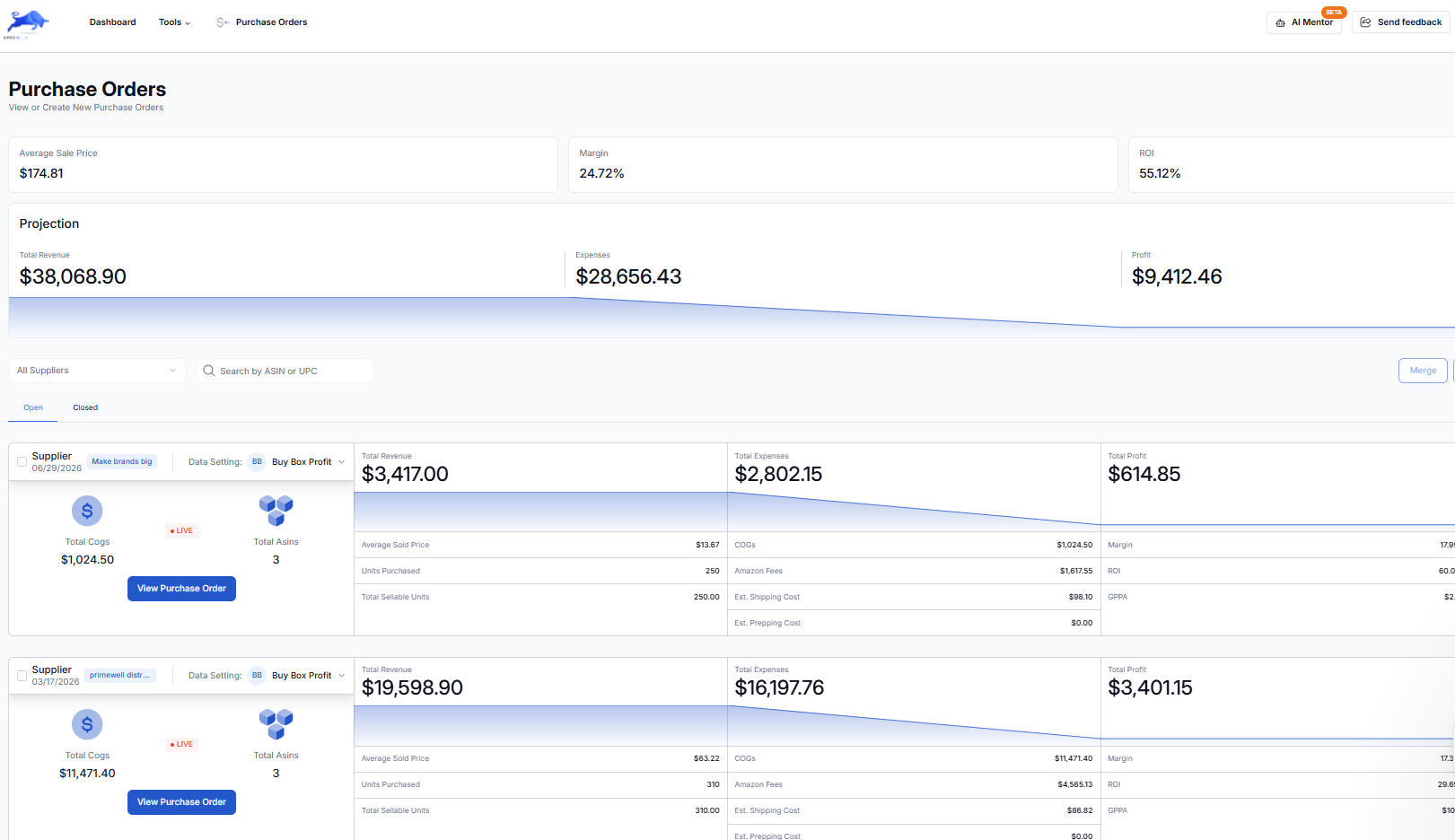
Apex Blue builds a purchase order from your product database or from a supplier scan. Each order shows landed cost, projected revenue, profit and ROI. When you submit an order, its unit costs become the cost of goods for those products in your profit and loss, and a cost you type yourself always wins. The inventory view shows days of stock left and what needs restocking. Its restock suggestions come from your stock, your sales velocity and the cover you set, so they are not a demand forecast.
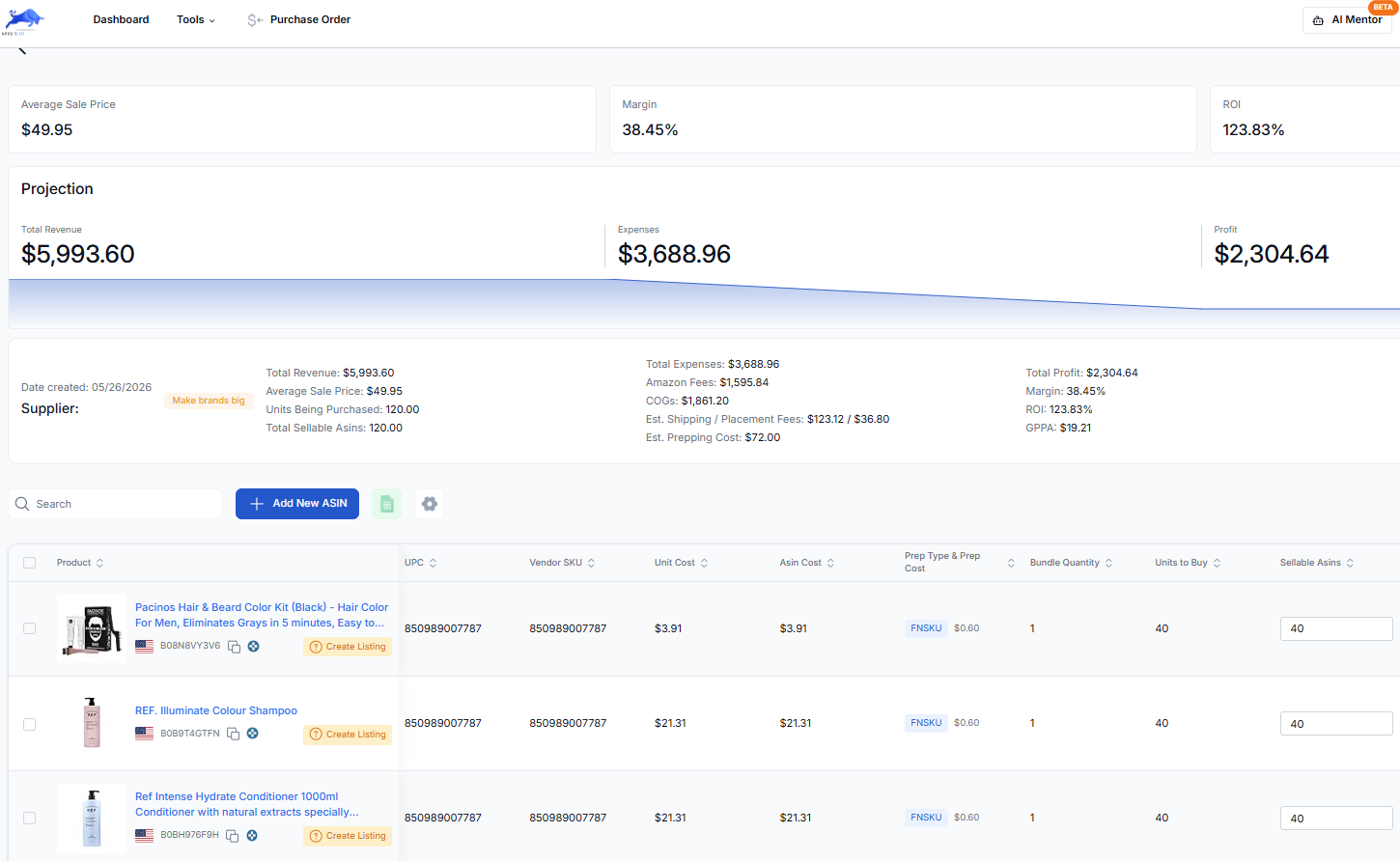
From Stef's lesson (Purchasing, at 30:22), filmed on an earlier version of the app: once the supplier is paid, he submits the order, which moves it to closed orders, and uploads the supplier's invoice to it, so he can find it later by searching the ASIN. Our account health guide shows how he keeps invoices findable.
| Beginner | Starter | Pro | |
|---|---|---|---|
| Price | $49.99 a month | $149 a month | $299 a month |
| Purchase orders with landed cost, profit and ROI | Yes | Yes | Yes |
| Purchase order discrepancy tracking | No | No | Yes |
Every plan starts with a trial. On Beginner: 7 days free, then $49.99 a month, plus tax where applicable. Card required, nothing charged until day 8. Cancel any time before then. The Purchasing and Restocking lessons are part of Apex University, if you want to watch the whole workflow before you try it.
Questions about wholesale purchase orders
How do I create a purchase order for Amazon FBA wholesale?
Start from a current quote from the supplier. List each product with its UPC, the supplier's item code, case pack, number of cases and unit cost, and add a header with your business name and address as they appear in Seller Central, the ship-to address, payment terms and labeling instructions. Send it in the supplier's preferred format and ask for written confirmation before you pay.
What is the difference between a purchase order and an invoice?
You write the purchase order. It says what you want to buy, how many and at what price. The supplier writes the invoice, which bills you for what it sold and shipped. You check the final invoice against your PO and against what actually arrived, and the invoice is the document you keep as proof of where your units came from.
Can I change a purchase order after the supplier has confirmed it?
If it has not shipped yet, ask, and treat any change as a new agreement. Email the change with the PO number, ask the supplier to confirm it in writing, and update your PO so it still matches what was agreed. Once the goods have shipped, a change becomes a return or a credit instead.
What should I do when a supplier sends a different product than I ordered?
Do not label it or send it to Amazon. Photograph the product and its UPC, tell the supplier in writing with the PO number, and ask for a return at their cost or a credit. A substitute has not been through your research, it may sell on a different listing, and you may not be approved to sell it.
Apex University comes with a free Apex account: nine lessons, no card.
New sellers under $5,000 a month in Amazon sales. Unlimited supplier price lists a month, up to 50,000 lines, 500 products, purchase orders and profit and loss.
7 days free, then $49.99 a month, plus tax where applicable. Card required, nothing charged until day 8. Cancel any time before then.
Sources
- How to find wholesalers, Amazon
- Inventory management techniques and best practices, Amazon
- SP-API changelog: US FBA prep and labeling services end, Amazon Selling Partner API
- Invoice requirements for appealing a policy violation, Amazon Seller Central
Reported by others
Some of Amazon's pages need a Seller Central sign-in to read, and we have not yet checked their current wording for this version of the page. If Amazon's page and this guide disagree, Amazon's page is the one that counts.
We build software for Amazon sellers who buy from wholesale suppliers, and we write these guides from what we see in that work.