How to find brands to sell on Amazon wholesale
Find wholesale brands by starting on Amazon and working backward. Note the brands behind listings that sell well, the brands other resellers carry in their storefronts, and those on distributors' lists. Keep a brand when its products sell steadily, its listings have room for one more seller, and your account can sell it. Then ask the brand who supplies it.
- A brand is worth approaching when several of its products sell steadily, other resellers already share its listings, and Amazon isn't the seller on most of them.
- Reverse sourcing starts on Amazon: a listing that sells, then its brand, then the company behind the brand, then the distributors that company supplies.
- Other resellers' storefronts show brands someone has already found a way to buy. Copy their brand list, never their buying decisions.
- Your distributor's price list is a brand list too. A brand that works on two or three lines often has more products worth asking your rep about.
- Check approval and the brand's reseller rules before you write to anyone, and buy only from the brand or one of its authorized distributors.
Many new sellers skip a step in stage 5 of the Amazon wholesale roadmap: deciding which brands are worth chasing at all. Our guide to Amazon wholesale suppliers covers where distributors are and how to vet them. This page is about the step just before that.
Picking brands first makes the supplier search shorter. Instead of applying to every distributor you can find and hoping its catalog has something good, you know which brands you want and you go looking for whoever carries them. Every email you send is specific, and every account you open has products you've already checked.
The methods here come from Stef, who teaches the Finding Suppliers lesson in Apex University, and from how brand research works inside Apex. Where Amazon has a rule that matters, we link Amazon's own US page.
What makes a brand worth approaching
Know what you're looking for before you start looking. A brand is worth an email when most of the points below are true. None of them is a hard rule, and you'll find exceptions to each, but a brand that fails three or four of them usually isn't worth a first order.
| Look for | Why it matters | Where to check |
|---|---|---|
| Several products that sell steadily | One good product is a product, not a brand. A brand with many listings that sell month after month gives you reorders and room to grow with one supplier. | The sales rank and "bought in past month" figures on Amazon, and a year of history on Keepa |
| Other resellers on its listings | It shows the brand's products reach sellers like you through some channel | The list of other offers on each listing |
| Not too many sellers per listing | Every FBA seller priced near the Buy Box shares the sales with you | The offer list, and Keepa's offer count over time |
| Amazon isn't the seller on most of its listings | Where Amazon holds the Buy Box most of the time, there's little left for anyone else | "Sold by" on each listing, and Keepa's Amazon price history |
| Good ratings, and products people buy again | Fewer returns and steadier reorders | Ratings, reviews and the kind of product it is |
| Your account can sell it | Some brands need Amazon's approval, and approval differs from one account to the next | Seller Central's Add a Product tool |
| Easy to prep and ship | Hazmat, meltable, fragile, oversized and short-dated products bring extra rules and costs | The listing details, and our list of products to avoid |
| A way to buy it | You need a distributor that will open an account for you, or a brand that sells direct | The brand's website and distributors' websites |
The first four rows are about demand and competition. Our guide to analyzing a price list goes deeper on reading sales rank and on counting the sellers who really compete for the Buy Box, which is not the same as counting every offer.
The fifth row is the one beginners underrate. Stef makes the case for everyday consumables in the Finding Suppliers lesson:
"In any business, you're going to have refunds, but not that many people are refunding tube of toothpaste or their dog's pet treats. These type of products have a very low return rate, meaning more profit is left behind in your business."
From Stef's lesson (Finding Suppliers, at 0:55)
Big brands or smaller ones?
Household names have the demand, but they're usually the hardest place to start. They sell through large distributors with minimums sized for retail chains, their listings tend to be crowded, and Amazon often sells them itself. You can still buy them, through a distributor that will take a smaller account, but the margins are often thin.
Our rule of thumb, not a law: brands one size down are often the easier first yes. Think of a brand that's well known within its category, sells across a few dozen listings and already has a handful of resellers on them. Very small brands are more likely to sell to you directly, which our guide to brand-direct wholesale covers, but check that there's enough demand on Amazon to make the account worth opening.
Signs a brand doesn't want resellers
Some brands sell happily through distributors to anyone who'll protect their price. Others work hard to keep resellers off Amazon. These are the signs to look for before you spend time on outreach. One of them alone may have an innocent explanation.
- Only the brand sells its fast-moving products, or only the brand and Amazon. Other sellers may have been pushed off. That's a warning sign, not proof.
- Its website has a reseller policy or a list of authorized online retailers, and says that anyone else is unauthorized.
- It sets a minimum advertised price (MAP) and says it enforces it. Not a deal breaker, but expect to be asked to follow it.
- Sellers report complaints from the brand. Search seller communities for the brand's name with words like "IP complaint". Treat what you find as other sellers' reports, not facts, and read our guide to Amazon IP complaints before you buy a brand with that reputation.
- Its products are enrolled in Transparency. Ask your supplier whether the brand uses it. It's a hard stop unless the supplier can give you coded units, and our list of products to avoid covers how to check.
A brand Store on Amazon is not one of the warning signs. Amazon's guide to Brand Stores says a Store requires enrollment in Brand Registry, which requires a pending or registered trademark. So a Store tells you the brand is registered and has built its own presence on Amazon. It doesn't tell you whether the brand welcomes resellers. A registered brand can still sell through distributors, and Brand Registry has a role the brand can give the resellers it works with, which the last section covers.
Brand approval is its own question. Our page on gated brands explains why approval for the same brand can differ from account to account, and how to check yours.
Reverse sourcing from listings you already know
Reverse sourcing means starting from a product that already sells on Amazon and working back to someone who can sell it to you. Ordinary wholesale sourcing runs the other way: a distributor sends you a price list, and you check each line against Amazon. You'll do both. Reverse sourcing is how you decide which distributors are worth applying to in the first place.
Stef sums it up near the end of the Finding Suppliers lesson:
"You go to Amazon, you find the brand that you're looking for, you find who the manufacturer is, you reach out to the manufacturer, they'll give you a list of distributors."
From Stef's lesson (Finding Suppliers, at 23:15)
Here's that loop, one step at a time.
- Start from a listing you trust
A product you already sell, one that passed your checks on a supplier's price list, or one from Amazon's Best Sellers list in your category. You want proof of demand before you spend any time on the brand. Still choosing a category? Our guide to the best categories for Amazon wholesale compares them.
- Find the brand, and the company behind it
The brand name sits just under the product title. Then look for the company that makes or owns it. Many listings show a Manufacturer line in the product details, and the package photos often print "Distributed by" or "Manufactured for" with a company name and city. That company is often the one you'll contact, especially when one parent company owns several brands.
- See everything the brand sells on Amazon
Click the brand name under the title. If the brand has a Store, that opens it. If it doesn't, search the brand's name on Amazon and tick it in the Brands filter on the left of the results. Now you're looking at the brand's whole range, not one product.
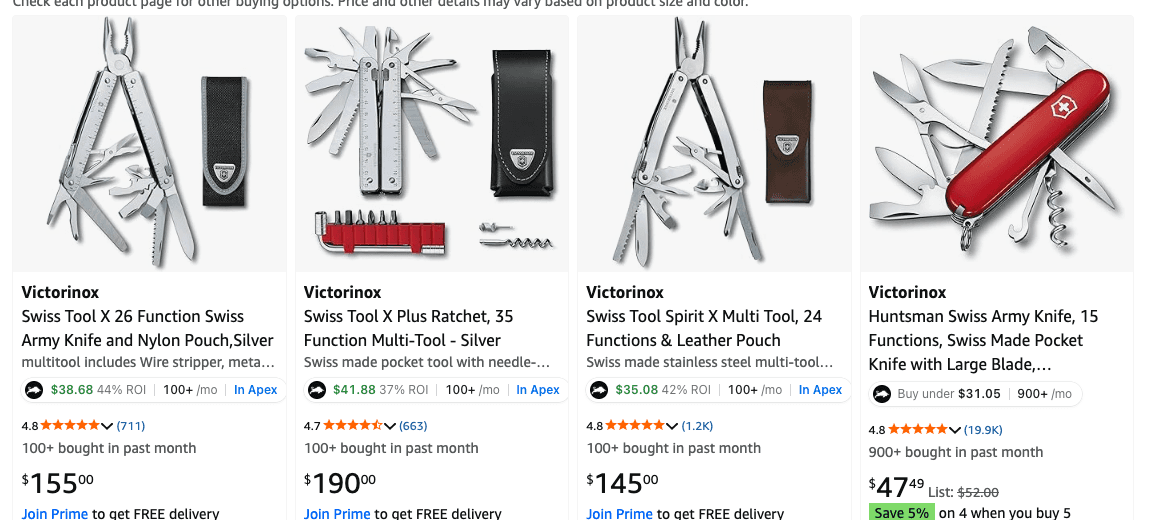
An Amazon search for one brand with the Apex extension's badges under each result, from the example made for its Chrome Web Store listing. - Check the range, not just the product you started with
Run the brand through the table above: how many of its products sell steadily, how many sellers share each listing, and how often Amazon is the seller. A brand where several products pass is worth approaching. A brand where only your starting product passes usually isn't.
- Write it down
Add the brand to your list with what you found and where you found it. You'll come back to it when you look for its distributor, in the last section of this page.
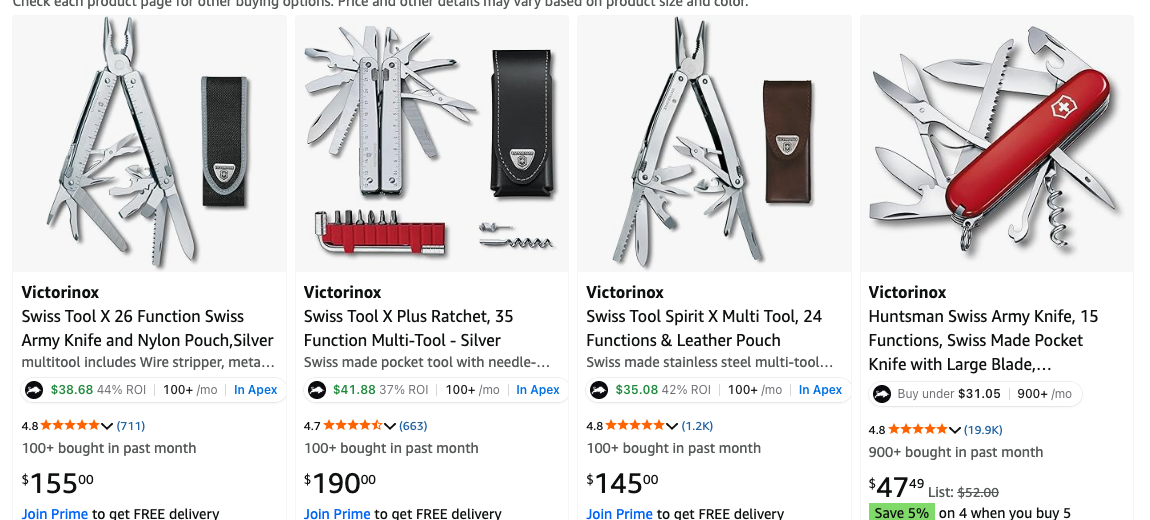
If you use Apex for Amazon Sellers, a brand search on Amazon is quicker to read: each result gets a one-line badge with its monthly sales and either your profit, where Apex knows your cost, or the most you can pay for your target return. It's free to install, and its numbers open when you finish Apex University.
Apex University's Brand Reverse Search lesson walks through the same idea inside Apex. It was recorded on an older version of the software, so some screens look different today.
Names and categories are public, and contacts open with a subscription.
Storefronts of sellers like you
Sellers call this storefront stalking, which makes it sound sneakier than it is. Every seller's storefront is a public page on Amazon. If another reseller is selling a brand, they found a way to buy it, and the brand may be open to sellers like you.
How to open a seller's storefront
- Open a listing in your category that several sellers share, and open its list of other offers.
- Pick a seller who ships with FBA and isn't the brand or Amazon.
- Click the seller's name. That opens their seller profile, with their ratings and feedback, and often their business name and location.
- Follow the link from the profile to the seller's products. That's their storefront: the products they're offering right now. Bookmark it, so you can come back later and see what they've added.
Big storefronts can run to thousands of products. They're easier to read one department at a time, using the filters down the left of the page.
Whose storefront to read
- Resellers, not brands. A storefront with many brands across one or two categories looks like a wholesale buyer. A storefront with one brand is probably the brand itself, or a private label seller.
- Sellers a step ahead of you. A huge store may carry brands that took years of buying history to open. A store a little bigger than yours shows brands you could realistically open next.
- Sellers in the categories you want to sell in, so the brands you find fit the approvals and suppliers you're building.
What to write down
- Brands that appear again and again. A dozen products from one brand suggests a steady supplier. One product from a brand may have been a one-off buy.
- Clusters. Several brands from the same category often come from one distributor's catalog. That's a clue to which distributor to look for.
- Not the bundles. Skip multipacks and bundles the seller put together, and listings where they're the only seller. Those aren't things a distributor can sell you.
What a storefront can't tell you
- What actually sells for them. A storefront shows offers, not sales.
- Where they buy, or whether they're authorized. Some storefronts mix wholesale with online arbitrage, and a brand they bought at retail may not be open to you at all.
- Whether the brand still opens new accounts. A brand that welcomed resellers three years ago may have tightened up since.
So copy the brand list, never the buying decisions. Every brand you take from a storefront goes through the checks at the top of this page, on your own numbers.
You don't need a tool for this, only time. Some research tools will list a storefront's brands for you: SmartScout says you can pull up a seller's storefront to see every brand behind it, and Seller Assistant describes a storefront tool that lists a store's brands. Our comparisons of SmartScout and Seller Assistant cover what else each does. In Apex for Amazon Sellers, the product panel shows who holds the Buy Box, and when Apex knows which seller it is, clicking the name opens their storefront.
Brands behind a distributor's list
Distributors are the other shortcut, because brands are what they sell. Many publish their brands on their websites, as a brands page, a manufacturers page or a line card. In the lesson, Stef opens one distributor's site, finds the page listing its manufacturers and brands, and starts reading off household names:
"And they actually tell you right here who they're buying from and the brands that they have."
From Stef's lesson (Finding Suppliers, at 11:25)
Four places to read a brand list:
- Distributors' websites. Look for pages called brands, manufacturers, line card or product lines. Check each brand on Amazon. The distributor whose brand list best matches what you want is the one to apply to first.
- Your own price lists. Once you have an account, every price list is a brand list. After you've run the list, group the lines that passed by brand. A brand with two or three good lines is one to dig into: look up the rest of its range on Amazon, and ask your rep about the products that weren't on the list.
- The Distributor Vault. In the Distributor Vault, names and categories are public, and contacts open with a subscription. Use it as a list of distributor websites to read for brands in your category.
- Trade show exhibitor lists. Shows publish who's exhibiting, so an exhibitor list is a brand list too. In the trade show part of his lesson, Stef finds out which companies will attend a show, researches their brands on Amazon, and writes down the five or six he wants to meet there. Our suppliers guide covers shows in more detail.
On a distributor's own website, the Apex extension can also put the matching Amazon listing next to each barcode on the page, once you switch it on for that site. That turns a distributor's online catalog into a quick first pass on which of its brands sell.
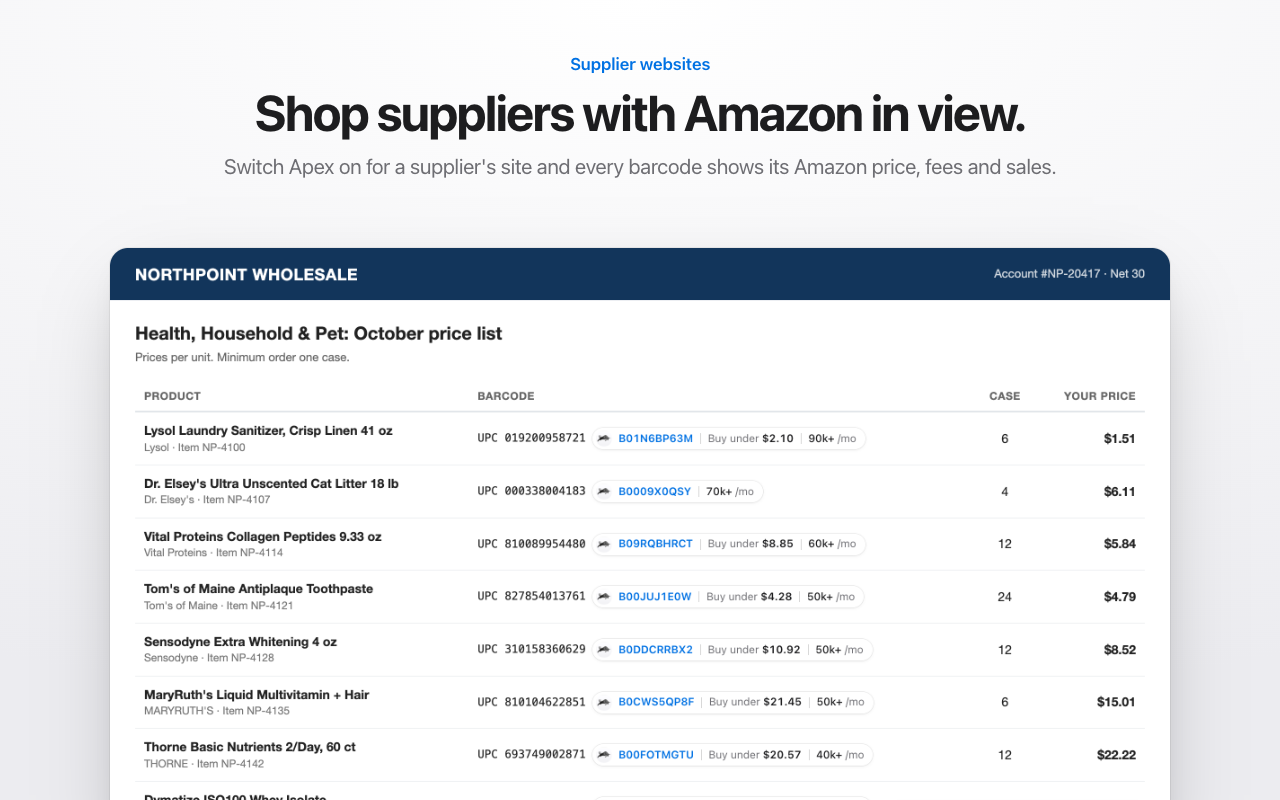
Brand searches in Apex
Apex Green has a Brands page built for this job. It lists brands on Amazon by category. Pick a category, and each row shows a brand's average price and sales rank, how many products it has on Amazon, how many sellers share each listing and how many of them use FBA, the share of its listings Amazon sells on, and its rating and reviews. Sort by any column.
Search a brand and open it, and you see everything it sells on Amazon, with each product's rank, estimated monthly sales, Buy Box price, FBA fees and what's left after Amazon's fees. Open that list in Products to use every filter: a sales rank range, a range for the number of sellers, and Items In My Database set to hide what you already have. What's left is the brand's products you haven't looked at yet.
That last filter is what the walkthrough below calls a reverse search. A supplier sends you one brand, and you see every other product of theirs worth a look.
Then do what Stef describes in the Finding Suppliers lesson (at 21:40): once you see what else a brand sells, email your rep and ask whether they can supply those products too. A brand you already buy is the easiest place to grow.
The Brands page comes with every Apex plan. What changes is how many different brands you can search in a month:
| Beginner | Starter | Pro | |
|---|---|---|---|
| Price | $49.99 a month | $149 a month | $299 a month |
| Brands searched a month | 10 | 25 | Unlimited |
Every plan starts with a trial. On Beginner: 7 days free, then $49.99 a month, plus tax where applicable. Card required, nothing charged until day 8. Cancel any time before then.
From a brand to its distributor
You have a short list of brands. Now you need someone who'll sell them to you, and Amazon is clear about who that should be.
Work through these in order. The early ones cost nothing but a few minutes.
- The brand's website. Look for pages called "where to buy", "find a distributor", "wholesale", "retailers" or "become a dealer", and check the footer. If the brand is owned by a parent company, the parent's website usually has the sales contact. A distributor the brand names itself is the best lead you'll get.
- Ask the brand who it supplies. Big brands rarely open an account for a small reseller, but they can often tell you who will. Our distributor email templates include a first email that asks exactly that.
- Ask the distributors you already buy from. They may carry the brand, or be able to get it.
- Ask a smaller brand to sell to you directly. Our guide to brand-direct wholesale covers how to pitch one.
When the first answer is no, ask the follow-up question. In Stef's experience, a no often comes with names:
"And if these people deny you guys, then you ask them, 'Who do you distribute to that I can buy from?' Because at the end of the day, the supply chain doesn't lie, and all the companies are going to profit eventually."
From Stef's lesson (Finding Suppliers, at 4:34)
Before the first order of a new brand, search a few of its products in Seller Central's Add a Product tool and look for Show limitations. If approval is needed, the ungating guide covers applying, usually with an invoice from the distributor you just found.
Once you're buying a brand regularly, the relationship can give you more than a price list. A letter of authorization is the paper version, and only the brand can give it. If the brand is in Brand Registry, it can also add you in Amazon itself.
Keep a brand list
A spreadsheet is enough. What matters is that every brand you look at gets the same columns, so you can compare them and pick up where you left off.
- The brand, and the company that owns or makes it
- Where you found it: a listing, a storefront, a distributor's brand page, a trade show
- How many of its products sell steadily, and how many sellers share those listings
- How often Amazon is the seller
- Whether your account needs approval for it
- Any reseller policy, MAP policy or Transparency enrollment
- The distributors that carry it, and who you've contacted at each
- The next step, and the date you'll take it
Questions about finding brands to wholesale
What is storefront stalking on Amazon?
It's reading another reseller's public storefront to see which brands they carry, then researching those brands yourself. It's a research shortcut, not a buying list: a storefront shows what a seller offers, not what sells for them, what they paid or where they buy.
Is reverse sourcing the same as online arbitrage?
Not quite. Online arbitrage sellers use the same words for finding an Amazon product on a retail website and buying it there to resell. In wholesale, reverse sourcing ends with the brand or one of its authorized distributors, who sells you cases with invoices. The research on Amazon looks the same. Who you buy from is different.
Can I sell a brand just because other resellers already sell it?
Not necessarily. They may be authorized by the brand, already approved for a brand your account still needs approval for, or buying somewhere you can't. Check the brand's products in Add a Product on your own account, and buy only from the brand or one of its authorized distributors.
Does a brand Store on Amazon mean the brand won't sell to resellers?
No. A Store needs Brand Registry, so it tells you the brand is registered and active on Amazon. A registered brand can still sell through distributors, and Brand Registry has a Reseller role a brand can give to the sellers it works with. Look for a reseller policy, MAP or Transparency instead.
Apex University comes with a free Apex account: nine lessons, no card.
New sellers under $5,000 a month in Amazon sales. 2 supplier price lists a month, up to 20,000 lines, 500 products, purchase orders and profit and loss.
7 days free, then $49.99 a month, plus tax where applicable. Card required, nothing charged until day 8. Cancel any time before then.
Sources
- How to find wholesalers, Amazon
- Guide to Brand Registry roles, Amazon
- Transparency, Amazon
- Creating an Amazon storefront (Brand Store), Amazon
We build software for Amazon sellers who buy from wholesale suppliers, and we write these guides from what we see in that work.
Copy-paste emails for a first message to a distributor or brand, an honest answer to 'do you sell on Amazon?', follow-ups, an LOA request and a script.