Online arbitrage vs retail arbitrage: what each is, and which fits you
Online arbitrage and retail arbitrage both mean buying products below their Amazon price from another retailer and reselling them on Amazon. The only difference is where you buy: online arbitrage uses retail websites, retail arbitrage uses physical stores. Everything after the purchase works the same, and neither gives you a supplier you can reorder from.
- Online arbitrage, also called ecommerce arbitrage or online retail arbitrage, buys from retail websites. Retail arbitrage buys in physical stores with a phone in hand.
- Amazon applies the same rules to both: genuine products, approval where it asks for it, New only when the item is as it came off the shelf, and an Amazon barcode on every unit you send to its warehouses.
- A store receipt isn't the manufacturer or distributor invoice Amazon asks for when a product needs approval, so arbitrage works best in products that are open to your account.
- Both are cheap ways to learn listings, fees and prep. Neither gives you supply that repeats, which is why many sellers move on to wholesale.
- Apex doesn't sell an arbitrage tool. Amazon's own Seller app, the Add Products search in Seller Central and the calculator on this page cover the basic checks on a find.
People often talk about online and retail arbitrage as if they were two different businesses. They're really one business with two shopping trips. You find a product that sells on Amazon for more than you can buy it for, you buy it, and you resell it. What changes is where the hunting happens, how your hours get spent, and how much you can see before you pay.
This guide defines both, puts them side by side, walks through the Amazon rules that apply to each, and shows how to check a find before you spend money on it. It ends with a look at when arbitrage stops being the right model. If you want the bigger picture first, reselling on Amazon compares every way of getting stock, including wholesale and private label.
What is online arbitrage?
Online arbitrage means buying products on retail websites at a price below what they sell for on Amazon, then reselling them on Amazon for a profit. You might find the deal on a store's website, a sale page, a clearance section or a marketplace, place the order online, and have it shipped to your home or to a prep center. From there it goes to Amazon like any other inventory.
You'll also see it called ecommerce arbitrage or online retail arbitrage. All three names mean the same thing. Sellers often shorten it to OA.
A typical online arbitrage find goes like this:
- You spot a product on a retailer's site that's marked down.
- You look up the same product on Amazon and check its price, its sales rank, who sells it and whether you're allowed to list it.
- You work out what Amazon's fees leave you after the purchase price, tax, shipping and prep.
- If the numbers work, you buy, receive the units, label and prep them, and send them to Amazon.
The big advantage is reach. You can check dozens of retailers from one chair, at any hour, without driving anywhere. The big drawback is that you can't see the product before you pay. You find out what arrived when you open the box.
Online arbitrage is not dropshipping. In online arbitrage you take delivery of the stock and then sell it as your own. Having a retailer ship an order straight to your Amazon buyer is a different thing, and Amazon prohibits it (more on that in the rules below).
What is retail arbitrage?
Retail arbitrage means buying products in physical stores at a price below what they sell for on Amazon, then reselling them on Amazon for a profit. Amazon's own guide to reselling defines it the same way, as a way of capitalizing on retail deals, and says it can work if you follow Amazon's selling guidelines.
So the meaning of retail arbitrage is simple: the store shelf is your supplier. Sellers often shorten it to RA. In practice it looks like this:
- You visit big-box stores, outlets and clearance aisles.
- You scan barcodes with a phone app to see what each product sells for on Amazon and whether it's worth buying.
- You buy the items that clear your numbers, take them home, and prep, label and ship them to Amazon.
The big advantage is that you can pick the item up. You can check the box for damage, see the expiration date, and make sure it's the exact size and pack count the Amazon listing shows. The big drawback is reach. You can only shop the stores you can drive to, and only what they have on the shelf that day.
Online arbitrage vs retail arbitrage, side by side
Here is the comparison in one table. Both models end in the same place, an offer on an existing Amazon listing, so the differences are all on the buying side.
| Online arbitrage | Retail arbitrage | |
|---|---|---|
| Where you buy | Retail websites and online marketplaces | Physical stores: big-box, outlets, clearance aisles |
| How you find a deal | Browsing retailer sites and sale pages, or software that matches retailer catalogs to Amazon | Walking the aisles and scanning barcodes with a phone app |
| Seeing the item before you pay | No. You see it when it arrives | Yes. You can inspect the box on the shelf |
| How stock reaches Amazon | The retailer ships to you or a prep center, then you send it to Amazon | You carry it home, prep it and send it to Amazon |
| Costs on top of the item | Sales tax, any retailer shipping, prep and shipping to Amazon | Sales tax, fuel and travel time, prep and shipping to Amazon |
| Reach | Any retailer that ships to you | The stores within driving distance |
| Where your hours go | Screen time checking matches, then unboxing deliveries | Driving, aisle time and checkout lines |
| Buying the same deal again | Sometimes, while a sale lasts | Rarely, once the clearance shelf is empty |
| Your paper trail | Order confirmations and receipts from the retailer | Store receipts |
| The mistake that costs most | A wrong match: a different size, pack count or variation from the Amazon listing | Buying clearance stock that turns out to be damaged or no longer New |
Notice what's the same in both columns. Every unit is a separate buying decision, and the paper trail is a retailer's receipt. Those two facts drive most of what follows.
Why online arbitrage usually reaches further
A retail arbitrage seller can only grow by driving further or waiting for the next clearance cycle at the same stores. An online seller can check far more retailers in the same hour, and an online sale isn't limited to what one store has on its shelf. That's why sellers who start in stores often add online sourcing when they want to grow.
Online doesn't remove the real limit, though. Someone still has to check every product, one at a time, and the deal you found this week may not exist next week. Software can find more candidates, but it can't make a clearance sale repeat.
The Amazon rules that apply to both
Amazon's rules don't change with how you bought something. They're about whether the product is genuine, whether you're allowed to sell it, what condition it's in and where it came from. Some of these rules live on Seller Central help pages that need a sign-in, so we couldn't check their current wording. Where Amazon says the same thing on a public page, we link that page too.
Sell only genuine products. This is the rule every other rule protects.
Amazon's guide to reselling adds practical advice that fits arbitrage well: research where products come from before you buy, check that they're authentic, undamaged and working, and keep records of what you bought, such as invoices.
Get approval where Amazon asks for it. Some categories, brands and products need Amazon's approval before you can list them. Sellers call it being gated.
This is where arbitrage runs into trouble, because of the documents approval asks for.
A store receipt shows you bought something. It doesn't show where the product came from in the supply chain, and it doesn't come from a manufacturer or distributor. Amazon's reselling guide is careful on this point: when you resell a product bought from a retailer, you might need additional documents, such as invoices.
The practical lesson for both models: stick to products that are open to your account, and don't buy a gated product hoping a receipt will get you approved. The ungating guide explains how approval works, the gated categories list shows where it applies, and Amazon ungating invoice requirements covers what makes an invoice pass.
List New only when it's really new. Amazon's condition guidelines describe a New product as one in its factory packaging, as if you'd just walked into a store and taken it off the shelf. Clearance stock with a crushed box, a broken seal or a missing part doesn't meet that. And a buyer paying for New expects a clean box, so peel off price and clearance stickers before you ship.
Don't let a retailer ship to your buyer. This is the line between online arbitrage and something Amazon prohibits.
Amazon's guide to reselling puts it in one line: drop-shipping retail-to-retail is prohibited. A retailer's delivery usually comes in the retailer's box with the retailer's paperwork, so this is the version arbitrage sellers need to stay away from.
Amazon's reselling guide also says two other sources are off limits: auctions and liquidation aren't valid sources of supply. Liquidation pallets and auction lots often get sold as cheap arbitrage stock, so it's worth knowing that up front.
Label and prep every unit you send to Amazon. Two 2026 changes hit arbitrage sellers harder than most, because arbitrage stock arrives as many different products in small quantities.
- Amazon ended commingling for inventory shipped on or after March 31, 2026. Resellers who aren't a brand's Brand Representative in Brand Registry now have to put an Amazon barcode sticker on their units, even when the product already has a manufacturer barcode (Amazon's announcement).
- Amazon stopped offering prep and item labeling for US FBA shipments on January 1, 2026 (Amazon's developer notice). That work is yours, or a prep center's.
FNSKU labels explained shows how to label, and Amazon rule changes for resellers keeps the running list of what else changed. Small mixed shipments can also change what you pay to send stock in, which the inbound placement fee guide explains.
Apex University comes with a free Apex account: nine lessons, no card.
How to check a find before you buy
Whether you're in a store aisle or on a retailer's website, the check is the same. It takes a few minutes per product, and it's the habit that separates sellers who make money from sellers who collect inventory.
- Match the exact product
Find the Amazon listing for the item in front of you. Scan the barcode, or search by the UPC or the exact name. Then compare the size, the count, the color or flavor and the pack quantity. A two-pack on Amazon and a single unit at the store are not the same product, and it's an easy mistake to make online, where you can't hold the box.
- Check that you can sell it
In Seller Central, go to Catalog, then Add Products, and search for the same listing. Amazon's guide to finding wholesalers explains what you'll see: if the product requires approval, Show limitations appears next to it, and an Apply to Sell button starts the approval process when there is one. The Amazon Seller app has an Add a Product option too, but read the note on the app further down before you rely on its scan screen.
- Look at who sells it and the price history
See how many sellers share the listing and whether Amazon itself is one of them. Then look at the price over the last few months rather than today's price, because a price spike can vanish by the time your units arrive. A price history tool such as Keepa shows this, and how to read a Keepa chart explains what to look for.
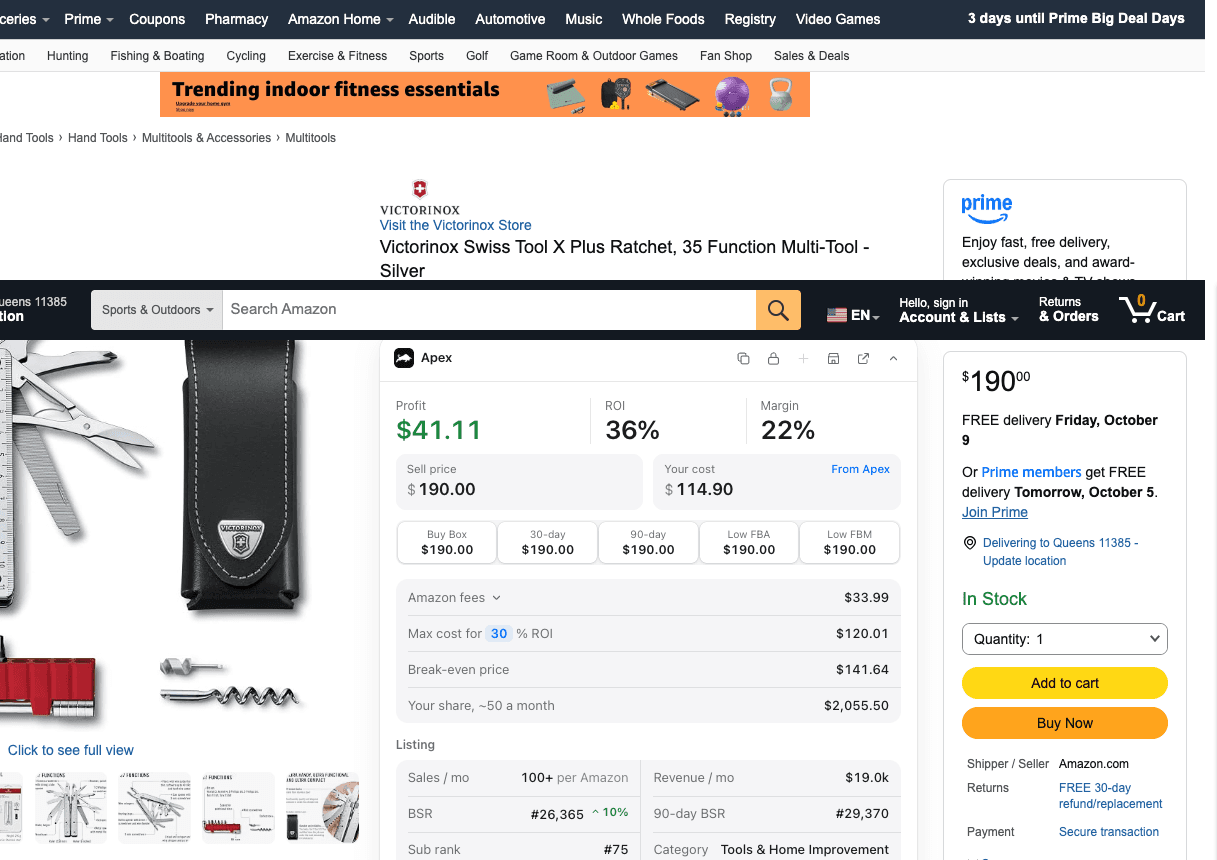
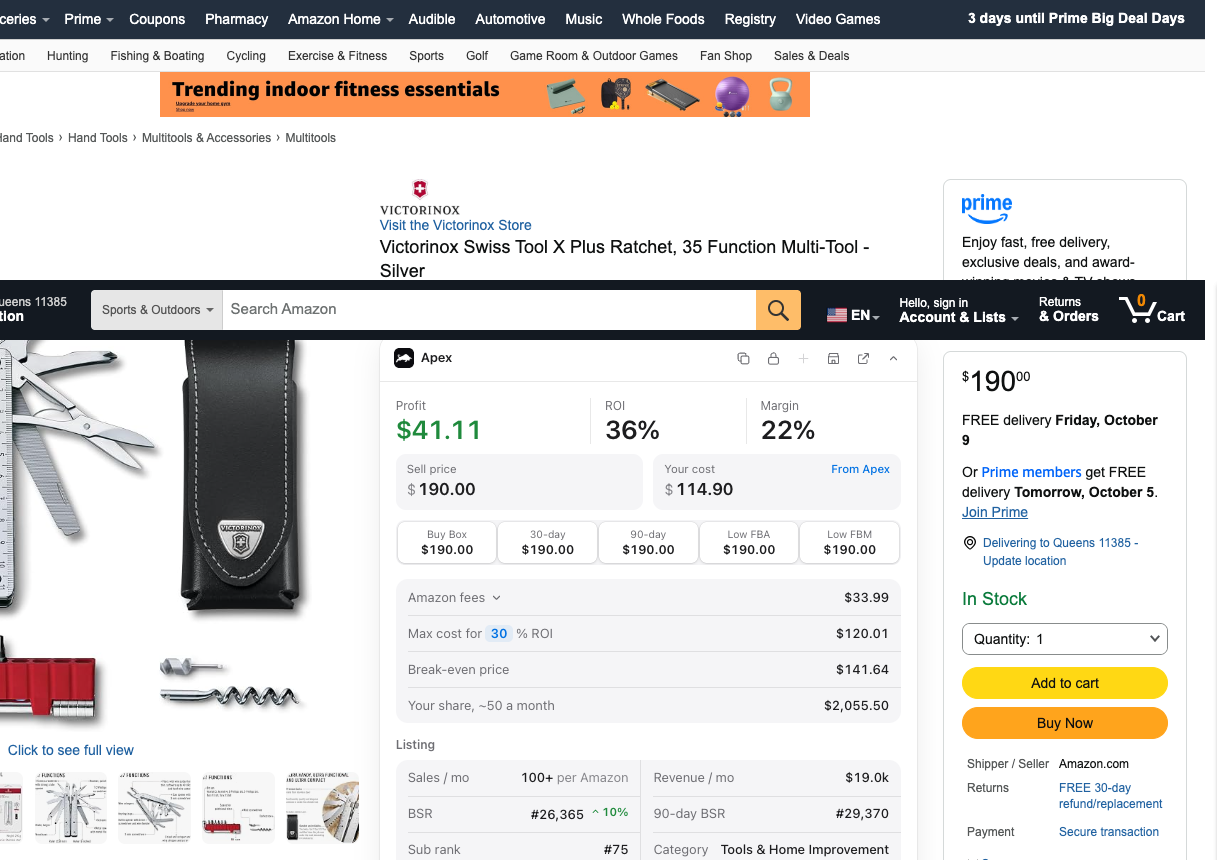
Two checks on one listing: Amazon.com is the seller (bottom right), and the 30-day and 90-day prices match today's. The panel in the middle is our Chrome extension. - Work out what's left after fees
Amazon takes a referral fee on every sale and, if it ships the order, a fulfillment fee. Add what you'll pay in sales tax, shipping, labels and prep. The Amazon FBA fees guide explains each fee, and the calculator below does the math.
- Check the item itself
In a store, check the box, the seal and any expiration date before you buy. Online, check the seller is the retailer itself and read the return policy, so you're not stuck with a wrong or damaged delivery.
- Keep the paperwork
Save the receipt or order confirmation for every buy, filed so you can find it by product. It won't get you approved in a gated category, but it's your record of where each unit came from.
The calculator
Use this for step 4. Type the Amazon selling price, pick the fee category, and type the FBA fulfillment fee from Amazon's Revenue Calculator (we haven't copied Amazon's fulfillment table onto this site yet, so we don't guess it). Add your prep and shipping cost per unit.
In a store, the Most I can pay mode is the useful one. Type the return you want and it shows the most you can pay per unit and still get there. Compare it with the shelf price plus sales tax, and walk past anything that comes out higher.
Profit and most-you-can-pay calculator
Per unit, from Amazon's FBA fulfillment fees page or Amazon's Revenue Calculator. Leave it empty if you ship orders yourself.
Per unit.
Per unit: storage, returns, ads, anything else you count.
Per unit.
Type what you pay the supplier.
Runs in your browser from Amazon's published US fee tables. Nothing you type is sent anywhere.
The best apps for retail arbitrage
You don't need much to start. Here's what to try, in the order we'd try it.
Amazon's own Seller app
Start with the Amazon Seller app. Amazon's guide to the app says you can download it at no cost, and all you need is an Amazon selling account. Point your phone's camera at a product or its barcode and the app shows whether it's listed in Amazon's store, its current offers and pricing, and which sellers offer it. If you find something you want to sell, the guide says to select Add a Product to start.
So treat the app as the fastest way to find the listing, and confirm approval in Seller Central's Add Products search before you buy. For fees, Amazon's FBA Revenue Calculator is free to use, has a public version that needs no sign-in, and estimates what you'd keep with Amazon shipping the order or with you shipping it.
Paid scanning apps
Paid apps add faster scanning, saved buying rules and more data on each listing. SellerAmp is one example: SellerAmp says its SAS tool runs as a mobile app, a Chrome extension and a web app, can scan barcodes in a store and analyze them later, and names both retail and online arbitrage among the ways sellers use it. We haven't tested its accuracy, and prices change, so check its own pages before you subscribe.
Tools for online arbitrage
Online arbitrage has its own category: software that searches retailer websites and matches what it finds to Amazon listings. Tactical Arbitrage is a well-known one. Its maker, Threecolts, says it scans more than 1,400 retail sites, matches products to Amazon listings and calculates profit, and sells it on its own or inside its Seller 365 bundle. Whatever finds the candidates, check every match yourself before you buy. The software can match the wrong pack size as easily as you can.
For price history, Keepa is a common choice. Its charts show a product's price and sales rank over time. That matters in arbitrage, because a find that only looks profitable against a short-lived price spike is an easy trap.
Where Apex fits
Honestly, it doesn't, not for arbitrage. Apex sells no arbitrage tool: no in-store scanner app, and nothing that searches retail websites. Our software is built for wholesale, where you scan a supplier's whole price list and turn the best lines into purchase orders.
A few things we make are still useful to an arbitrage seller:
- Our profit calculator works for any Amazon product, including an arbitrage find, and it's free (unlimited, no sign-in).
- Apex University, our video course, teaches the wholesale model that arbitrage sellers often move to. It's free (nine lessons, no card).
- Our Chrome extension, the panel in the screenshot above, shows profit at the cost you type, Amazon's fees and the 30-day and 90-day prices on amazon.com product pages. It runs in Chrome on a computer, not on your phone, so it helps more with online finds than in a store aisle. It's built for wholesale buyers, not as an arbitrage scanner. Apex for Amazon Sellers is free to install from the Chrome Web Store. Its product data opens once you finish Apex University, which comes with every Apex account.
The rest of our calculators and tools are on the tools page.
What each costs in time and money
You'll see confident numbers online for how much arbitrage takes to start and how many hours it eats. We're not going to give you one. There's no reliable published figure, and what you need depends on the products you choose and what's near you. Here's what actually costs money and time in each model, so you can work out your own.
Money, in both models:
- The products themselves, bought one deal at a time, so you can start as small as you like.
- Sales tax at checkout. A store charges it unless it accepts your resale certificate, and each retailer sets its own rules on that. The resale certificate guide explains what the certificate is and how to get one.
- Amazon's selling plan and fees on every sale. The fees guide explains the two selling plans and what each costs.
- Labels, poly bags, boxes and tape, or a prep center's per-unit charges.
- Shipping your boxes to Amazon, plus storage while units wait to sell.
On top of that, online arbitrage adds shipping from the retailer when an order doesn't qualify for free delivery, and the cost of returning wrong or damaged items. If you buy on Amazon.com itself to resell, you pay sales tax there too unless you join Amazon's Tax Exemption Program, which the resale certificate guide covers.
Retail arbitrage adds fuel and wear on your car, and the trips that turn up nothing worth buying.
Time, in both models: finding deals, checking each one, prepping and labeling, building shipments, and handling the odd return. Retail arbitrage spends more of it on the road. Online arbitrage spends more of it at a screen and unboxing deliveries.
The fair way to judge either model is to track it. For four weeks, write down the hours you spend, what you buy and what each unit earns after every fee and cost. Profit divided by hours is your real hourly rate. If it's not worth it to you, you've learned that for the price of a few products. Is Amazon FBA worth it walks through the same question for every model.
Which one fits you
Start from your situation, not from whichever model sounds more exciting.
| If this sounds like you | Lean toward | Why |
|---|---|---|
| You have a car, stores nearby and spare weekends | Retail arbitrage | You can inspect every item and learn fast from the shelf |
| Your time comes in short blocks at a computer | Online arbitrage | You can source at night, between other things |
| You live far from big stores | Online arbitrage | Your reach isn't limited by driving distance |
| You want to see every product before you pay | Retail arbitrage | Online, you only see it when it arrives |
| You want to sell products that need approval | Neither | Receipts aren't the invoices Amazon asks for |
| You want the same products to restock month after month | Neither, eventually | That's what wholesale is for |
Plenty of sellers do both, using whichever channel fits the week. The skills are the same: matching listings, reading prices, knowing the fees, prepping units. Just keep each buy's receipt, because the rules apply to every unit whatever the source.
When to move on to wholesale
Arbitrage is a good teacher. It's also hard to grow, because every unit needs a fresh find and nothing guarantees the next one. These are the signs you've learned what it has to teach:
- You can list, prep, label and ship without looking anything up.
- Most of your hours go into finding the next deal rather than selling.
- Your best sellers are products you can't buy again.
- The products you'd most like to sell need approval, and your receipts won't get it.
- You'd like to plan stock and cash a month ahead instead of a week.
That's when wholesale makes sense. You open an account with a brand or one of its distributors, buy by the case, and reorder the same products when they sell through. The invoices you get are the kind Amazon asks for in approvals. Stef, who teaches Apex University, compares the two main models in lesson one and explains why the course builds around wholesale. On scaling, he's direct:
"And of course, this is a lot easier to scale with proper systems and automations."
From Stef's lesson (The Game, at 4:23)
He's just as clear about the cost in the same lesson (at 4:59): you have to open accounts and build supplier relationships, and you'll be turned down along the way before it starts to pay off.
What carries over from arbitrage is most of the Amazon side: reading listings, fees, prep, labels and shipments. What's new is the buying side: setting up a business suppliers will sell to, opening accounts, and buying a supplier's opening order instead of one deal at a time.
From here:
- Reselling on Amazon compares arbitrage, wholesale and every other model side by side, including retail arbitrage against wholesale.
- How Amazon wholesale works follows the money from brand to buyer.
- Wholesale vs private label covers the other choice you'll hear about.
- The cost to start wholesale works through budgets.
- How to start Amazon wholesale is the step-by-step guide when you're ready.
Questions about online and retail arbitrage
Is retail arbitrage legal?
Amazon allows it. Its guide to reselling describes retail arbitrage and says it can work if you follow Amazon's selling guidelines. Reselling genuine products you bought is an ordinary retail business. Trouble comes from what you sell and how: counterfeits, opened items listed as New, products that need approval, or brands that don't want resellers on their listings. Our guide to reselling on Amazon covers the rules. This is general information, not legal advice.
Which is more profitable, online arbitrage or retail arbitrage?
Neither has a built-in edge on margin, because both depend on the size of each discount you find. Online arbitrage can turn up more candidates per hour, while retail arbitrage lets you skip damaged stock by inspecting items first. Your own numbers decide it: track profit after every fee and cost against the hours you spend, for a few weeks of each.
Is online arbitrage the same as dropshipping?
No. In online arbitrage you buy the stock, receive it, and then sell it on Amazon as your own, usually through Amazon's warehouses. Having a retailer ship an order straight to your Amazon buyer is retail-to-retail dropshipping, which Amazon's guide to reselling says is prohibited. Our dropshipping section explains the one version Amazon does permit.
Does retail arbitrage still work on Amazon?
It can, especially as a way to learn, but the work per unit went up in 2026. Amazon stopped prepping and labeling for US FBA shipments in January, and for inventory shipped since March 31, resellers have to put an Amazon barcode on every unit. Gated products are still out of reach without a manufacturer or distributor invoice, or the brand's letter. Count the extra labeling and prep time when you run your numbers.
Can I do online arbitrage and wholesale at the same time?
Yes, and many sellers do, often keeping some arbitrage going while their first wholesale accounts get established. Keep the records separate by product: receipts for arbitrage buys and invoices for wholesale orders. Expect receipts to carry less weight than distributor invoices if a product needs approval or a brand questions where your units came from.
Runs in your browser, no sign-in, as often as you like.
You don't need to pay for anything at this stage.
Sources
- Guide to reselling in Amazon stores, Amazon
- Amazon anti-counterfeiting policy, Amazon Seller Central
- Categories and products requiring approval, Amazon Seller Central
- How to find wholesalers, Amazon
- Drop shipping policy, Amazon Seller Central
- What are Amazon condition guidelines?, Amazon
- Commingling practices will end effective March 31, 2026 (US notice), Amazon Seller Forums (News_Amazon)
- SP-API changelog: US FBA prep and labeling services end, Amazon Selling Partner API
- How to use the Amazon Seller mobile app, Amazon
- How to estimate profits with the FBA Revenue Calculator, Amazon
Reported by others
- Brand Approval: Invoices vs Receipts and Retail vs Distributor (a seller's post quoting Amazon's decline notice), a seller on the US Seller Forums
- Changes when scanning products with the app (sellers' thread, US Seller Forums), sellers on the US Seller Forums
- SellerAmp SAS, SellerAmp
- Tactical Arbitrage, Threecolts
Some of Amazon's pages need a Seller Central sign-in to read, and we have not yet checked their current wording for this version of the page. If Amazon's page and this guide disagree, Amazon's page is the one that counts.
We build software for Amazon sellers who buy from wholesale suppliers, and we write these guides from what we see in that work.
How do I start? Do I need an LLC, an EIN and a resale certificate? How much money?