Gated brands and auto-ungate lists on Amazon: why no list fits your account, and how to check yours
No public list of gated brands fits your account, because Amazon decides brand approval seller by seller and keeps revisiting it. A shared auto-ungate list shows someone else's account on the day they checked. To know where you stand, search one product per brand in Seller Central's Add Products, then check every product before you buy.
- Brand approval belongs to your account. The same brand can be open to one seller and gated for another, and a brand that is open to you today can need approval next month.
- An auto-ungate list is a list of brands to check, not a list of brands you can sell.
- Some brands say in their own words that they don't want marketplace resellers. Crayola doesn't authorize resellers on any online marketplace, and Nike won't consider marketplace sellers for its retailer program. When Amazon asks for the brand's letter and the brand won't give one, a better invoice won't help.
- Check brand first: one product per brand narrows a supplier's list quickly, but confirm every product before it goes on a purchase order.
- Keep your own list, with the date you checked, and check again before every reorder.
Search for a list of gated brands on Amazon and you'll find plenty of them: brands to avoid, brands that are "auto-ungated," spreadsheets passed around seller groups. They share one problem. Amazon doesn't decide a brand's approval once, for everyone. It decides it for your account, and it keeps deciding.
This page explains why, what an auto-ungate list can and can't tell you, the signs that a brand doesn't want resellers, and how to check any brand on your own account, one product or a whole price list at a time. Then it goes through the brands sellers ask about most, in each brand's own words wherever it publishes a policy. For the application itself, start with the ungating guide. For categories rather than brands, see the gated categories guide.
A note on our sources. Amazon's approval pages in Seller Central need a sign-in, and we couldn't read their current wording for this page. Amazon's side here comes from pages anyone can open: posts by Amazon staff on the US Seller Forums, Amazon's guides on sell.amazon.com, and the published model of the API Amazon offers for approval questions. Each brand's position comes from the brand's own website or filings. Where we couldn't find one, we say so rather than guess.
Why brand gating differs by account
A gated brand is one where Amazon wants to approve your account before you list its products. Amazon decides which products need approval, and it grants approval one selling account at a time. An Amazon staff post on the US Seller Forums sets out where a restriction can sit:
So when two sellers get different answers for the same brand, there's usually an ordinary reason:
- One of you was approved. Each account earns approval with its own documents. A seller who applied with a distributor's invoice for that brand, or with the brand's own letter, can list what you can't.
- The rule changed after one of you looked. A seller in a US Seller Forums thread had sold one brand for about two years when six of its products, all steady sellers, started showing that they required approval, and Amazon wasn't taking applications for them. The staff reply explained that restrictions and policies sometimes change, and that a past approval doesn't settle it, because Amazon keeps deciding which products to restrict as its catalog grows.
- The gate isn't on the brand at all. It can sit on one product, so the rest of the brand is open. Or it can sit on the brand in one category only, so the same brand is open in another. And because Amazon staff say different approvals may need different applications, don't assume a category approval also opens a brand that is gated on its own.
- You're asking about a different condition. The API that Amazon offers for these questions, its Listings Restrictions API, can tie a restriction to a condition, such as New or Used, and its published model lists thirteen conditions. A brand open to you in one condition isn't proof it's open in another, so check the condition you plan to sell.
Amazon's own list of what needs approval lives on its Categories and products requiring approval page, inside Seller Central. We don't know of a public Amazon list of gated brands. Every list you find comes from a seller or a software company, and it describes the accounts it was checked on.
Auto-ungated brands: why another seller's list doesn't apply to you
Sellers call a brand auto-ungated when their account can list it without applying. You'll also hear it used for a brand that was gated on an account and later opened without an application.
Auto-ungate lists turn up in seller groups, in videos and for sale. Even a careful one can't answer the questions that matter to you:
| What the list says | What it can't tell you |
|---|---|
| "This brand is ungated" | Whose account it was checked on, and on what day. Approval is decided account by account, and Amazon keeps revisiting it. |
| "Ungated for new accounts" | Whether your account gets the same answer. We couldn't find an Amazon page on how it decides which brands open on their own. |
| One product checked per brand | Whether every product of the brand is open. A gate can sit on a single ASIN. |
| Nothing about condition | Whether the answer holds for the condition you plan to sell. |
| Nothing about FBA | Whether Amazon's fulfillment centers will take the product. Dangerous goods need a separate review. |
| Nothing about money | Whether the product makes a profit, or whether Amazon itself sells it at a price you can't match. |
Use a shared list the way you'd use a tip from another seller: as brands worth checking on your own account. Don't buy stock on the strength of it.
Build your own list instead
Your own list is the only one that applies to you, and it costs a few minutes a brand. Keep one row per brand with:
- the brand, and the ASIN you checked it with,
- the condition you checked,
- what Amazon showed: open, Apply to sell, or no way to apply,
- the date.
Check again before every reorder, and note any brand whose answer changes. Over time, that list tells you which brands are worth a purchase order and which applications are worth your time. It's also the list to bring to a supplier when you ask what they carry.
Signs a brand restricts resellers
Approval is Amazon's decision, but a brand's own stance can shape it. These are the public signs we look for, each with an example in the brand's or Amazon's own words. One sign alone can have an innocent explanation. Several together, as a rule of thumb, mean the brand is a long road for a new reseller.
| Sign | An example | What it means for an approval |
|---|---|---|
| The brand says it doesn't authorize marketplace sellers | Crayola's FAQ: it does not authorize resellers in any online marketplace, and it can't provide a letter of authorization for Amazon (Crayola) | If the gate needs the brand's letter, the brand has said it won't give one |
| Its retailer program turns away marketplace sellers | Nike's help page: applications to sell Nike product on a digital marketplace such as Amazon or eBay will not be considered (Nike) | You may not be able to buy from the brand at all, so any invoice has to come through its distributors |
| Its own shop isn't for buying to resell | Nike's US Terms of Sale, LEGO's US shop terms and adidas's CONFIRMED app terms all rule it out | The brand's own store isn't a source, and its receipt isn't the invoice an application asks for |
| Amazon staff have told a seller to get the brand's letter | For Funko, an Amazon staff reply said the fix was a brand authorization letter from Funko, after an application with an authorized distributor's invoice was denied (thread) | A distributor's invoice may not be enough on its own |
| The brand's products are enrolled in Transparency | Amazon says a valid code must accompany every unit of a protected product (Amazon) | Only units that arrive with the brand's codes can be listed or shipped, so the stock has to come through the brand's supply chain |
| Show limitations, but no Apply to sell | What your own account shows in Add Products | There's nothing to apply for today |
A brand that restricts resellers may also act on listings once you're selling. Our guide to finding brands covers the warning signs to look for before outreach, and products to avoid has the by-hand check for brands that file complaints, including how to read the seller count over time on a Keepa chart.
How to check a brand on your account
Here is the check that answers the question for you, first for one product and then for a whole supplier list.
One product, by hand
- Pick the exact product
Use the ASIN you would actually buy: the right size, the right variation, in the condition you plan to sell. A similar product from the same brand can give a different answer.
- Search it in Add Products
In Seller Central, go to Catalog, then Add Products, and search by ASIN, UPC or product name.
- Read what comes back
Use the table below. If Show limitations appears, click it and read the summary. If the summary names the brand, the brand's other products will likely give the same answer, but still check each one. If it names a category or a type of product, it tells you about that category, not about the brand.
- If you see Apply to sell, read the form before you buy
The application lists what Amazon wants for that product. That might be an invoice, a letter from the brand, or both. Decide whether you can get it before you spend money on stock.
Amazon's developer documentation for the Listings Restrictions API describes the answers in its own terms. Here's how they line up with what you see:
| What you see in Add Products | How Amazon's API describes it | What to do |
|---|---|---|
| No limitation shown | No restriction for your account | You can list it. FBA rules, such as dangerous goods review, still apply |
| Show limitations, with Apply to sell | Approval required, with a link that may let you remove the restriction | Read the application, then decide whether you can supply what it asks for |
| Show limitations, with no way to apply | Not eligible, and no link is provided to remove the restriction | Skip the product. There's nothing to apply for today |
| The product isn't found | The ASIN doesn't exist in that marketplace | Check the code you searched, and that the listing is on amazon.com |
A whole price list, brand first
A distributor's price list can carry hundreds of brands. You don't need to check every line before you know which brands are worth your time.
- Do the profit work first. Approval only matters for products you'd buy. Our guide to analyzing a wholesale price list gets you to a short list.
- Group the short list by brand, and check one product per brand. A brand-level gate shows up on any of its products, so one check per brand sorts the list into brands that are open, brands you can apply for, and brands with no way in.
- Then check every product you'll order. One product per brand can't catch a gate on a single ASIN, or a brand that is open in one category and gated in another. Before a line goes on a purchase order, check it on its own.
- Weigh the applications. An approval that opens a brand with, say, forty profitable lines on your supplier's list is worth more than one that opens two. Apply where the paperwork unlocks the most of what you'd buy anyway.
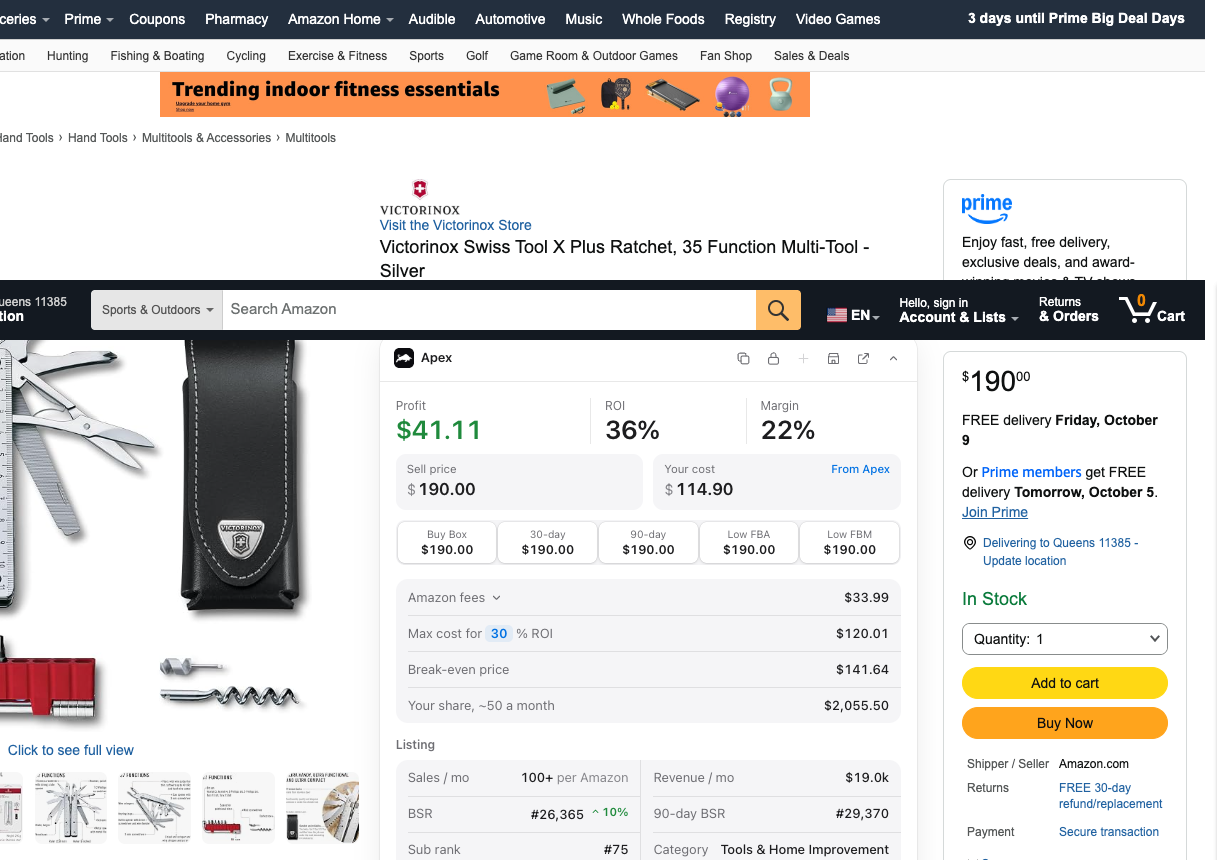
If you browse on amazon.com, Apex's Chrome extension, Apex for Amazon Sellers, can ask the same question from the product page. Its Check if you can sell it button asks Amazon about your account, once your seller account is connected to Apex, and shows Ungated, Needs approval, Can't sell, or Amazon didn't say. It's free to install, and its numbers open when you finish Apex University. The extension page explains what it needs.
If the answer is Apply to sell
An application for a brand asks you to show where your stock came from. Amazon's wholesale guide says branded products should come straight from the brand or from one of its direct distributors or wholesalers, and that a product needing approval may call for a purchase invoice or a letter from the brand. So the work is finding who supplies the brand, and that starts with who makes it. Stef, who teaches Apex University, describes it this way:
"You go to Amazon, you find the brand that you're looking for, you find who the manufacturer is, you reach out to the manufacturer, they'll give you a list of distributors."
From Stef's lesson (Finding Suppliers, at 23:15)
The invoice requirements guide covers what the invoice has to show, line by line. When a brand only wants authorized resellers, an invoice may not be enough, and you need the brand's letter of authorization. Our letter of authorization guide explains who can issue one and how to ask.
What not to do
- Don't buy a brand's stock from its own store to resell. Nike's, LEGO's and adidas's own shop or app terms all rule out buying for resale, and a store receipt isn't the manufacturer or distributor invoice an application asks for.
- Don't create a new product page to get around a gate. Amazon's wholesale guide says that when a product is already sold in the store, you match your offer to its existing product detail page using the product ID. New pages fall under Amazon's ASIN creation policy.
- Don't buy a list, or an approval. A paid list has the same problems as a free one. A service that offers to supply invoices or letters from companies you never bought from puts your whole account at risk. The ungating guide covers the safe routes.
Apex for Amazon Sellers is free to install, and its numbers open when you finish Apex University. Create a free account, work through the lessons, then install it from the Chrome Web Store.
Brands people ask about
These are the brands sellers ask about most. For each one: what the brand says in public, what that means on Amazon, and what to check. None of it tells you your account's answer. Only Add Products does.
| Brand | What the brand publishes | What it means for you |
|---|---|---|
| Nike | Marketplace applications to its retailer program won't be considered | The letter Amazon has pointed a seller to is hard to get |
| adidas | Its US app terms forbid buying for resale; we found no public retailer policy | Its own shop isn't a source |
| Pokémon | Merchandise is licensed only for its own channels and major retailers | No small-retailer route to merchandise from Pokémon Center |
| LEGO | Its US shop is for personal use, not resale | A LEGO Shop order can't support an application |
| Disney | It licenses its characters for use on other companies' products | Trace the company that made it |
| Crayola | It doesn't authorize resellers in any online marketplace | If the brand is the gate, it stays shut |
| Dove, Colgate, Tide | We found no public reseller policy | Check your account, and watch for dangerous goods lines |
Nike
Nike's help page on becoming a Nike-authorized retailer says the program is reserved for conventional retail businesses, and that applications to sell Nike product on a digital marketplace such as Amazon or eBay will not be considered. Nike's US Terms of Sale also say purchase of products for resale from Nike's own stores is strictly prohibited.
On Amazon's side, a seller on the US Seller Forums applied for Nike more than once, with documents from Nike and from a department store. The Amazon staff reply in that thread said the seller would need a letter of authorization from Nike to sell its products.
Put those together and the document Amazon pointed to comes from a company that says it won't consider marketplace sellers for its retailer program. That's our reading of the two pages, not a rule from either company. Your account may still show something different, so search the exact product before you decide, and don't buy Nike stock hoping an application will work out.
adidas
We couldn't find a public adidas page about becoming an authorized retailer or about selling on marketplaces. What adidas does publish, in the US terms for its CONFIRMED app, is a no-reselling rule: you may not use the app to buy items for resale, and adidas can cancel orders and close accounts it believes are buying to resell.
So the brand's own app isn't a supply source, and its receipt wouldn't be the invoice Amazon asks for anyway. Check the exact product on your account. If Apply to sell appears, the invoice should come from adidas or a distributor it supplies.
Pokémon
Pokémon Center's support page on distributors says its items are licensed for sale only through Pokémon Center, its vending machines and limited-time deals with major retailers such as Target and GameStop, and that it doesn't offer licensing or wholesale pricing to smaller retailers for merchandise. The exception it names is the Pokémon Trading Card Game, which is distributed through its partnerships with mass-market retailers.
Two more things are worth knowing. The Pokémon Company International is responsible for licensing outside Asia, so a Pokémon product can be made by a licensed company rather than by Pokémon itself, and the invoice that matters traces to that maker. And cards are often sold as collectibles, so check the condition you plan to sell as well as the brand.
If a supplier offers you sealed Pokémon product, ask in writing where it buys it. Amazon's wholesale guide says sellers are responsible for selling authentic products, fake cards are what its anti-counterfeiting policy is about, and a trail you can't trace back to the publisher won't help you if a listing is questioned.
LEGO
LEGO's US shop terms say the LEGO Shop is intended for consumers buying for personal use, not for resale or commercial use, and that it can't issue a tax invoice that includes business details. So a LEGO Shop order can't give you the business invoice an application asks for, and buying there to resell goes against LEGO's terms.
We couldn't find a page where LEGO sets out terms for selling on marketplaces. Most LEGO sets sit in Toys and Games, where holiday selling requirements have been reported for the winter season; the gated categories guide has the detail. As with every brand here, the check on your own account is the answer.
Disney
Disney's annual report says it licenses characters from its film, television and other properties for use on third-party products, across toys, apparel, games, home décor, health and beauty, food and more (Form 10-K). In other words, many Disney products are made by other companies under license. A LEGO set with Disney characters, for example, is made by the LEGO Group.
That changes what you check. The supply chain to trace is the maker's, so the invoice should come from that company or its distributor. The brand shown on the Amazon listing may be the maker's name rather than Disney's, so check approval on the exact product, not on the word Disney. And stay away from anything that uses Disney characters without a license: unlicensed character goods are the kind of listing that draws an IP complaint. We couldn't find a page where Disney publishes a policy for marketplace resellers.
Crayola
Crayola is the clearest case on this page, because it says it in writing. Its wholesale FAQ states that it does not authorize resellers in any online marketplace, naming Amazon, eBay, Walmart and Alibaba. In answer to how to sell Crayola on Amazon, it says it is unable to provide a letter of authorization.
The same wholesale FAQ sets minimums for buying direct and names authorized distributors for smaller retailers. Buying from one of them gets you genuine stock, but Crayola's marketplace line covers everyone, so it doesn't make you an authorized Amazon seller of Crayola. If Crayola needs approval on your account and the application asks for the brand's letter, the brand has said no. If it's open on your account, you can list it, but know where the brand stands before you buy deep.
Dove, Colgate and Tide
We looked for a published reseller or marketplace policy from Unilever (which makes Dove), Colgate-Palmolive and Procter & Gamble (which makes Tide), and found none. That isn't evidence that they welcome resellers. It only means there's nothing public to quote.
These are the everyday brands on grocery and health and beauty price lists, and for a reason. In his Finding Suppliers lesson, Stef explains why wholesale sellers favor products like these: few people return a tube of toothpaste, and consumables get bought again (Finding Suppliers, at 0:55).
Three checks matter more for these brands than a list:
- Approval on your account. Beauty, and Health and Personal Care, are reported to have gated subcategories (see the gated categories guide), and a brand can be gated on its own. Search the exact product.
- Dangerous goods. Amazon's own examples of everyday dangerous goods include dishwashing and laundry detergents, deodorant sprays, and mouthwash with alcohol. That's a separate FBA review, not an approval, and our guide to products to avoid explains it.
- Amazon on the listing. Amazon may be selling the product itself. The same guide shows how to tell, and when that rules a product out.
To buy them, work back from the maker: the parent company, then the distributors it supplies. The Distributor Vault lists US distributors by name and category, and our wholesale suppliers guide covers how to vet one before you open an account.
Whether reselling a brand is legal at all is a different question from whether Amazon approves you. Our page on whether reselling on Amazon is legal covers that side, and an authorized reseller relationship, when a brand offers one, is covered in the letter of authorization guide.
Questions about gated brands
Is there an official list of gated brands on Amazon?
Not one we know of. Amazon keeps its rules on approvals inside Seller Central, and it decides brand approval account by account, so a universal list couldn't be right for everyone. Lists you find online describe the accounts they were checked on. To know about a brand, search one of its products in Add Products on your own account.
What does auto-ungated mean on Amazon?
It's a seller term, not an Amazon one. It means your account can list a brand or product without applying, or that something gated on your account opened later without an application. We couldn't find an Amazon page that explains how or when that happens, so treat it as something to check for, not something to plan around.
Can a brand that was open to me need approval later?
Yes. Amazon staff have said restrictions and policies change, and that Amazon keeps making new determinations about which products need approval as its catalog grows, even for sellers who were approved before. Check each product again in Add Products before you reorder it.
Why does one product need approval when the rest of the brand is open?
Because a restriction can sit on a single ASIN, or on a brand in one category only. Amazon staff list individual ASINs, brands, brands within categories, categories and subcategories as levels where a restriction can apply. That's why a brand-first check narrows a list but doesn't replace checking each product you'll order.
Does approval for a brand in New condition cover used or collectible items?
Don't assume it does. Amazon's Listings Restrictions API reports a restriction for a condition, such as New, Used or Collectible, so the answer can differ between them. Search the product in the condition you plan to sell, especially for collectibles such as trading cards.
You don't need to pay for anything to apply. Amazon decides every application.
Sources
- Requesting approval to sell a brand (staff post), Amazon Seller Forums (Manny_Amazon)
- Listing is still active but I can't send inventory (thread with an Amazon staff reply, US Seller Forums), Amazon Seller Forums
- How to find wholesalers, Amazon
- Categories and products requiring approval, Amazon Seller Central
- ASIN creation policy, Amazon Seller Central
- Amazon anti-counterfeiting policy, Amazon Seller Central
- Transparency, Amazon
- Listings Restrictions API model, version 2021-08-01 (reason codes and conditions), Amazon Selling Partner API
- What Amazon FBA sellers should know about dangerous goods (hazmat), Amazon
- Funko application denied with an authorized distributor's invoice (thread with an Amazon staff reply, US Seller Forums), Amazon Seller Forums
- How do I become a Nike-authorized retailer?, Nike
- Nike Terms of Sale (US), purchase for resale, Nike
- adidas CONFIRMED app terms (US), section 9, No Reselling, adidas
- Where can I find information about distributors? (Pokémon Center support), The Pokémon Company International
- About The Pokémon Company International, The Pokémon Company International
- LEGO Shop terms and conditions (US), The LEGO Group
- The Walt Disney Company annual report on Form 10-K, fiscal 2025 (merchandise licensing), The Walt Disney Company
- How can I sell Crayola products on Amazon?, Crayola
- What are your requirements to purchase direct or become a wholesaler?, Crayola
Reported by others
- Multiple applications to sell Nike brand (a seller's post quoting Amazon's case message, with an Amazon staff reply), Amazon Seller Forums
- How to find ungated products on Amazon every day (July 2026), SellerAmp
Some of Amazon's pages need a Seller Central sign-in to read, and we have not yet checked their current wording for this version of the page. If Amazon's page and this guide disagree, Amazon's page is the one that counts.
We build software for Amazon sellers who buy from wholesale suppliers, and we write these guides from what we see in that work.
Who can authorize you to sell a brand on Amazon, what a letter of authorization should cover, how to ask for one, and what it does not do for you.