Amazon's inbound placement fee: how it works, with a calculator
Amazon's inbound placement fee is a per-unit charge for sending FBA inventory to fewer warehouses than Amazon would choose. Choose a minimal split, usually one location, and every unit pays a fee set by its size tier and weight, which can be higher in the West. Choose Amazon-optimized splits and there is no fee, but you ship to several warehouses.
- A minimal split sends your boxes to one location (generally) and every unit pays the fee. Amazon-optimized splits send them to several locations with no placement fee. Bulky products can also pick a partial split to two or three locations, at a lower fee.
- The fee depends on the size tier, the shipping weight and the region Amazon sends the shipment to. Amazon publishes a range for each size and weight, and Send to Amazon shows the exact fee before you confirm.
- Extra-large products don't pay it, and Amazon's warehousing service, AWD, includes placement in its own pricing.
- Splitting only saves money when the extra freight to reach more warehouses costs less than the fee you avoid. Price both before you ship.
- Put the fee in your landed cost when you buy the inventory, not weeks later when the charge shows up.
Minimal split vs Amazon-optimized splits
When you create a shipment in Send to Amazon, Amazon asks how you want it split. That one choice decides whether you pay the inbound placement fee, and it's easy to click past.
Here's the idea behind the fee. Amazon wants your stock spread across warehouses near shoppers, so orders arrive faster and cost less to deliver. On its FBA page, Amazon says the cost of this service "covers distributing inventory to fulfillment centers close to customers." If you send everything to one warehouse, Amazon does that spreading for you and charges per unit. If you send your boxes to several warehouses yourself, you've done the spreading, and there's no placement fee.
It's one of the newer lines in the stack of Amazon fees. The fees guide shows where it sits next to the referral fee, the fulfillment fee and storage.
Amazon's help page for this fee needs a Seller Central sign-in, so we couldn't check its current wording for this guide. The summary above and the fee table further down are based on that page. If anything here differs from what Send to Amazon shows you, go with Send to Amazon.
| Option | Where your boxes go | Placement fee | Who can pick it |
|---|---|---|---|
| Minimal shipment split | The fewest locations, generally one | Yes, on every unit | Standard-size and bulky products |
| Partial shipment split | Two or three locations | Yes, lower than a minimal split | Bulky products only |
| Amazon-optimized shipment splits | Several locations Amazon picks | None | Shipments that qualify |
Why you might not see every option
Amazon only offers the options a shipment qualifies for. When a seller asked why they couldn't get the no-fee option, an Amazon staff member on the US Seller Forums listed what affects it:
- whether the shipment mixes standard-size items with larger items or special handling items,
- whether every box holds the same items in the same quantities,
- how many boxes there are of each item,
- and where the demand for the product is.
The reply's advice was to send standard-size items in a separate shipment from larger and special handling items, keep the boxes identical, and add more boxes.
This is where wholesale has an edge. Distributor stock comes in case packs, so sending five or more identical cases of one product is often just a normal shipment. Small mixed boxes, a few units each of many different products, are much harder to fit into that rule.
- Ship standard-size items apart from bulky and special handling items.
- Pack every carton of a product the same way: the same item, the same quantity.
- Aim for at least five identical cartons or pallets per item, the reported minimum for the no-fee option.
- Compare each placement option's fee in Send to Amazon before you confirm.
- Write down the fee you were quoted, so you can match it to the charge later.
The region you end up paying for
With a minimal split, Amazon picks the inbound location. You can set a preferred inbound region in your FBA settings, but when a seller asked how to choose one, an Amazon staff member replied that you can't pick a region outright and that several factors decide where the inventory goes.
The region matters, because the fee changes with it. Here's how another Amazon staff member put it on the US Seller Forums:
"There may be higher fees for shipments sent to locations in the West versus other parts of the country."
Jameson, Amazon staff, US Seller Forums
Which items pay it, and the exemptions
Every unit in a minimal split pays the fee if it's a standard-size or bulky product. The amount per unit is set by the product's size tier and its shipping weight, so a shipment of 240 one-pound units pays the one-pound fee 240 times. The number of boxes doesn't change the fee, though it can change which split options you're offered.
Amazon's public FBA page points the same way: it describes the placement service as covering standard and large bulky products, and doesn't mention extra-large ones.
Amazon sorts every product into a size tier from its packaged size and weight: small standard, large standard, small bulky, large bulky and extra-large. If you're not sure of a product's tier, our FBA calculator looks it up from the ASIN, and the size tiers guide explains how Amazon measures and weighs a product to pick one.
Ways to pay less, or nothing
- Amazon-optimized splits. No placement fee, as long as your shipment qualifies (see above).
- Partial splits, for bulky products. Two or three locations cost less per unit than one.
- Extra-large products. These pay no placement fee at all. Their other FBA fees are a different story, so check them in the fees guide.
- Amazon Warehousing and Distribution (AWD). Amazon says "AWD pricing covers FBA inbound placement", so there is no separate placement charge for stock that reaches FBA from AWD. AWD has its own storage, processing and transportation fees, so compare the whole bill, not just this line.
- A credit for new sellers. Amazon's New Seller Incentives page lists a $400 credit toward inbound placement costs for new Professional sellers who send eligible products into FBA within 90 days of listing. It says the credit expires after one year. Incentives change, so check that page for the current amount and who qualifies before you count on it.
When the fee is charged
When Amazon announced the fee, it said the fee would be charged 45 days after the products are received. That's the timing Amazon gave at launch, and we couldn't confirm it on the current help page, which needs a sign-in. Whatever the exact delay, the charge doesn't come on the day you ship. It lands later, after you've stopped thinking about that shipment.
That delay is why sellers get surprised by it. Write down the fee Send to Amazon quoted for each shipment, and count it in the cost of the inventory the day you buy it. The landed cost section below shows how.
The ranges Amazon publishes, and how we turn them into an estimate
Amazon doesn't publish one price per product. For each size tier and weight band, it publishes a range, from a low figure to a high one. Here is that table for the US store.
| Size tier | Shipping weight | Minimal split (one location) | Partial split (two or three) |
|---|---|---|---|
| Small standard | Up to 0.5 lb | $0.14 to $0.32 | Same as minimal split |
| Small standard | Over 0.5 lb up to 1 lb | $0.16 to $0.32 | Same as minimal split |
| Large standard | Up to 0.75 lb | $0.20 to $0.40 | Same as minimal split |
| Large standard | Over 0.75 lb up to 1.5 lb | $0.24 to $0.50 | Same as minimal split |
| Large standard | Over 1.5 lb up to 3 lb | $0.34 to $0.60 | Same as minimal split |
| Large standard | Over 3 lb up to 5 lb | $0.38 to $0.76 | Same as minimal split |
| Large standard | Over 5 lb up to 7 lb | $0.40 to $0.98 | Same as minimal split |
| Large standard | Over 7 lb up to 10 lb | $0.42 to $1.20 | Same as minimal split |
| Large standard | Over 10 lb up to 15 lb | $0.44 to $1.50 | Same as minimal split |
| Large standard | Over 15 lb up to 20 lb | $0.55 to $1.90 | Same as minimal split |
| Small bulky | Up to 5 lb | $1.10 to $1.60 | $0.55 to $1.10 |
| Small bulky | Over 5 lb up to 12 lb | $1.75 to $2.40 | $0.65 to $1.75 |
| Small bulky | Over 12 lb up to 28 lb | $2.74 to $3.50 | $0.81 to $2.19 |
| Small bulky | Over 28 lb up to 42 lb | $3.95 to $4.95 | $1.05 to $2.83 |
| Small bulky | Over 42 lb up to 50 lb | $4.80 to $5.95 | $1.23 to $3.32 |
| Large bulky | Up to 5 lb | $1.30 to $1.80 | $0.55 to $1.25 |
| Large bulky | Over 5 lb up to 12 lb | $2.10 to $2.90 | $0.65 to $1.80 |
| Large bulky | Over 12 lb up to 28 lb | $3.40 to $4.10 | $0.81 to $2.30 |
| Large bulky | Over 28 lb up to 42 lb | $4.70 to $5.60 | $1.05 to $2.95 |
| Large bulky | Over 42 lb up to 50 lb | $5.50 to $6.50 | $1.23 to $3.50 |
- Amazon publishes a range for each size tier and weight. The exact fee for a shipment is the one Send to Amazon quotes when you create it.
- The fee applies to shipping plans created on or after January 15, 2026. Extra-large products carry no placement fee.
Source: Inbound placement service fee, Amazon Seller Central
How to read the table
- Find the row. Start with your product's size tier, then the weight band its shipping weight falls in. Use the weight Amazon has for the product in its packaging, not the bare item. The FBA calculator shows it for most ASINs.
- The minimal split column is what a single location costs per unit, from the low end to the high end of Amazon's range.
- The partial split column has its own figures only for bulky products. Standard-size rows say "Same as minimal split" because standard-size products have no partial option: for them it's one location with the fee, or Amazon-optimized splits without it.
- Weight bands are narrow at the light end. Small standard has two bands and large standard has several, so a few ounces of packaging can move a product into the next band.
- Bulky rows cost much more per unit, and they're the only rows where a partial split has its own, lower price.
How we turn a range into an estimate
Why put the West at the top? Amazon's own staff say the West may cost more, so the West gets the top of each range, the East gets the bottom, and Central sits in between. Every placement figure on this page, in the calculator below and in our FBA calculator is our estimate. If Send to Amazon quotes something different for your shipment, go with Send to Amazon.
Which schedule applies to your shipment
Amazon has changed this fee more than once since it started, so the date of your shipping plan matters.
- 2024. Amazon announced the fee in December 2023, for standard-size and large bulky products, starting March 1, 2024.
- 2025. Amazon's 2025 fee update lowered the minimal split fee for large bulky products from January 15, 2025. It also waived the fee on up to the first 100 units of each qualifying new parent ASIN in the FBA New Selection program, in shipments created from December 1, 2024 through March 31, 2025. That waiver is over.
- 2026. Amazon's 2026 fee update took effect on January 15, 2026. That announcement doesn't spell out the placement fee, but Amazon's help page for the fee dates the current schedule, the table above, from the same day: it applies to shipping plans created on or after January 15, 2026. The schedule splits bulky products into two tiers, small bulky and large bulky, the same split the size tiers guide covers.
When Amazon changes the fee again, we update the table and the calculator together and add the change to our log of Amazon rule changes. Our editorial policy explains how we check fee pages against Amazon's own.
Runs in your browser, no sign-in, as often as you like.
Placement fee calculator
Pick the size tier, type the shipping weight, choose the split and region, and add the number of units. It runs in your browser from the table above, so the two always agree.
Inbound placement fee calculator
Amazon publishes a range for each size and weight, highest in the West. This uses the low end for the East, the high end for the West and the middle for Central. Send to Amazon shows the exact fee when you create the shipment.
Runs in your browser from Amazon's published US fee tables. Nothing you type is sent anywhere.
How to fill it in:
- Size tier. If you don't know it, paste the ASIN into the FBA calculator, which looks it up.
- Shipping weight. The shipping weight of one sellable unit, in pounds, packaging included. The FBA calculator shows Amazon's figure for any ASIN.
- Shipment split. Start with the minimal split to see the most you'd pay, then switch to Amazon-optimized to see what you'd save. For bulky products, try a partial split too.
- Inbound region. What sets the fee is the region of the warehouse Amazon sends your boxes to. In the Purchasing lesson, Stef sets it to the region his inventory ships out from, as a stand-in for where Amazon will send the boxes. If you're not sure, use West: it's the top of Amazon's range, so your budget is less likely to come up short.
- Units in the shipment. Count sellable units, the ones that each carry their own Amazon label. A two-pack you bundle yourself and sell as one listing is one unit, so use the weight of the whole pack.
For a product that's already on Amazon, the FBA calculator does more of the work. Paste the ASIN and it finds the size tier and weight, applies the same table with an East, Central and West switch, and puts the placement fee beside the referral fee, the FBA fee and your profit. Lookups there are limited: 3 free lookups, then sign in with a plan. If Send to Amazon has already quoted you a fee, type it into the calculator's "Use Amazon's own fee quote" box and the profit updates with Amazon's figure.
Does splitting save money once freight is counted?
Amazon-optimized splits take the placement fee away, but they don't take your costs away. You're sending boxes to several warehouses instead of one, so the freight bill changes. The question is simple: does the extra freight cost less than the fee you avoid?
Put another way, split when this is true:
freight to several warehouses, minus freight to one, is less than the placement fee per unit times the number of units.
How freight usually prices
- Small parcel (individual boxes). Carriers price each box by its weight and how far it travels. Each box ships on its own either way, so splitting mostly changes how far each box goes. A box sent across the country costs more than one sent to the next state.
- Pallets (LTL freight). Freight is priced per shipment, with minimum charges. Splitting one pallet load across several warehouses can mean several freight shipments, each with its own minimum, and pallets that travel half full. This is where splitting can cost more than the fee.
- Time and handling. More destinations mean more shipments to label, track and check in. Ask your prep center whether it charges per shipment, per box or per pallet before you decide.
Stef's freight number
In the Purchasing lesson of Apex University, Stef sets up the shipping cost for a supplier before he builds the purchase order. Here's how he budgets freight into Amazon:
"Unless you are an Amazon seller that is already sending truckloads, you want to be doing per pound. Doing sixty cents per pound is going to give you the best view. On average, we're paying roughly forty-two, forty-eight, sometimes even fifty-two cents per pound."
From Stef's lesson (Purchasing, at 3:48)
That's his own shipping, budgeted a little above what he really pays, so a product that looks profitable has room to spare. Your rate depends on your prep center, your carrier and the distance, so use your own once you have a few shipments behind you.
A quick way to compare
- Price the minimal split
Put your size tier, weight and units into the calculator above with a minimal split. If you don't know the region, pick West. That total is the placement fee for the shipment.
- Price freight to one location
Multiply the shipment's total weight by your freight rate per pound, or use your carrier's quote.
- Price freight for the optimized split
Count how many shipments the Amazon-optimized option creates in Send to Amazon, and get a quote for each one from your carrier or prep center.
- Compare
If the extra freight from step 3 is less than the placement total from step 1, split. If it isn't, take the minimal split and count the fee in your landed cost.
Here's one example. Say you're sending ten cases of 24 units of a one-pound, large standard product: 240 units, about 240 pounds before the weight of the boxes. At Stef's sixty cents a pound, freight to one location comes to about $144. Set the calculator to Large standard, 1 lb, minimal split and 240 units, and you'll see what the placement fee adds on top. If shipping the same ten cases to several warehouses adds less than that placement total, split. If it adds more, one location is the cheaper choice even with the fee.
How the fee changes your landed cost
Landed cost is what one unit really costs you by the time it's sitting in Amazon's warehouse: what you paid the supplier, prep and labels, freight to Amazon, and the placement fee. The placement fee is separate from what you pay to ship the boxes, whether you use Amazon's partnered carrier or your own. Stef puts landed cost this way in the same lesson:
"So when you read landed cost, this is the true dollar amount that it will cost you to bring this inventory inside Amazon Fulfillment Centers."
From Stef's lesson (Purchasing, at 4:50)
The placement fee is a set amount per unit, so it doesn't care what the product sells for. That makes it hurt most on low-priced products with thin margins. On a product that clears a couple of dollars a unit, a minimal split can take a real bite out of your profit. On a light product that clears ten, it's a small slice. Set the calculator above to your product and put the fee next to your profit per unit.
Count it before you buy
- When you work out the most you can pay a supplier, take the placement fee off what Amazon pays you per unit, along with prep and freight, before you work back from the return you want. The Amazon profit calculator runs that math in its "Most you can pay" mode: add the placement fee to its "Other per-unit costs" box, next to prep and inbound shipping.
- When you size an order, remember the fee is per unit. Doubling the order doubles the placement fee, unless the bigger order is what gets you enough identical cartons for Amazon-optimized splits.
- When you compare products, compare them on profit after placement. The wholesale profit margins guide covers what return is worth aiming for.
Labels are part of landed cost too: the FNSKU labels guide covers who labels each unit and what it adds. For how many units to send the first time, see your first wholesale order.
How Apex counts it
Apex Green works out a landed cost for every product it matches on a supplier price list, with the freight you set and an estimated placement fee in it, so the profit and ROI you filter on already include them. In the Purchasing lesson, recorded on an older version of the app, Stef sets this up once per supplier: the inbound region his inventory will ship out from, the split option and a freight cost per pound. Apex Blue then carries the estimates into each purchase order, so you see the placement fees for the whole order before you place it.
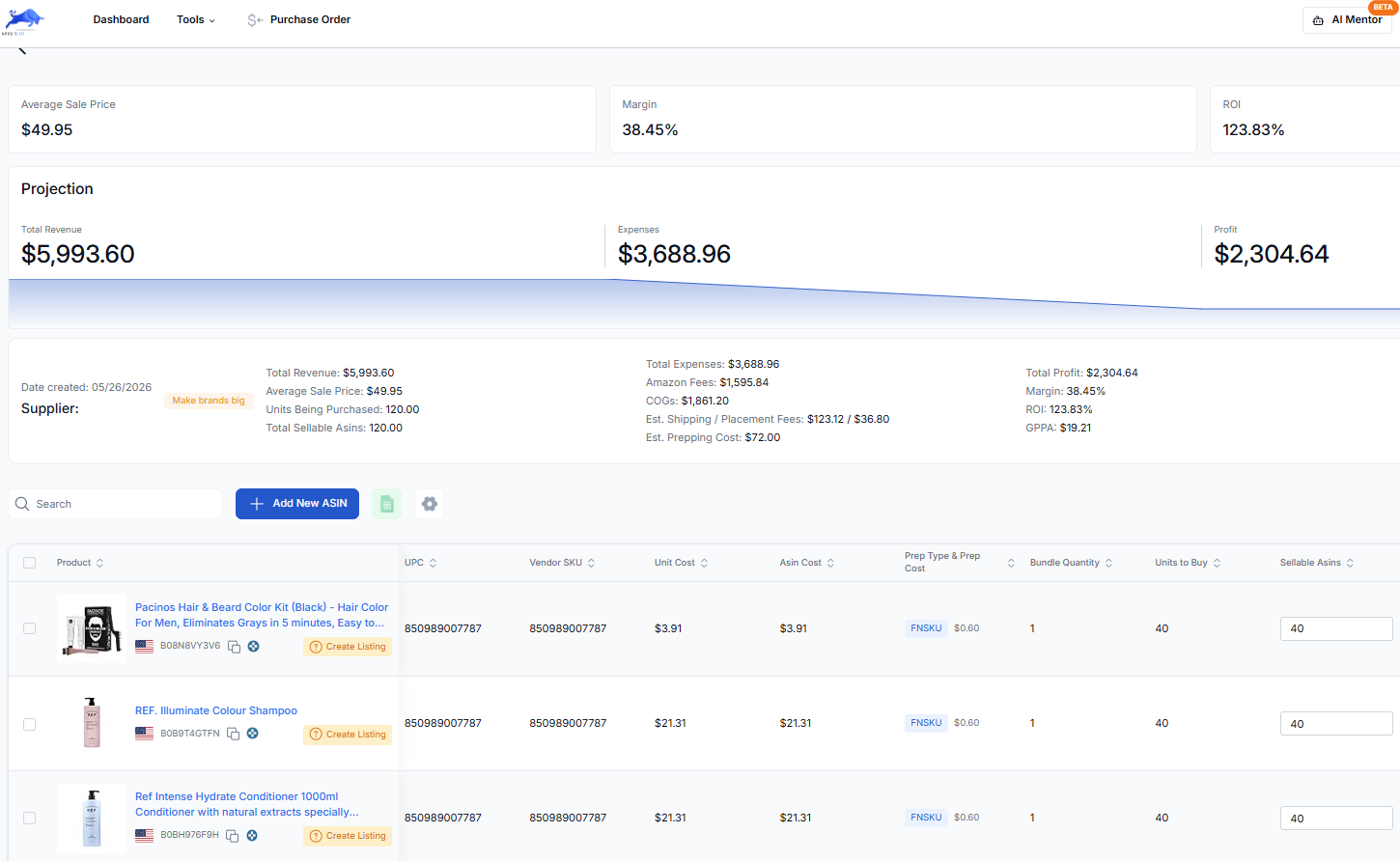
If you're checking one product at a time, the calculator on this page and the FBA calculator are all you need. If you're checking a whole price list, that's the job Apex Green was built for. The purchase order workflow guide picks up from there.
Questions about the inbound placement fee
Can you avoid Amazon's inbound placement fee?
Yes, in a few ways. Amazon-optimized splits carry no placement fee when your shipment qualifies. Extra-large products don't pay it. Stock that reaches FBA from Amazon Warehousing and Distribution has placement included in AWD's pricing, though AWD has fees of its own. Bulky products can cut the fee with a partial split. Whether avoiding it saves money depends on what the extra freight costs.
Why doesn't Send to Amazon offer me Amazon-optimized splits?
Amazon only offers the options a shipment qualifies for. Its staff have said the mix of item sizes, whether every box is identical, the number of boxes per item and demand all play a part. PPC Land has reported a minimum of five identical cartons or pallets per item. Try a separate shipment for standard-size items, identical boxes, and more boxes per product.
When does Amazon charge the inbound placement fee?
When Amazon announced the fee, it said it would be charged 45 days after the products are received. So it shows up weeks after you ship. Note the fee Send to Amazon quoted for each shipment, so you can match it to the charge.
Is the inbound placement fee charged per unit or per box?
Per unit. Each sellable unit in the shipment pays the fee for its size tier and weight band. The number of boxes doesn't change the amount, but it can change which split options Amazon offers you.
Does the region I ship to change the placement fee?
Yes. Amazon's staff say fees may be higher for shipments sent to locations in the West. Amazon picks the inbound location, and you can only set a preference. Our calculators use the low end of Amazon's range for the East, the high end for the West and the middle for Central, as an estimate.
Paste an ASIN for its Buy Box price, Amazon fees and your profit at your cost.
New sellers under $5,000 a month in Amazon sales. 2 supplier price lists a month, up to 20,000 lines, 500 products, purchase orders and profit and loss.
7 days free, then $49.99 a month, plus tax where applicable. Card required, nothing charged until day 8. Cancel any time before then.
Sources
- Inbound placement service fee, Amazon Seller Central
- Amazon FBA: other FBA costs, FBA inbound placement service, Amazon
- Update to US referral and Fulfillment by Amazon fees (announcing the inbound placement service fee), Amazon
- Update to US referral and Fulfillment by Amazon fees for 2025, Amazon
- Update to US referral and FBA fees for 2026, Amazon
- Amazon Warehousing and Distribution, Amazon
- New Seller Incentives, Amazon
- Amazon staff reply on placement fees by region (Jameson_Amazon), Amazon Seller Forums
- Amazon staff reply on choosing an inbound region (Bryce_Amazon), Amazon Seller Forums
- Amazon staff reply on when placement options are offered (Jameson_Amazon), Amazon Seller Forums
Reported by others
Some of Amazon's pages need a Seller Central sign-in to read, and we have not yet checked their current wording for this version of the page. If Amazon's page and this guide disagree, Amazon's page is the one that counts.
We build software for Amazon sellers who buy from wholesale suppliers, and we write these guides from what we see in that work.